Rob is a product and multidisciplinary design leader with over 20 years experience building things you’ve probably loved.


























Building for small business through data-driven account-tech
Small business has a big problem. They’re high risk. They’re so high risk that the majority fail within five years of incorporation. The reason that the majority of small businesses fail is complex. Some simply fail because their owner isn’t good at business. Some fail because the market rejects their offering. But if you have a business that is viable - and you have some business acumen then your biggest risks are - making bad decisions and a lack of access to capital.
Most business owners make bad decisions, not because they don’t seek out good advice - but because they don’t have the right numbers in front of them to make a good decision.
Most business owners lack access to capital because, as a whole, small business is high risk. For a bank or lender, the general risk is often not worth engaging with. For a viable business, they lack the ability to de-risk themselves from their contemporaries. Risk is a numbers game, and the house always wins.
Quota was founded to resolve that weighted bet, and it resolves it through providing small business owners with SPOT - a single point of truth in their business data, that can be verified by banks and lenders and underwritten by accountancy professionals.
Accountancy professionals are uniquely placed to validate small business data. They’re also uniquely trusted by banks and lenders. Accountancy professionals are also in a race to the bottom - stagnant pricing and the threat of AI is undermining their business models, and their only respite is to move up the value chain towards offering services that mom and pop bookkeepers cannot offer.
So the problem space Quota finds itself in is rather unique and multi-sided. It serves the small business owner, it serves the lender. But it also serves the accountancy professional. And it is the accountancy professional who ultimately drives Quota - in both its legitimacy and reach - to the small business owner and the lender.
Quota is a heavy data product. It’s also a finance product. It’s a product where precision wins and errors can cause real life pain. It relies on complex data connectivity with dynamic ledgers and bank APIs, and it requires incredibly deep categorization models to provide the insights required by those making large capital decisions.
In short, Quota is Bloomberg Terminal for SMB. But it’s a Bloomberg terminal simultaneously used by a highly qualified accountancy professional and a business owner with a financial knowledge largely limited to ‘number go up’.
My role on Quota was broad and it encompassed leading Product and Design from the position of co-founder.

Quota allows Accountancy professionals to quickly onboard businesses through automatic connections to QBO and Xero.

From there, Quota automatically maps the history of the company using a proprietary codec called QCS. QCS is a complex beast of a codec that required very stringent information architecture. That architecture then is able to generate a parser logic, which can be leveraged by AI query engines.

This complexity is hidden in Quota - the categorization, the logic paths - to generate a smooth onboarding experience where the Accountancy professional is able to input, connect, sync and categorize any small business in under four minutes. Quota is also able to handle interdependency between types of businesses, industries and connected businesses, such as franchises and groups of companies.

This means for the Accountancy professional, businesses can be compared, reports generated and up-market advice created at-a-glance. However the big win for most Accountancy types is the way which, thanks to the QCS codec, any business on the platform is instantly compiled. A compilation in most industries is the financial standard for investment of any type, and for most Accountants, a compilation is (a) time consuming to produce (b) has very slim margins and (c) is immediately out of date at the point on compilation. Quota provides real time compilations for every connected business.

QCS also powers the finite details behind equations. It’s able to show past and future trends per equation with tabular detail.

For analysts who require additional details into individual numbers and QCS outputs, X-Ray mode provides the granular breadcrumbs. With X-Ray in QCS the analyst is able to leverage QCS to ‘no code’ the ledger. The AI agent QAI also leverages this X-Ray layer, able to allow for general prompts by both the Accountancy professional and small business owner.

What’s fascinating about Quota, and QCS as a codec in general is the power that exists within the codecs ability to find patterns within the abstracted data - and for that I thank the analytic mind of my PM Jay Dort. This allowed us to build smart budgeting tools based on prediction models, effectively running spread-bets against a company ledger, and allowing QCS to amend its variables when the budget was made actual.
The most interesting thing for me with Quota was the creation of flows. In product design and product generally, we talk about flows in terms of usability and execution. What you can see. What is tangible. What is human. In Quota those flows are the data itself, and the usability is determined by the way by which that data is not only presented but how that data is referred to, architected and made accessible in a variety of deep-use cases. The product challenge then becomes understanding the data layers, understanding where the leverage is and understanding what is possible.
In many ways QCS - and Quota - is a pure design product, but a design product with no true visible render. Where the aesthetic is the function and that function can be anything.
I intend to write more about QCS and Quota in the near future.

Making student travel visually not suck and scale across multiple destinations

I never intended to visually design Spring Break. It just kind of happened. It’s not my normal design brief.
Student travel is a money-making beast. It’s a billion dollar market with a guaranteed influx of new users every year. But because every year this new influx of thousands of students hits campus with zero previous experience of what it is to ‘Spring Break’, student travel providers are pretty lazy when it comes to trying to move things forward. To progress. And as such, everything is just a bit…well…tacky.

And because it’s a bit tacky - no designer wants to tackle it. I love a challenge which others won’t touch with a stick. For more context, we’d recently acquired a millennial / student travel company, and we had three months to roll out live campaigns.
I’m going to go through the iterative process of tackling this project from start to finish, so it’s not all portfolio - there’s some duds here, and I’m going to show them. I should also point out that my role in this project was as Design Leader, overseeing Product, UX and Marketing, so many other talented people with specific skills worked on these over numerous revisions (hence I’m showing you process and not a link to some shiny Dribbble account).
A look at the current market

The current market in Spring Break world is pretty grim. It’s cartoon-y. It’s cheap. What’s crazy about that however is the cost of actually going to Spring Break - students are paying $800-$3000 for a one week vacation all-inclusive with flights.

An example of existing artwork for Spring Break Cabo San Lucas, 2018
There’s also the additional complication of Sororities and Fraternities - large family style travel groups who seem to not only have large amounts of money, but also transcend trends. Investigating trend within Greek groups opens up levels of inner hierarchy, and history - these are establishments where you gain societal status, not where you gain cool. To that extent understanding the current output of Spring Break providers makes some sense - cheap, quick, fun. But our research showed that whether it was Greek groups, Sports groups or just random large groups looking to Spring Break they were all unified around Trust, Transparency and Value for Money. Taking this into account we can begin to build our mood - it’s got to be clean, trustworthy and high value - and in the student / socially-led world this is an easy find. But while these students are driving the decision making and narrative, it’s not usually them paying for it - the decider is mom and dad. So if you want to scale the stories you tell, want to increase the experiences you offer and, by proxy, increase the cost of your packages - you have to get mom and dad onboard, because they hold the AMEX.
Beginnings

Early discovery into new textures

Early discovery into type
Normally with Marketing Design I’d begin with a moodboard, some brand analysis - but with this project we knew we were dealing with complexity. 50+ schools, 10+ destinations, merch, staging visuals - not to mention social media, UGC and below the line campaigns. A quick calculation early on revealed that per-destination a campaign might require 200+ assets for below the line use, including variants of those assets across an average of 10 different schools. That’s a lot of assets, and with a high-growth strategy involving HTML and SEO, this means multiple variants of variants, A/B testing and constant key word changes.
We’re a remote / distributed team, with the bulk between London and Los Angeles, and stakeholders in Las Vegas. This meant two things. Firstly we’d use an asynchronous tool to coordinate our design process. Secondly, with the complexity and timezones in play, we’d need to change our working practise to not require stakeholder approval for every asset variant.
We created a Campaign framework that presented parent key art to stakeholder, with cascading variants from the parent key art being asynchronously available and editable. For this we chose Figma, which not only allowed us to sync our critique with our Product Design and CX teams, but also allowed for asynchronous feedback from stakeholders along with shareable permalinks.

Our Figma templating for the Marketing framework - 10 destinations ready to export in multiple formats
Scalable Design - V1


To scale the design with the amount of variants in the brief we immediately moved away from bespoke illustration or specific key photography and began to look at montage styles and design frameworks based around core patterns, rhythms and devices. One clear device was gradients - they were flexible, allowed us to chose complimentary colour-ways per destination, would scale to partnerships and brand guidelines, and could be used across multiple brand touch points from web product to merchandise to CSS. Another clear device was emojis. Emojis allowed us to quickly add mood or a sense of social to the campaign. The reason this was strategically important was that with a new influx of students every year, and the average college student last only four years in their degree, the ability for us to re-use photography from the student trips wasn’t a long-game solution. Sure when you’re 22 us using you in a poster campaign is cute - you and your friends, drunk, enjoying the sun. It’s a slightly different story when you’re 25 and trying to lock down that finance job. This meant we were largely reliant on UGC and social imagery to fuel our content pipelines, and with that comes lower quality, shaky footage and ‘embellishment’ (be that Insta-Gifs or general LOLz). You can deny that reality by heavily polishing your content or having a high refusal rate - or you can lean into it and make your professional content look as accessible and as fun as the UGC. We chose the latter. By combining UGC with stock imagery you achieve an unusual look - neither appears what it was. The UGC looks punchy. The stock imagery looks relevant. It also most importantly looks truthful.
Another range of devices we utilised was a mixture of in-destination specific stock imagery (locations, buildings, mountains), in-country specific stock and vector imagery (flowers, tropical fruit, palm trees) and experientially specific imagery (pool floats, surfboards, boats, fruit). There’s a few reasons for these using devices which are beyond general aesthetic. We used experiential imagery to ‘shortcut’ the destination - what you see is what you get - if there’s a boat, there’s a boat party, if there’s water there’s a beach, if there’s a pool float there’s a pool. But we also used this imagery to bypass restrictions - the boat party supplier wasn't confirmed, so a cartoon boat fills in, you can’t advertise alcohol to under 21s in the US, but in Mexico you can drink it and it’s part of your holiday package - so we show cocktail fruit, ice cubes and bubbles.
We also introduced patterns into the designs, although they play a largely supporting role - this is a ‘unknown unknown’ scaling element. Do we need staging backdrops? What colour are the tote bags? These patterns were our backup if all else failed. A consistency in the framework foundation - spots, stripes, circles, squares - a bread and butter element that we treated like a Swiss Army knife in case the on-site experiential got tricky.
Scaleable Design - V2


Our designs were rating well in user testing, however our stakeholders wanted more options relating to ‘premium destination’ feels - with more a focus on the destination itself. We began by breaking down the framework approach to its components and simplifying our approach. Could we make an impact with UGC and without UGC? Could we keep stock elements as destination-specific triggers? How could we make this feel more tropical and more luxurious?
We began using less vector and more photography in our foundation to ‘luxe up’ the destination IDs, and we found that in doing so we validated our framework further through it’s flexibility. We also retroactively applied our tonal changes to our existing designation designs. We still kept the UGC focus, but we offset it with more detailed execution, and developed a pictorial destination ID and a ‘lockup’ that operated better on social video stories and web page headers.
Scaleable Design - V3
One of the limitations we discovered with our UGC framework style however was how it worked with artist imagery. During our discovery of the campaign we began to look more closely at the experiential execution and the events we’d be coordinating at the tail end of the campaign when in-destination. With that came headliners for events, and with that came artists bookers and agents. We began to adopt the framework for a more typographic led approach to allow for studio quality imagery which had IP limitations attached to them, such as crop, orientation and scale.
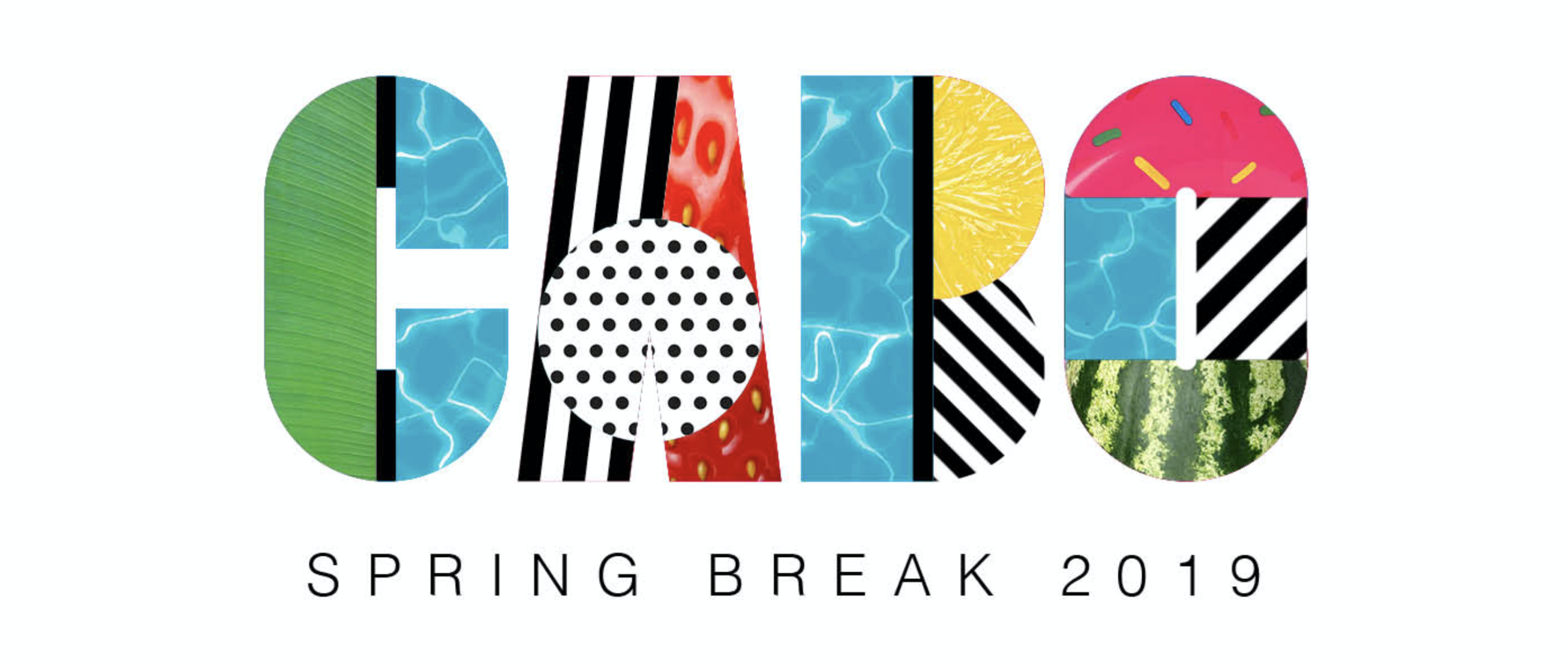

We took many of the elements and devices of the montage framework and applied them to block type treatments. This allowed us to - in a single type treatment - encapsulate a destination in a locked self-contained logo style, which made its application more scaleable across static and video backgrounds, and gave us clear options for animation.

We also began to play with other messaging, adopting the framework within other typography to experiment with storytelling, along with using it in the context of broader storytelling imagery.


Using a self-contained type-based framework allowed us to use more large scale imagery, and incorporate UGC as part of that on social with framing devices. The frames allowed us to take devices and use them to provide contextual impact while not interrupting the core imagery.
Most of our communication strategy was aligned to Instagram, and as such we had to operate between 1:1 and 9:16 formats, while also making sure that artist imagery remained uncropped and untouched.


So - does it scale? Yes it does. Does it make Spring Break cool? Not sure yet. Head to Cabo San Lucas in March to find out.

Time for that 'where should Design live in your organisation?' conversation

Where does Design live in your organisation? The answer to that is likely different depending on your Design discipline. If you're a visual Designer it's more likely you sit within Marketing. If you're a UX, UI or Product Designer it's more likely you'll sit either in Engineering (if you're working in an early stage company or on an Engineering-heavy product) or in Product (if you're working in a later stage company or a consumer or customer focused product). It's highly unlikely - whatever your discipline - that you'll sit in a Design vertical that reports directly into leadership.
There are a range of options when considering where to place Design in an organisation, and the most obvious places are within existing 'leadership' verticals. Most organisations tend to have one or more of these leadership verticals, which are headed by someone who reports into - so that's nearly always one or a combination of; Product, Engineering, Marketing or Operations.
There's a long history of Designers bemoaning the need for Design verticals, and the need for a 'seat at the table' - whatever that really means. In truth, there are some good arguments for placing Design in it's own vertical, just as there are good arguments for placing it inside other verticals - however in most organisations, Design is seen as incumbent and a service of larger needs. The reasoning here is that most organisations are founded and focused on solutions - on an engineered / technical solution, a solution to a customer need or problem, or a brand / communications / content solution. In these environments, typically, Design is seen as an executor of strategy, not the creator of strategy. In engineered solutions, Design might build patterns that allow check-out processes through payment integrations. In customer / product solutions, Design might craft and test empathetic and user focused flows. In brand or content solutions, Design will visually execute narratives and stories. In start-up organisations, these various solutions usually play out through the early stage hiring of a generalist Designer with a singular focus on execution. Later that organisation will employ a vertical leader - who then is charged with overseeing the Designer. The Designer then ends up working within that vertical.
One reason that Design performs these somewhat subservient roles is, in most organisations, Design is not really that tangible. There are many other reasons, sure, but it is very rare that Design's impact in an organisation is measured beyond basic output. Engineering can use uptime stats, Product can use bounce-rates, Marketing can use KPIs and click-throughs, views and likes. However, even beyond these basic metrics, it's rare to even see Design represented in higher level strategic metrics such as OKRs - or for those who don't operate OKRs - basic quarterly strategies.
Why is that? Is it because Design is just perceived as a subjective output by non-Designers? Or is it because Designers do a bad job of making Design non-subjective? If it's the latter, then it's hard to blame them when you look at the details. In larger organisations, Design discipline can incorporate UX, visual, animation, commission, narrative, copywriting, experiential, editorial, photography, video, branding, agency management - there's likely many more. Aligning these hugely varied roles, and with them their varied outputs, and often an orgs vastly differing opinions on those outputs and their 'perceived value' - makes managing the full gamut of Design a highly complex proposition. So complex in fact that it's very rare to find a Design leader who not only operates with this level of breadth, but also is even permitted that level of remit.
Even in smaller orgs you'll likely have a combination of visual / brand and product focused design roles. The complexity in leading or coaching even those two disciplines can be vast - running critique across visual and brand, coaching those skillsets - yet also running equivalent critique in UX, UI, user behaviour and research and coaching a completely different range of skillsets - is one hell of a context switch.
So surely with such a context switch, and with such a level of complexity, it makes complete sense to align design disciplines with their relative organisations.
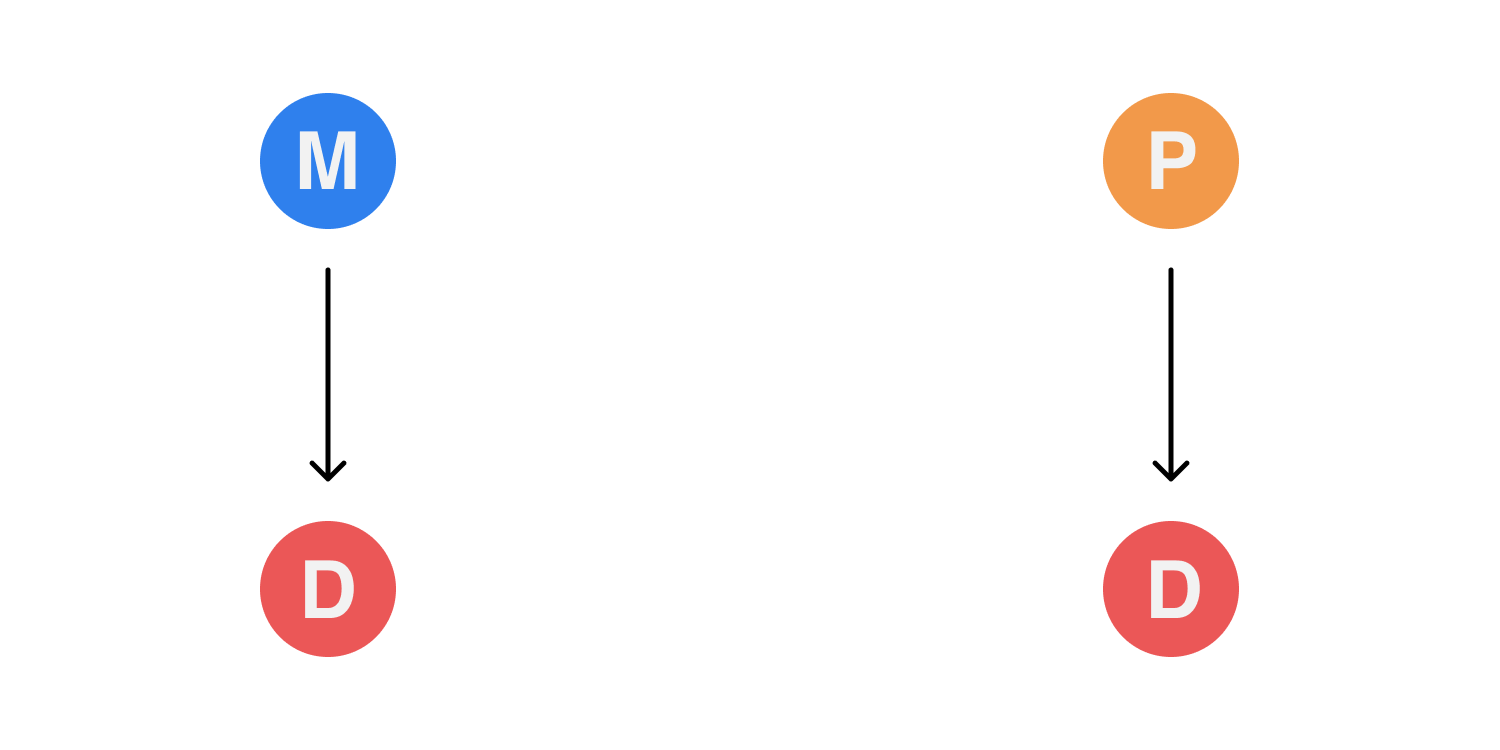
The case for Design inside existing leadership verticals
Most organisations will likely run Design in some variant of this model. In a typical scenario Design sits inside Marketing and inside Product. In Marketing the Design team will be represented by a Creative Director (or equivalent leader) who reports to the VP, Head or Chief Marketing Officer. On the Product side, the Design team, most likely made up of Product Designers, will report to the VP, Head or Chief Product Officer.
Pros
Splitting Design disciplines into their relevant verticals means that the Designers inside those verticals have a distinct culture and context that's aligned with their output. In Marketing, Design will entirely cohabit with visual, story and content, and the workflows and strategies day-to-day are likely understandable within that ecosystem. In Product, Design will cohabit with research, community, and product owners - their workflows aligned to Engineering and will likely incorporate agile practise.
The benefits of these focused contextual ecosystems is the ability to quickly mobilise teams and get shit done. From a Design management point of view, line management and coaching is easier as the disciplines are inter-connected and share a common base. Design as a service in these environments also means that Designers can coordinate with their relevant peers to get behind broader reportable metrics and outcomes.
Cons
With Design inside verticals, Design does, however your look at it - become a service, and the position of Design within that vertical can become quickly determined by the approach to, or understanding of, Design by that vertical leader. This means that, even with a Design management layer below that vertical leader, the Design environment, or the concept of Design, is set culturally by either the leader for Product or Marketing. With that leader usually not being a Designer, there is then a conflict in communication, leadership and coaching as the vertical lead tries to manage a discipline they don't fully understand, and they will likely form desire lines in communication with other Product people or other Marketers.
This disconnect means that a Design leadership role within a vertical requires constant mediation of communication, and also the upward management of both design expectation and design education. For verticals that don't support a Design leadership role, the onus on design culture, leadership and coaching inevitably falls on the vertical leader, and in those environments the success of design falls on that leader having either the experience of understanding of design to maintain the status quo and both enable and coach the design talent in that vertical to a high standard. In verticals that don't recognise Design leadership, typically the chance of attracting talent drops, as does the chance of retaining that talent.
Another issue with this model is that is silos Design within verticals. In some organisations this has limited impact, but in organisations where Marketing is a key player in driving and on boarding users into Product, those silos can quickly begin to show themselves. Issues like copywriting, brand appropriation, tone and consistency can suffer, and those issues can be difficult to solve as Design fails to form the core linkage and the success relies on the two vertical leaders not only communicating at the right level, but also aligning their Design services to execute on the same strategies through varied disciplines - disciplines that the vertical leaders won't effectively understand in any great depth.
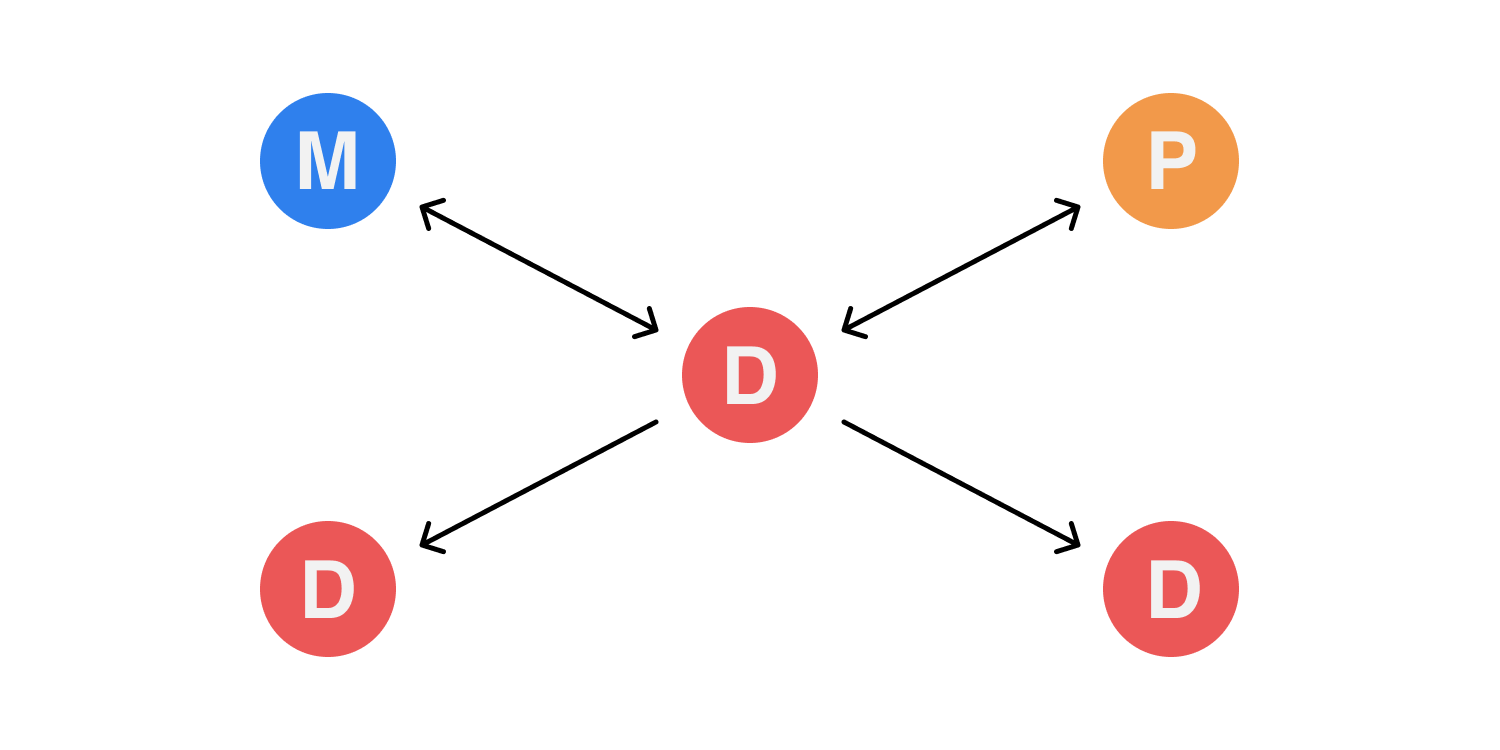
The case for Design inside existing leadership verticals, with joined Design leadership
This effectively places Design within the leadership verticals (as in the previous case), but assigns a Design leader to oversee and lead Design cross-vertically. In this instance it's likely that a VP or Senior layer is created that reports to both the Marketing Lead and the Product lead with the intention that the VP / Senior can coach within both verticals and manage up to both vertical leads. On paper this look best case - the VP oversees the Design leader in each individual vertical, and provides context and communication between the two Design teams, while also maintaining a cross-vertical Design culture and apply consistency in output.
Pros
The VP / Senior layer applies increased communication around Design and because of this there is an increase in culture and consistency. In organisations that require a blurred line between Marketing and Product, or Product and Brand, this layer brings a lot of impact into the quality of the various Design outputs. There is also an increase in Design education, and while the VP / Senior coaches the various Designers in their cross-vertical team, there is the opportunity for the vertical leads themselves to gain insight into Design, and it's requirements beyond the various in-vertical outputs. In reality the VP / Senior role provides a Designer who is not a direct contributor, but has the oversight to provide advisory - their abstracted role gives them space to think and balance requirements, which while key to coordination of staffing and communication, provides the vertical leads with cross-vertical Design strategy which they can incorporate into their own vertical leadership.
Cons
The VP / Senior removes the need for vertical leads to manage and coach Design inside their verticals, but it places the VP / Senior in a relatively tough position, executing against dual strategies and acting as a singular conduit. With any organisational setup which relies on a singular linkage, that linkage inevitably becomes a point of weakness. The VP / Senior is responsible for not only Design culture, but for bridging disciplines, cross-criticism, cross-context and for coordinating strategies from two verticals, which often might have competing needs. The VP / Senior is therefore beholden to the clarity and reality of the individual vertical leaders strategies, without a direct strategic input of their own. Depending on the organisation and it's complexity, this can place the VP / Senior in a position where they are largely reactive in their execution, advisory for decision making, as they attempt to weigh up, from line managers, the best decision to make. This can of course be mitigated by either 'managing up' to those leaders, or applying a communication strategy that attempts to align the two channels - however it's highly likely that the VP / Senior will, purely through he nature of the contextual differences of the various verticals - find themselves between a rock and hard place. They may find that the vertical leaders default to - or subconsciously - revert to line managing within the vertical, effectively cutting off strategic input and making the VP / Senior contextually irrelevant. This isn't inevitable, but the VP / Senior is one layer of management more than the 'get shit done' scenario described previously, and unless they find themselves involved in every decision in every team, align to every strategy and understand every context - they may find themselves in danger of becoming redundant or - worse - part-informed and therefore ineffective.

The case for Design existing as it's own vertical
Much is made of this ideology in Design circles, likely because it oozes control and enablement. But to execute this type of organisational change requires more than simply placing Design in a vertical - and this is why it's such a rare entity.
There is also quite a bit to be discussed about Design taking on such a heavily contextual role and - as is often the case - such a janitorial one. Most vertical leads are operational roles at their core and are focused on strategy, insight and alignment. Design not so much. Designers, regardless of their leadership component, usually try to incorporate some element of independent contribution to their day to day. That might read like a cliche, but it's largely a by-product of Design as a discipline. Because Design is a craft, it is taught, learnt and gained through the process of doing. Its ultimate execution may be quantitively or qualitatively led, but the process of Design, the thinking, the skill, the coordination of thought and action, is directly empowered and built through contribution. Managing contributors then can be difficult, especially if the Design leader does not have the necessary insight or knowledge into that craft. That insight and knowledge allows for hiring, coaching, enablement, context and better communication cross-discipline. To that point if a Design leader is to run a Design vertical, then to perform better than a Marketer or Product leader, they have to provide value to the organisation - through that insight into craft - by building strategic tangibles. If that sounds familiar, then it is - most Engineering teams mirror this to some extent. Where Design differs from Engineering, however, is in the sheer scale of disciplines it represents, and therefore the sheer amount of context required by Design leaders of a wide variance of craft.
In truth, however, the reasons that Design isn't often seen in its own vertical is more to do with how it's perceived - and that perception is driven by Design's need for the individual contributor and the practice of craft. Craft doesn't seem strategic, it seems reactionary. It doesn't seem inclusive, it seems closeted. The decisions made in the process of crafting a Design solution are not easily exposed or understood by others - and this is largely proven through the presence of subjective critique around Design. Subjective critique is usually the sign of miscommunication, or a misunderstanding of either how Design critique works, or where Design is placed within the organisation. Either way it's usually a symptom of a lack of Design education being delivered into the organisation.
Design existing as its own vertical solves this to a point. It creates a level hierarchy for Design to coexist alongside Product, Engineering Marketing and Operations - and with that, craft, critique and Design education is brought into definition across the leadership.
Pros
With Design reporting into the leadership level, there's a clear acknowledgement that narrative, craft, aesthetic and usability are accepted as being on par with - and also form part of - the strategy of the organisation. With Design able to operate inside - and independently - of other verticals, end to end narratives, consistency and creative innovation can now exist cross-discipline and there is the opportunity, depending on the Design leadership, to have huge wide reaching impact and penetration across the whole organisation. Design therefore becomes, rather than an occasional empathetic workshop facilitator, a thought leader with the ability to move into any vertical. Design is placed in a position where its hard-won skillsets related to problem solving and diligence can be refracted back onto the organisation itself - this isn't a Design thinking exercise design to empower the executive, but rather a constant revision of service Design within the organisation - Design begins to Design the organisation as a whole. Design talent becomes easier to hire, develop and retain, as thought leadership and Design strategy resonates within the organisation, rather than just in 'maybe one day' Medium posts, 'attract the talent' organisation blogs or 'big sell' conference stages. Design talent onboard into a vertical of their own, able to discover new disciplines, talk a common language and culture and therefore create more meaningful critique. Storytelling improves, Design quality improves, and the organisation shifts positively through the hard-won Design skills of the Design vertical becoming part of the organisations DNA. The organisation now approaches its problems using Design as a peer and trusted advisor.
Another benefit is within the Design leadership and management of the vertical itself. A dedicated Design vertical allows for management structures to be created that are perfectly suited to a variety of Design disciplines. Design management in this environment becomes less about assigning management layers to cross-communication roles with other vertical leaders, but allows the Design vertical to appoint management structures that encourage coaching, contribution and skill transference with the Design culture.
Cons
With Design having a broader remit, and encapsulating a wide variety of disciplines, there is a real pressure on Design leaders to oversee not only multiple disciplines, contribute and coach, but also lead design on an organisation level. Depending on the complexity of the organisation, those skillsets and disciples could be so diverse for some Design leaders that they become unable to effectively embrace those disciplines and skillsets effectively in the Design vertical. Additionally the sourcing of such a diverse Design leader can be a very difficult thing to do, especially for organisations that might not be renowned for their Design output. It may also be the case that in some organisations, hiring the required level of generalist to lead the Design vertical might actually handicap the organisation if they have strong requirements in one specific Design skillset. This could see a Product focused organisation with a more limited Marketing remit struggle to hire a generalist Design leader when they really need to hire a hyper-skilled UX Design leader - how does a leadership team hire the right Design leader to run a Design vertical when they might not be qualified enough to hire the right Design leader?
There are other downsides of course, and they mainly involve elements of disruption. The cultural shift for some organisations to bring Design into the leadership is just too vast for them to actually action. Changing perception of Design can be a tough thing. Giving Design the room to form its leadership role can be seen as high risk - and the reality of there being few organisations that have moved Design into leadership, the lack of 'proof' in wider business culture of it having true impact - means that for many, Design as its own vertical has a big question over it's added value.

Leading Design in remote and distributed teams isn't rocket science

If you have remote team members in your organisation — whether they’re designers or not — or if you have distributed offices in more than one city — then realistically you’re touching some of the issues associated with asynchronous or remote working.
Even if asynchronous or remote working is completely culturally abstract in your organisation, you’ve never considered it, there’s only four of you in one tiny office who always lunch together — or even if it’s something you personally detest the idea of and have sworn off it for the remainder of your career because reasons — you’ll still encounter some of the issues asynchronous or remote teams deal with.
This is in part because support for remote and distributed work is an inevitable end game for future businesses. The era of the ‘big city’ being essential to success is waning, while the empowerment of the provinces and a cultural drive to embrace a better way of living and working is in the ascendance. The fact is major cities are where they are due to their geographical relation to rivers, line of sight communication, rail lines, harbours and established trade routes.
These things are no longer deciding factors in your global design strategy. We have the internet now.
The good news is - it's a Design problem
In most orgs, regardless of size, design is the core power that binds development, marketing, sales, brand and business stakeholders. Effectively its role is to be the central, lateral communication channel. It defends the user, it actions and commissions research, it discovers trend, it crafts solutions, it communicates — and all of this affects the entirety of your products community, yet also the organisation itself - including the inevitable bottom line. Even if your org as a whole hasn’t realised this superpower design has to effect change, then even getting your design org to — at the very least — communicate effectively with each other, with minimal friction and shared knowledge - can only be a good thing.
I once worked in an org that was proud of it's 'low bus number'. This meant that a small group of employees had a huge amount of knowledge and therefore context - and therefore responsibility - and if those precious few employees were run over by a bus - the company would fail overnight. It was seen as a privilege to be one of those few chosen employees. To me that displayed pointless risk, and it was, as you'd expect, needlessly stressful on those precious few. It meant they couldn't take holiday, work flexibly or easily delegate. It also meant that every communication had to travel through them, every decision validated by them. This created a communication and knowledge fiefdom where knowing basic things to get a job done could often involve something of a knowledge quest for anyone 'normal'. So why did that org try to encourage a culture of 'low bus numbers'? Well, all ego aside, it was easy. It was easier to synchronise a few people than constantly synchronise everybody. It was trickle down communications - and if you're knowledgeable in any way about the realities of economic theory - you know that trickle down doesn't really trickle down. It just creates silos and vacuums.
I’ve seen several orgs struggle with these kind of synchronous / asynchronous communication and transparency problems, and the good news is there is an ever growing industry of cute sounding, pastel coloured products dedicated to solving the majority of these problems from $5 per user per month. In reality though, as you've no doubt deducted from the fact that 'low bus number' organisations actually exist, reliance on tooling is doomed to fail without a large cultural shift towards accepting remote and asynchronous concepts as being a positive and progressive development in the workplace.
One of the many reasons orgs struggle culturally with remote or distributed work is an existing regressive or inert culture of managerial control often founded in a requirement to 'be present' (aka Presentee-ism). This often flows from senior leadership, but it can also creep into teams as cultural regression - through poor hiring, org restructuring, poor cross-org communication or underdeveloped and unadaptive culture. In all these environments, as you'd expect, change is going to be hard. However design orgs are well placed to drive, mitigate and communicate change - it’s a service design problem at heart - and designers are perfectly equipped in solving these knotty human problems with a reasonable level of empathy and an elegantly crafted solution. Let's be honest - isn't every Design leader at some level re-designing the org that they sit within anyway?
I'm not going to list the full benefits of embracing remote and asynchronous work practise - I feel we're all aware of them by now and they're well publicised. Certainly if you've been trying to hire Designers lately you'll know of the talent demand for such environments. There's a reason for that. However it's worth noting that remote and asynchronous work practise can often be misinterpreted - it is not just about people 'working from home' - rather it's a practice that respects peoples choice of environment, cadence and personality. While there are many who work from their home office and shun the two hour commute and higher house prices, there are an equal number who work in co-work spaces, alongside other mixed discipline colleagues, or simply tour between clients and offices. In truth you just don't have to all work from one office to benefit from such crucial things as top global talent sourcing, quick scaleability, simple holiday / sick day logistics, open knowledge share, diverse global culture, hyper flexible working hours, clearly defined goals, roadmaps and documentation - and the most impactful - self-curated focused work environments. Designers are a wonderful mix of introversion and extroversion and need both periods of group discussion and periods of absolute focus. Giving them the power to curate and design these environments on a personal level is very powerful.
If you're ready to take on the challenge of building a distributed, remote or asynchronous-positive Design environment - here’s some hard-won personal opinion on some next steps, pitfalls and quick wins.

Sweat your workflow
Do the level of discovery and critique you’d do on a new product or feature launch — on your current and future workflows. Design has one of the more complicated workflows in an organisation, primarily as the work produced is often incredibly varied in scope and often open to subjective feedback.
Do you currently work face to face and have quick discussions over the desk? Great — but you need to work out how that scales in a remote environment. Sure you can FaceTime someone and have that conversation, but in a remote environment that conversation, those decisions — those actions — are outside of the team, and the rest of that team loose precious context on your decision making. Because of this, any new workflows for design need to be transparent, basic and heavily contextual. This initially seems like a large upfront investment of time — documenting all conversations and workshops, running regular all-hands meetings and recording them, coordinating time-zones for group chats — and it is.
But the benefits you gain from this investment are ten fold. It’s easier to track changes and decisions, it’s easier to onboard new staff and contractors, it’s easier for staff to take holiday, it’s easier to align stakeholders — because it’s all there for everyone to see.
Transparency of information and knowledge is your friend, and creating systems and workflows that encourage transparency and open discussion are critical to success. Making these systems and workflows asynchronous is an additional superpower, allowing offline thinking, reflection and considered commenting possible. Synchronous environments empower the extrovert and the quick-thinker over all others - don't discount slow thought, complex contexts and the power of writing as a way of structured thinking.
In my experience I’ve found a some key areas that aid this.
Firstly you need a solid accessible environment to create centralised documentation. This is playbooks, ‘why we did what we did’ and outcomes. A single source of truth. This environment needs to be easy to use and low friction otherwise it’ll never gain traction in the team if documentation is seen as a chore. You’ll also need to set expectations on the standard of documentation, where it lives, responsibilities for updating it, and who sees what and when.
Secondly you need a clear approach to workflow. I’ve placed Kanban into Product and Marketing teams with equal success — just remember it has to have maximum clarity and minimum friction — and you’ll need to, again, set expectations. Creating workflows like Kanban relies on each designer taking on some project management responsibility to maintain clarity at handover.
Thirdly, communication cadences are crucial. When do you run a crit? How do you run it? What are the timezones in play? What are the skillsets of the attendees? How do you keep your team in sync — especially if they’re cross-discipline?
Fourthly, you’ll need to focus on the design process itself and the resulting taxonomies. How do you create a brief? If no-one is there to crowd round your screen to make quick iterations — how do you do this? When you’ve created something incredible — how does it get signed-off? How do you collate and distribute stakeholder feedback? When it’s signed-off, where does it live and how can others find it?
For me I’ve found solving these problems as a team and getting buy-in on a team level the best approach. I’ve also found that (with one critical eye on tool-creep) that giving designers a choice over the tools they personally use to solve these problems to be beneficial in allowing a constant peer review of new and emerging solutions.
Treat this like a range of design problems. Get your team to work on them as a whole, and be sure to bring in all the skillsets relevant to that discussion. Have a video editing team? Copywriters? If they touch your org creatively, involve them at the kick-off discussion. Retrofitting other workflows is both painful and usually causes a lot of resentment.

Consider your whole design org
And by that I mean — not just the Product Design team. It’s easy to see Product Design, with its proximity to development and agile practise, as the perfect starting point for building a remote playbook. But think about Marketing Design and broader Creative teams, and their unique requirements. Sure they do a lot of print, video or social — but a successful design org is one that is sync, creatively, cross-discipline, and you should consider the same remote needs that a Product Designer would have applying to a graphic designer crafting MPU Advertising. In my experience it’s ‘all or nothing’ — but there are huge benefits. If your Product Designer is building a product onboarding feature, and they can see the Marketing output and message for the product in real time (and vice versa) I defy anyone to say that this level of dual asynchronous context is a bad thing. At their core, Product and Marketing design are 90% about communication of story — so if those two teams aren’t on the same page…what chance does the end user or customer have in understanding the story you’re telling?
Communication, Communication, Communication
You’re not going to be sitting next to each other — and if you are, others who won’t be sitting next to you will need to be looped in. Begin by treating any significant offline conversation as a sort of taboo — ask yourself if any element of that conversation is critical for group understanding. The worst phrase you can hear uttered in remote teams is ‘I wasn’t aware of that’. People being unaware of critical information (even if you don’t consider it critical) is incredibly dis-empowering and quickly causes silos which inevitably devolve into cliques, and before you know it you have low bus numbers. Your role is always to prevent that from happening. To solve for this, choosing your communication cadence is critical — and that cadence can be split into online and offline comms.
Online Comms (Synchronous)
This is primarily video calls. Zoom and GoToMeeting all have good cheap tools for teams and using it effectively means making clear diary touch points in your regular weekly workflows, and remembering to record and archive meetings for those who cannot attend. I’ve found having a general all-hands design meeting mid-week to be a good ‘go round the room’ opportunity to catch up and listen, and another weekly critique-specific session to be pretty much optimum. Any more than that and you begin to get meeting fatigue and attendance will drop — your designers will be having numerous other meetings themselves inside their teams, so optimising the time you have as a group is critical. Slack is also your friend, however others have found tools such as Basecamp to be better for their workflows. Either way a continuous IM channel is critical.
Offline Comms (Asynchronous)
This is likely to be split into documents, workflow and assets. For documentation I’ve had success with Notion as a powerful centralised asynchronous document environment, however Dropbox offers it’s own version which some will prefer. For workflow, Asana has a low impact Kanban and list option for managing jobs to be done. Product Designers may prefer Jira to sync better with their development teams — the best tool here is usually the best tool for the job, and that can mean multiple tools (I run Asana and Jira) but the key is to give everybody access to everything - even if they rarely use it in their day-to-day. I’ve used Trello, Meistertask — there really is no shortage of options — however considering the workflow you apply to those tools is much more important. For asset management I've found the tool selection is usually driven by cost - the taxonomy is critical to how useful that tool is.
Sometimes synchronous can be hard if your timezones are extreme, but even in the worst extremes, there’s usually around two hours crossover during ‘reasonable’ working hours. Of course this puts pressure on those two hours of possible communications — squeezing an entire day of discussion into 2 hours is tough, but it forces focused meetings quite quickly, which is a good habit to build. Having said that, if there’s one thing that extreme timezones do beyond encouraging better meeting hygiene — it’s that they force you to discover the benefits of asynchronous workflows very quickly.
Criticism and Feedback
In remote communications environments, the process of criticism and feedback quickly becomes core to team success. Your weekly crit sessions become very important, and it’s necessary to make sure those meetings are coordinated well to create maximum value for everyone involved. There are a few tools to help with crit and feedback, but I’ve found in running remote crit that it’s important to schedule the work being critiqued in advance so everyone turns up knowing what their involvement is — and they have time to research the context from documentation before they log in. I’ve found that the designers who leverage the best critique are the ones who communicate up front what they want critique on, rather than awaiting a generic Q&A from their peers. I’ve also found making the crit session non-compulsory to be more respectful of people’s time where there is always limited space in the diary - the teams time is reserved in the diary once a week, you just need to bring something to the table.
For critique and feedback there are, again, offline and online elements. For online I’ve found Figma to be a great centralised design tool to coordinate different design disciplines (from Product to Marketing to Brand) under openly shareable transparent URLs. Invision Studio is similar, and both tools offer prototyping, presentation and support screen sharing. For offline, these tools also offer commenting and collaboration at the core of their products. I’ve found commenting and multi-user collaboration to be incredibly useful, and is something of a game changer in distributed teams. How you use commenting and collaboration in these tools however can be a contentious discussion — it’s entirely possible for 5 designers to pile onto one artboard and begin altering someones work, and the danger of ‘design by committee’ naturally increases with such powerful features. Your team needs to work out together where their red lines are in collaboration, and have awareness of how each other work, and prefer to receive feedback.

Coaching and Leadership
Remote teams need more coaching — or they seem like they need more. This is really due to you having to schedule it rather than it happening in typical daily conversation. The benefit of that though is it causes focus, and means the coaching can have more impact. Leadership also needs scheduling, but in reality remote or distributed teams need a slightly more passive lightweight form of leadership — you’re not organising group lunches and meet-ups and seminars, now your role is to make sure everyone is in the loop, concerns are addressed, communications are clear and transparent, and agreed documentation and communication cadences are being adhered to. Does it feel less social and more janitorial? Yes. Yes it does. But it doesn’t mean that it can’t be rewarding. I’ve found distributed and remote teams need more individual attention — coaching individual designers to find their leadership qualities and embrace them. Turning your entire design org into a team of design leaders is a very satisfying proposition — more so than expensing a group lunch or dragging everyone into the office via a two hour commute to attend a meeting.
Ownership
You’re not physically there, so you need to empower your team with ownership over their own work and their own ways of working. As you move towards distributed teams, so the ‘hovering Art Director’ in you has to take a back seat. Trusting that ‘things will get done to the required standard’ now becomes a key component in how you work together. Working with your team to discuss and define ownership — and then getting them to ‘own’ that ownership — is a crucial to them being able to perform remotely and build trust — both with you, and with other designers.
Turning up
You have to be face to face sometimes. Remote is great and everything, but there’s always going to be a need to spend time with those in your org; whether that’s to connect on a personal level, gain skill transference, kick-off a complex project, or just to bond as a group. Depending on your budget, those face to face opportunities might be decided for you.
Onboarding
Any new staff member will have an impact on the teams dynamic, but it’s not realistic to get the whole team together every time you hire someone (especially if your company is scaling quickly). Involving your team in the hiring process is always good practise regardless of work culture, but involving them in the onboarding is more important in environments where hanging out at lunchtime is harder to do. I've found onboarding new people through self-guided asynchronous tasks to be really useful for both manager and new starter; spin up a task board (it might be in Trello) and get your team to contribute to it (ask everyone 'what things did I need answers to when I started?'). I usually add tasks to grouped topics such as 'people to speak to', 'software to sign-up for' and 'links to key documentation'. The benefit of this approach is the new starter gets to keep this asynchronous onboarding for future referral - which reduces stress significantly in the first few weeks on the team. I also feel that turning up to meet them on their first week is hugely important. It shows you care, sure, but it removes fear in any new starter - I've flow 12 hours to mitigate that fear. Starting in any new culture is nerve-racking, so you should do your best to mitigate that worry with quick-to-access processes and be there as a friendly face to ease them in.
Leading
If you are a leader you have to pick a cadence of turning up that is optimal for your team. I’ve found something akin to quarterly useful, especially if your business runs a quarterly OKR process to define the business or team level goals. Get on a plane. Bring people together who need to be together.
Teams
Bring teams together that need to be together. That’s obvious. If you have a remote team that all work together on one product line, find a time for that group to meet in person maybe twice a year organised around what makes sense to their work. Let that team decide that cadence, and do all you can to support their choices. However as a leader, consider who from other teams should also be there — if you’re building a commercial product, is there a benefit in bringing Marketing Design and Product Design together? If Video Production is a large part of your onboarding, shouldn’t they be essential to any face to face meet up?
All Hands
Sometimes you have to bring everyone together to meet up and get to know each other. You’ve likely been working hard to prevent team silos, but even in the best case scenario, it’s likely you’ll have designers and creatives — or key stakeholders and colleagues — that have never met in person. Most companies choose to do this on an annual cadence over a one week retreat, which is great. Do it. But does your broader design team need that opportunity as well? Large retreats can be overwhelming and with so many faces, people can find it tough to connect on the things that matter. Consider the need for a smaller retreat to balance it out with a more focused agenda.
Celebrating Diversity
One of the wonderful prospects of remote and distributed teams is that the culture enables — and promotes — diversity and inclusion. The fact that the highest paying jobs and opportunities are in big cities, and the cost of education, combined with living costs vs renumeration (especially when you’re beginning your career) means that working the best jobs at the best companies in the biggest cities favours those who come from affluent backgrounds, who most likely are white, who most likely are male and who most likely have no complexity in their background. This means that there is a huge talent base internationally that cannot access the opportunities that they might be perfectly aligned to given the chance. If you have a family you care for, elderly parents, children, a non-affluent family history, or are a minority for whom opportunity is less accessible — which let’s face it is a lot of people — you can’t just up and leave to New York, London or San Francisco to throw down $3K on an apartment rental. And why should that sacrifice — or attainment — be the defining factor in your career success? Is it because the role you are qualified for, for whatever reason, requires you to be present in an expensive city, despite the fact that it — if we are all really honest — could be done from anywhere? Is it maybe because the people who run that company could / can afford to be in an expensive city and therefore presume others can?
The greatest benefit of remote and distributed teams is you can tear up the existing rulebook and look to build a different kind of org based on talent, skillsets and experience — regardless of location, background or privilege. In design, diversity is its lifeblood. Finding and solving user problems, communicating to broad ranges of people, communities and cultures — this is what design does. But without diversity in that design team, it’s just endless appropriation. The most exciting thing about the prospect of a remote and distributed future is the basic freedom it gives in team building, and the access it gives to a broader spectrum of great talent — wherever and whoever that talent might be.

Because Design principles are important and so is communicating them
I’ve created Design Principles for many of the projects and orgs I’ve worked with, and implemented them often in different ways. Implementation often depends on how the org communicates design internally, or where design sits in the orgs DNA. Here are the Design Principles I recently created for Verve and it’s associated product lines. It was designed to be broadly applicable, from conceptual through to customer experience - and designed to be adopted by the entire org. These principles are pretty typical in terms of solid principles - they cover experiences, tone, inclusivity, detail and end-to-end expectation - and also maintain relevancy beyond the design department.
Most important they’re also understandable by non-creatives - and because of this (and the millennial nature of our org) I distilled them into GIFs and images.
Often designers create rules and silos to empower themselves in an org, to make themselves appear important or to ‘land grab’. That’s usually understandable - it’s nice to define your own patch and defend it, especially if your experience of design within orgs has been largely negative; design as an add-on, design as a framing device, design as ‘polish’. The problem with this however is it comes across to others in the org as a defensive, if not uncommunicative position to take.
Designers can - and should - empower their orgs by giving away their skills freely, be transparent and de-mystify their processes. By doing this design becomes an aspirational skill to be adopted, mastered and therefore appreciated by all within an org, and from that understanding a professional respect is formed. Sometimes it takes someone being empowered by a skill to realise how tricky mastering that skill is - and by proxy appreciate and gain empathy for the complexity of wearing that skill professionally.
By empowering everyone in your org to understand and believe in design and it’s principles, you bring design into the org completely - without the need for trojan horses, battle cries and those endless whinging emails no-one reads.
Our Design Principles at Verve

Cooperative AF.
Everything we design is designed with others in mind.
What we design should work in cooperation with our diverse range of products, brands, clients, users and user networks. We never design in silo and we prioritise company wide integration of the solutions we create.

Inclusive AF.
We design for everyone.
We design for users internally and externally who are global, diverse and have different objectives, expectations and needs.

Keep it simple M8.
We don’t make people think.
We design for known behaviours, default reactions and real emotions. We never get in the way of our users actions or make it difficult for them to discover or navigate anything we create.

Always Transparent. Always Trustworthy. Always.
We are clear and open about our intent.
We don’t hide behind dark patterns or create unexpected behaviours. We are always clear about the intent of what we create, and strive to represent a source of truth to our users and gain their trust.

Where the wild things are.
We design experiences in places where our users choose to spend their time.
We’re mobile first and socially focused. We work with distribution in mind and consider how and why things are shared. We make sure we have first hand experience of living in these places.

A tiny part of a big experience.
We enable people to create great experiences, but we recognise we are a small part of that.
We are a small part of our users bigger experience with their network - we recognise that and remain humble. We celebrate offline experiences not in-app experiences.

Beginning, Middle and End.
We tell well defined stories.
From our user flows to our content, we make sure our narratives are clear, structured and functional. We avoid cliffhangers and unhappy endings.

Sweat the Comms.
We are focused on the clarity, consistency, frequency and tone of our communication.
We are honest and candid in our communications and communicate to maintain expected rhythms and maintain trust - both internally and externally. Oh, and tl;dr.

Usability with all the feels.
Accessible and usable doesn’t mean boring.
Simple and easy to use design can still communicate emotion. Being ‘Accessible’ and ‘Usable’ isn’t doing someone a favour - it’s our job.

Excite. Delight. Inspiration. Aspiration.
We curate and create unique ‘wow’ experiences no matter the medium, subject, audience or vertical.
From video to CRM , from social to stage, we always strive to create ‘wow moments’ within the useable environments we design.

Why Tho.
We question constantly.
We always question the way things are done and the existing ways of doing things. Our users move at the speed of light and it’s our job to keep up.

How to give creative feedback to creatives if you're not a creative

Giving feedback can be a tough thing to do - especially within creative teams. It’s also likely that you’ll be in a situation when the person giving the feedback isn’t creative themselves, which is both intimidating for the creative and the non-creative as they try to find shared language and approaches to move things forward. Here is a simple guide to structuring that feedback and how to both prepare for - and to give it.
Things to consider when giving or planning feedback
Should I actually be giving feedback?
You should only really give feedback when your feedback or expertise is relevant
Sometimes we can find ourselves giving unsolicited opinion on things that either aren’t in our skillset or perhaps we just don’t have the right context. When this happens, our feedback becomes ‘opinion’ and unless you have been asked for an opinion (or you have asked if you may contribute an opinion) the risk of other expert feedback being confused or overlooked increases.
This is especially a problem if the feedback of an expert is overlooked or an expertise based critique gets disrupted due to a well-intended opinion.
How should I set myself up for feedback?
You should choose and create a feedback group you trust - with each member of that group having the specific expertise you need to get the job done
A Designer wanting feedback on a campaign should create a feedback group containing all the experts their campaign will touch. This may include: Sales, Marketing, and Product Line experts. They’re also likely to include another Designer to that feedback group to check their own bias and quality of output.
It’s important to balance the feedback group carefully to make sure it contains all the voices and expertise required for success - including someone from your own expertise.
Try to stay in your lane.
You should only give feedback related to your specific role in the project
This doesn’t mean that someone in Sales can’t feedback to a Designer, it’s just that the feedback should be relative. In this example, Sales have an expertise in the marketplace and with the customer or partner. Feedback should therefore be given through that lens, rather than a direct critique of the design itself - a critique which another designer would be better suited to provide.
Giving context of your role and expertise in the feedback process can open up better discussions, and allow people to learn from you and you from them.
Subjective is bad.
Without your expertise or role focus, feedback just becomes opinion
Saying ‘I don’t like’ something doesn’t forward the discussion or improve the end result - you have to show, via your expertise, why your feedback is relevant. Otherwise the person receiving feedback has to de-code your feedback - or worse - will just ignore it.
Instead of saying ‘I don’t like this’, consider reframing your feedback to reference reasoning such as “in my experience in ‘x’ market’” or “here is a relevant example of something I know works in this market”. Use this as a reference point in moving the conversation forward.
Check your bias.
Everyone has a bias
Maybe it’s personal bias like - ‘I love the colour red!’ Maybe it’s a professional bias - something you want to personally achieve, do or be involved in. All this is fine, but you should consider these biases when giving feedback. It can prevent new ideas, approaches and solutions being formed.
If everyone in the feedback group has a bias (which they will) it can cause personal opinion to cloud actionable feedback. Check your bias and challenge it - is this relevant? How did I develop this bias? Should I apply this to my feedback?
Everyone is aiming for the same outcome.
Feedback can feel like a battle of wills sometimes
Always remember - and the group should articulate this clearly - that everyone is giving feedback to make sure the end result is the best it can be. Sometimes reminding ourselves at the beginning of a feedback session of what this agreed end result / success looks like can encourage more aligned feedback.
Sometimes this can mean constructing your feedback to make sure that it is angled towards everyone finding a consensus or shared result, and sometimes this can mean compromise towards a bigger goal - it’s not about personal ‘winning’ or scoring points.
Feedback can be painful.
Often the person who has produced the work requiring feedback has invested significant time and emotional energy into doing their best work possible
It’s worth always remembering this. Accept that the person receiving feedback is likely ‘exposed’ and may take things personally or become defensive. But if they are remember it’s because they care deeply about the outcome.
Give them time to explain their thinking and how they got to where they are before you jump in with critique. Defensiveness is usually caused because someone is worried about being misinterpreted or not being able to communicate their process.
It’s not personal.
When we receive feedback it can feel personal
It’s tough - when we’re invested - to abstract ourselves from what can sometimes feel like a personal attack (especially if that feedback has been worded poorly).
Ask questions and see the feedback process as a conversation - why is this feedback phrased as it is? Can it be rephrased? What do you mean when you say ‘x’? Dig deeper and do some discovery - it’s a great opportunity to learn, but also to improve others feedback ability.
Have you considered?
If we accept that someone receiving feedback is doing their best and is working for the best result - we should be also be considerate in our phrasing
It’s very possible that many of the options you’ll suggest were considered before the feedback session, so feedback should recognise this possibility. An example of bad feedback is “This isn’t right, it should be red because that’s our brand colour”.
An example of good feedback is “Have you considered using red? It’s our brand colour”.
Asking this question allows the person receiving feedback to respond rather than defend - it maybe that they HAD considered it, and this will give you a clear reasoning as to why they then did what they did.
Be respectful.
Remember the person asking for feedback is an expert also
We should always respect each others expertise. Because of that we should never use words like ‘Bad’, ‘Weak’ or any form of negative phrasing where possible as everyone has strengths where others have weaknesses. Use the feedback process to ask questions and discover why an expert has decided on a course of action.
Feedback sessions go both ways - it’s not just a show and tell. It’s an opportunity for mindshare towards a common goal, and a way of understanding each others expertise and reasoning around topics.
Give Praise.
It’s ok to say nice things
People respond well to praise (who doesn’t like to be told they’re doing a great job?), and in exposed situations like feedback sessions, praise can be a trust building part of the feedback process. Rather than say ‘this is good’, however, say ‘this is good because ‘x’. This allows the person to understand what - to that expert - good looks like.
Explaining why something works or is good allows that person to understand this for the future and apply it to other projects - it’s a great learning tool.
Agree Actions.
Feedback without actionable results is just discussion
Make sure your feedback discussions result in tangible ‘to-dos’. Agree on those and make sure everyone in the group agrees on those next steps to ‘align’ the current presentation before the next feedback round.
Feedback gets derailed and people get frustrated when agreed feedback is ignored, or feedback is opaque and unactionable. Make sure you have consensus as a group and accountability and set a date for the next session - before ending the feedback session.
An easy to use 1/2/3 feedback framework
Ask > Discuss > Agree Action.
1. Ask (“Have you considered ‘x’? Followed by your expert context and knowledge)
“Have you considered making this red? The research we’ve done on brand suggests this colour is the best choice for maintaining consistency across this product vertical”
2. Discuss
Allow the subject of the feedback session to respond to this question and listen carefully to their reasoning. Respond to this reasoning with follow up questions if required and use these questions to frame the discussion.
3. Agree Action
Decide the best way to move forward - what will be done, when and by whom.


How we built and exited a big data Saas using global remote teams

Sure it's a cheesy metaphor - but it is the actual sunset on my last work day in San Francisco
Leaving a product - especially one you've built from whiteboard to public release is a hard thing to do (and especially one where your desk has the above view). But that's what I'm doing, and as I leave Sonr - as goes the cliche - I've had the chance to reflect on what we've done, what we've shipped and the processes we've developed. This isn't a post about personal failure and / or learnings - I'll be delving into that in a medium post at some point soon (lucky you) - nor is it a commentary on startups or being part of a founding team. It's more an overview of product creation - specifically from my point of view as a Creative Director / builder / shipper / strategist of product (i.e someone with a strong preference relating to pens). Anyway, here's a quick fly-by-night overview of my past two years in Sonr-land.

Breaking ground on the product in Potrero Hill with the founding team - the first sketches
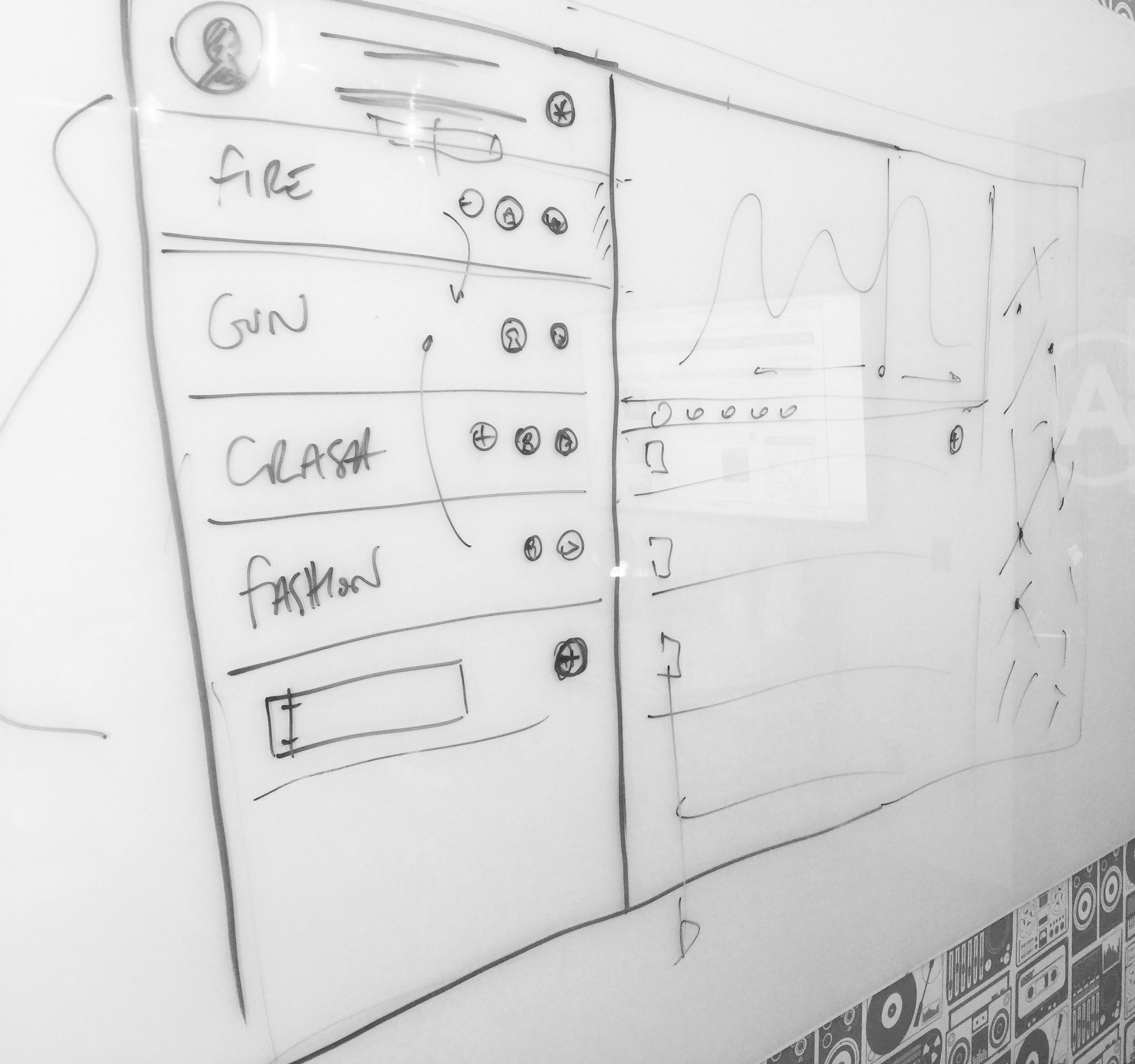
We started the product design in San Francisco in 2014 after the initial pre-seed round had closed. We had a whiteboard, a development team and had time-boxed a few days. I'd had a few weeks before my arrival to get some homework done - I'd performed some business canvas workshops, we'd done our requirements gathering from the business and from our potential customer base, we sorted cards, and we'd created our first round of user personas (knowing that we'd end up trashing them within the month). What we came up with in that first office in Potrero Hill was a very basic product specification that focused on business and user verticals - in fact much of the technology at that stage was a relative unknown (such were the joys of social APIs in 2014) but the focus was very much on building a proof of concept. We did this by utilising existing frameworks - specifically Bootstrap - to build the basic front end and get the ball rolling. Using existing frameworks is a great way of bypassing needless development - we were using the framework to test UX hypothesis, but also to give the backend something to output to. That first iteration, those first pre-MVP versions - we excepted their inevitable generic bland ugliness because we knew we'd be throwing them away sometime soon anyway. Using a simple framework can give you an advanced front end in minimal time with minimal spend compared to bespoke front end noodling. It allowed us to take the whiteboard process above to the UI below in weeks rather than months, while giving us the opportunity to quickly iterate front end elements around without slowing down backend development schedules.

The initial Bootstrap mockup which raised Seed
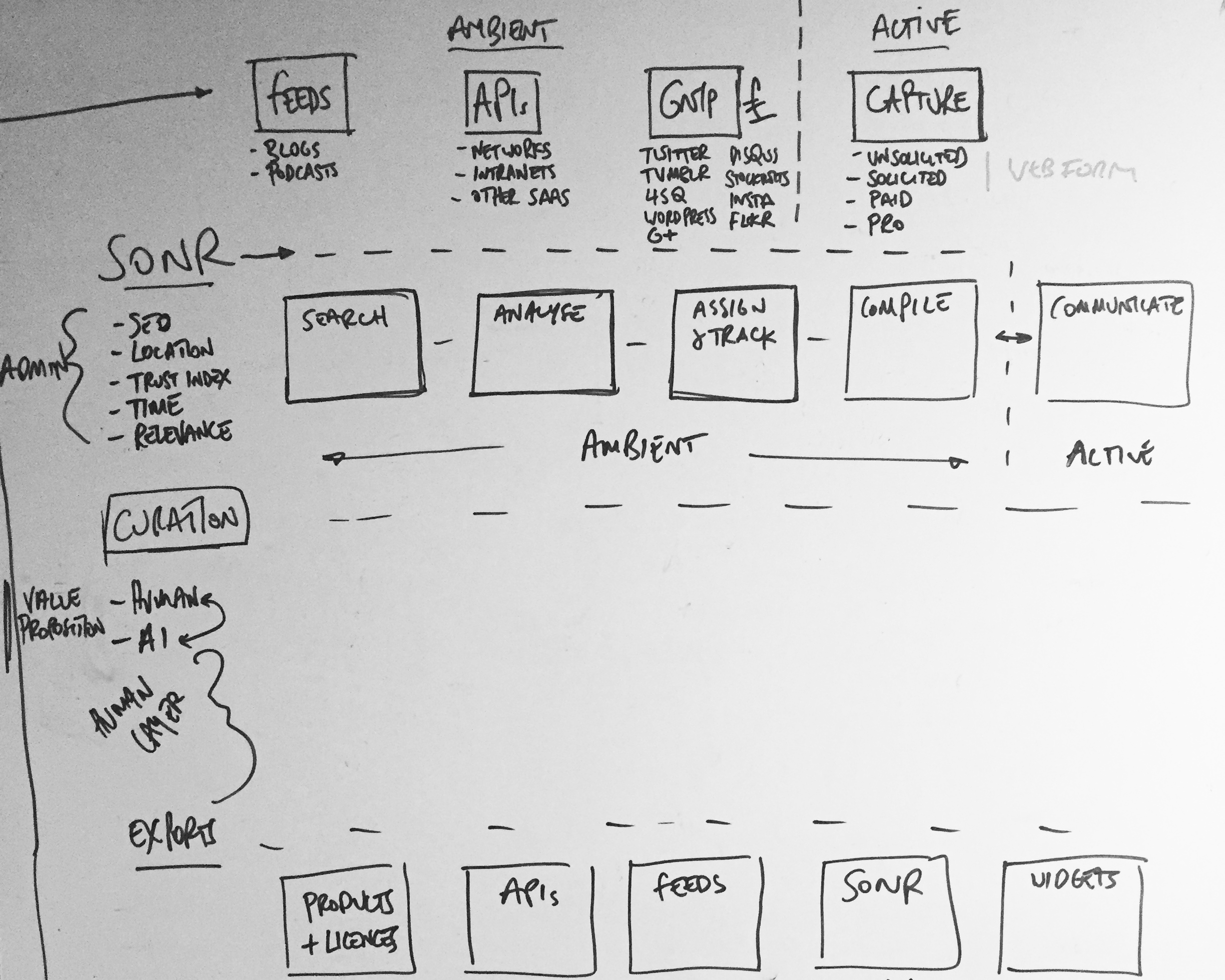
Active and Ambient states mapped out
From here we moved as fast as we could to prove hypothesis - I placed these early versions in front of as many possible end users as possible. This was quick and dirty guerrilla-style user testing, the type straight out of the IDEO playbook. We changed some things off the back of that. We - of course - also trashed our user personas and wrote new ones, and began to really figure out the structure of the data behind what we were now building. We deep-dived into API documentation, we attended conferences (see below) and spoke with possible partners, we scouted competitors, we tried to work out better user flows, oh, and we had to raise some significant money (which we did). I created user flows, overlaid with data architecture to try to break down and visualise the actions of the user and the impact on the product. This broke down the product into 'user intentions' (which were effectively collections of related user flows) and 'product reactions' (which were how the product would react to a 'user intention'). This gave us a high level overview of user and product intended behaviour, with both influencing each other. A user could be administrating, searching, curating or exporting - meanwhile the product could be active or ambient at any given time.

Visting Twitter Flock 2015 NYC

Visting SXSW 2015 Austin TX
Iterating to v2 with our awesome new product team in Midtown, NYC
Around this time we'd begun to crystallise a product team in New York who were beginning to build out processes, set up Jira workflows and form QA schedules. We began to form more stringent user testing systems, and began to do one-on-one Google Hangout interviews. The distributed nature of these teams, between New York, London and San Francisco at this point began to place strain on product development, and marshalling it became a full time balancing act of clear documentation, scheduled Hangouts and constant Slack use. With this in mind we spent time in New York training the team there to become product design focused, allowing them more time autonomously working with the west coast team on product features. We also began to iterate the designs to fully incorporate our user feedback from testing. With new front end developers being hired we were now able to break away from our Bootstrap framework, and move to something more advanced and scaleable in ReactJS. Initially we kept the Bootstrap aesthetic (there was no rush for design beyond UX elements at this phase of the build) - icons, drop-downs, transitions - they were all defaults and generics. We were ignoring the details until we solved the bigger UX picture.


Distributed teams are *really* hard work and can 'jetlag' a product
There were also organisational problems to solve - distribution meant we had the problems that all distributed teams have - things fall through the gaps, and communication is hard. Being on hangouts across multiple timezones led to long days for those on GMT and deep investigations into the best conference calling and video calling tech (bottom line: there are no 'amazing' conference call headphones - but it's all about the microphone. We ended up with Sennheiser PC36's for group chat and the Jabra SPEAK 510 for portable conference calling - and always using Google Hangouts. Slack may change this space, but for now Google is the best).
I began work on two things at this point - mobile (which was based in London) and documentation upgrades for those on the west coast. Documentation is often seen as a failure to pair-code, but while pair-coding is indeed best practise, it becomes near impossible with a 6-8 hour time difference. Here is the 'Manual' that was produced (below). The 'Manual' is written with a group definition (say 'Search' ) which is defined by the user Action, Behaviour and the related user stories that created the Action and Behaviour to be defined. Within each group there a section of each element that combines to group, each element having precise schematics defining it's default state, basic behaviour and basic action. This level of precise documentation prevents any grey areas forming, but also focuses the UX and product into defining every inch of the product and it's intended action - and making sure that this action is being supported by at least one user story (here's an excerpt from the 100 pages it eventually ran to).


With mobile being in London, the need for such precise documentation wasn't so great. We could pair-code and whiteboard solutions. We still needed to define the actions though, and we used Flinto for the bulk of our prototyping. These prototypes were then user tested by the product team and with our user groups for feedback. The feedback was then incorporated into the wireframes (see below).


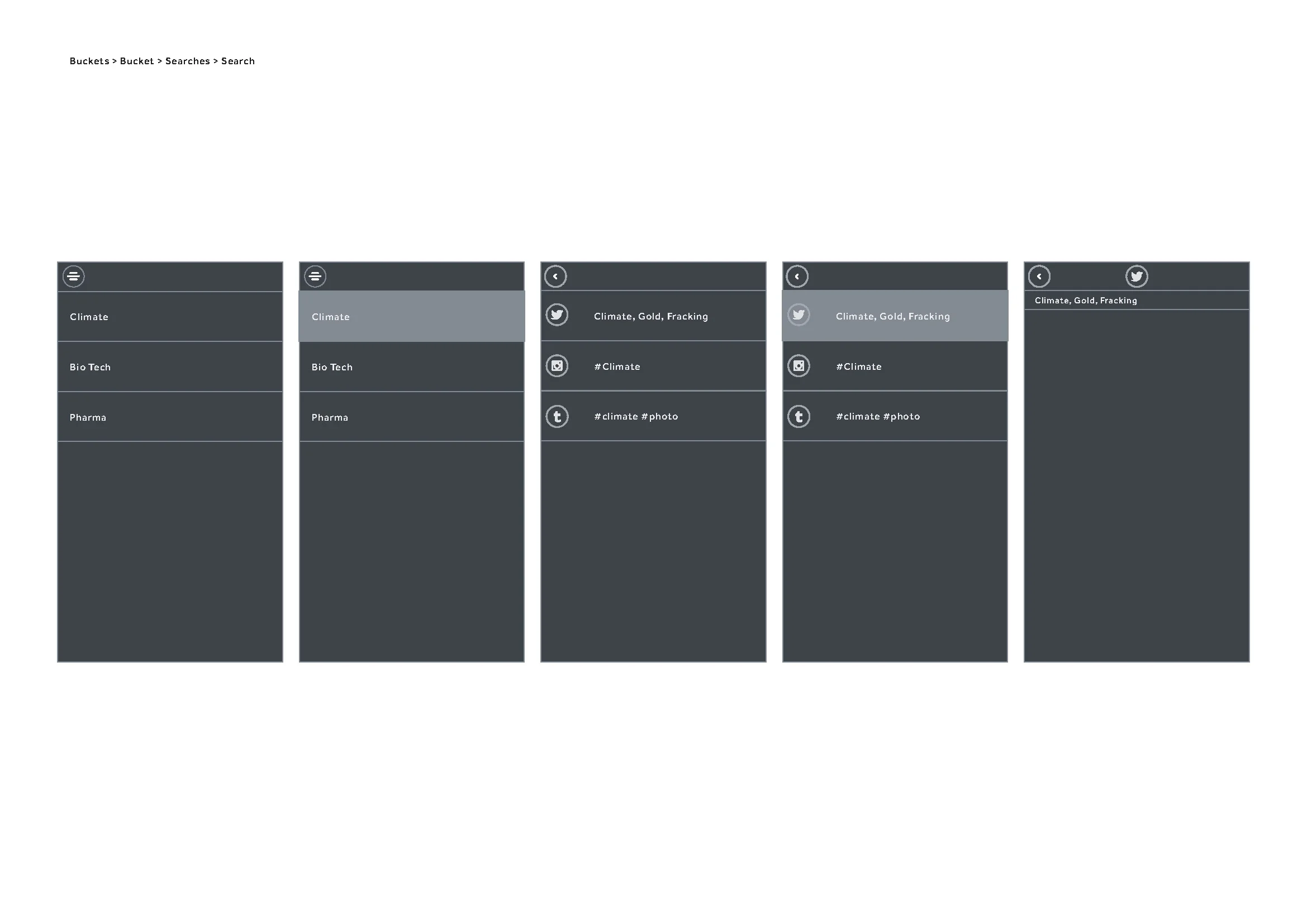

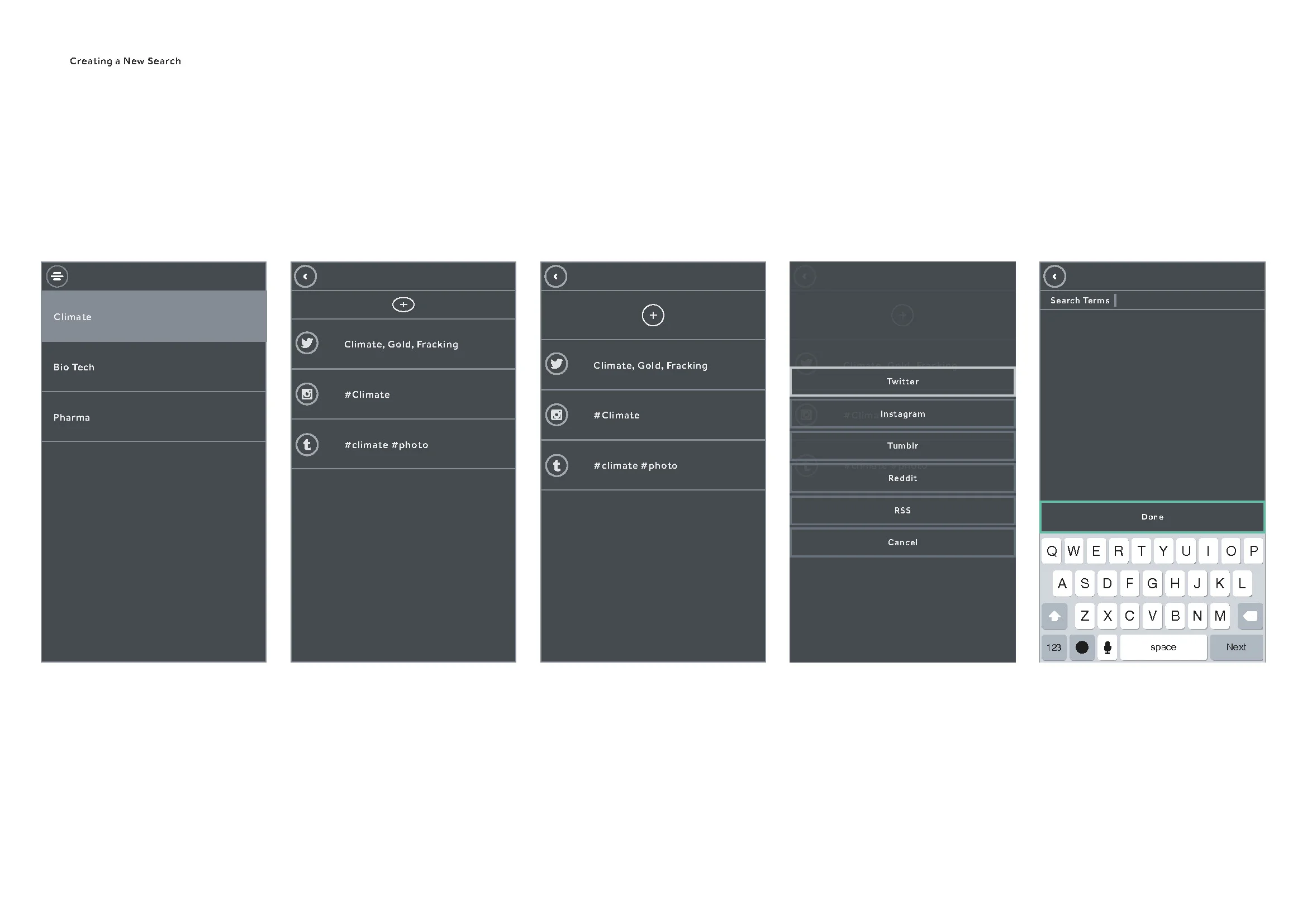
At this time we were getting significant feedback on the web side of the product, mainly about it's complexity. Now was the time to begin stripping away elements and beginning a process of reduction. Feature creep is inevitable, especially with diverse user testing groups, stakeholders and partnerships. The technology had also changed - our stack was nearing full development, but the partner APIs we accessed were developing at their own pace and changing. We also had ReactJS to consider as a framework - React works better in certain load scenarios than in others, and we were noticing lag in the front end performance. We began to simplify the design, but as we had defined and tested user stories we could focus more on the technological execution and making things more reliable, faster and economical.


Partner APIs are tricky beasts and by now, with large changes across most of the major social networks underway, some of our features - specifically the ones that attempted to unify some of the social network content - were becoming swiftly outdated (or worse - redundant). We were facing capping, call limits, sandboxing - the APIs were fluid and at the whim of their development teams. We soon realised we needed to simplify further. Like - waaaay further - and get to the core of the user stories that mattered and reduce the strain on the APIs. Some of the features were cool - some were 'wow' - but with the APIs in drift they would more often than not throw up an error or a time out. Effectively the experience we'd built was great when it worked, but was so prone to third party error we'd inadvertently built a frustrating experience that seemed buggy, but was in fact just feeding errors from APIs that we had no control over. This was a serious UX issue that needed resolving. We went back to the core ideas of the product and the subsequent research we'd done - along with all we knew about the APIs we'd been using. We chose to treat the APIs as individual elements which allowed for outages that wouldn't affect the UX as a whole. This also allowed us to prioritise individual network onboarding, sign-in, OAuth and sign-out.

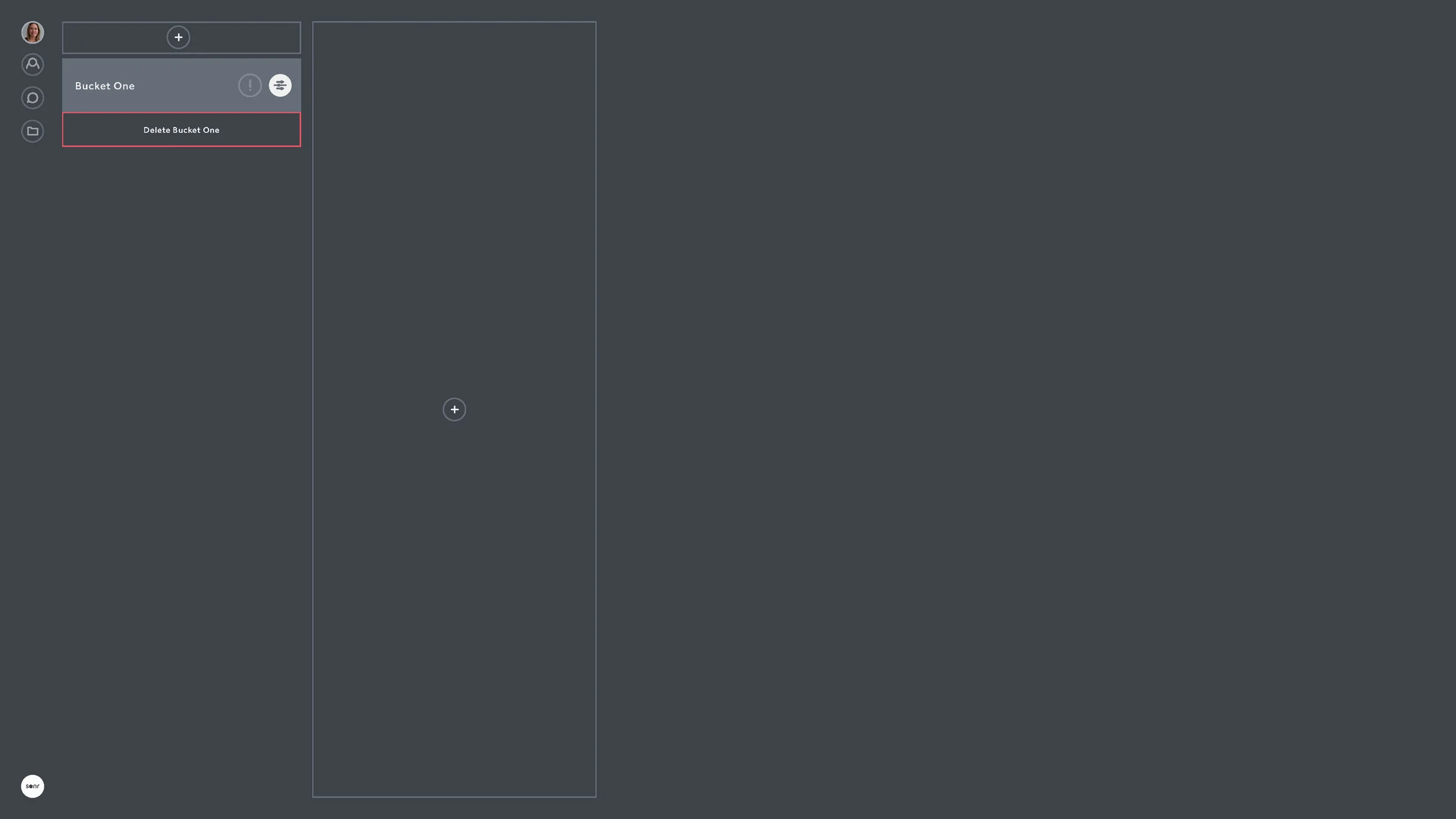


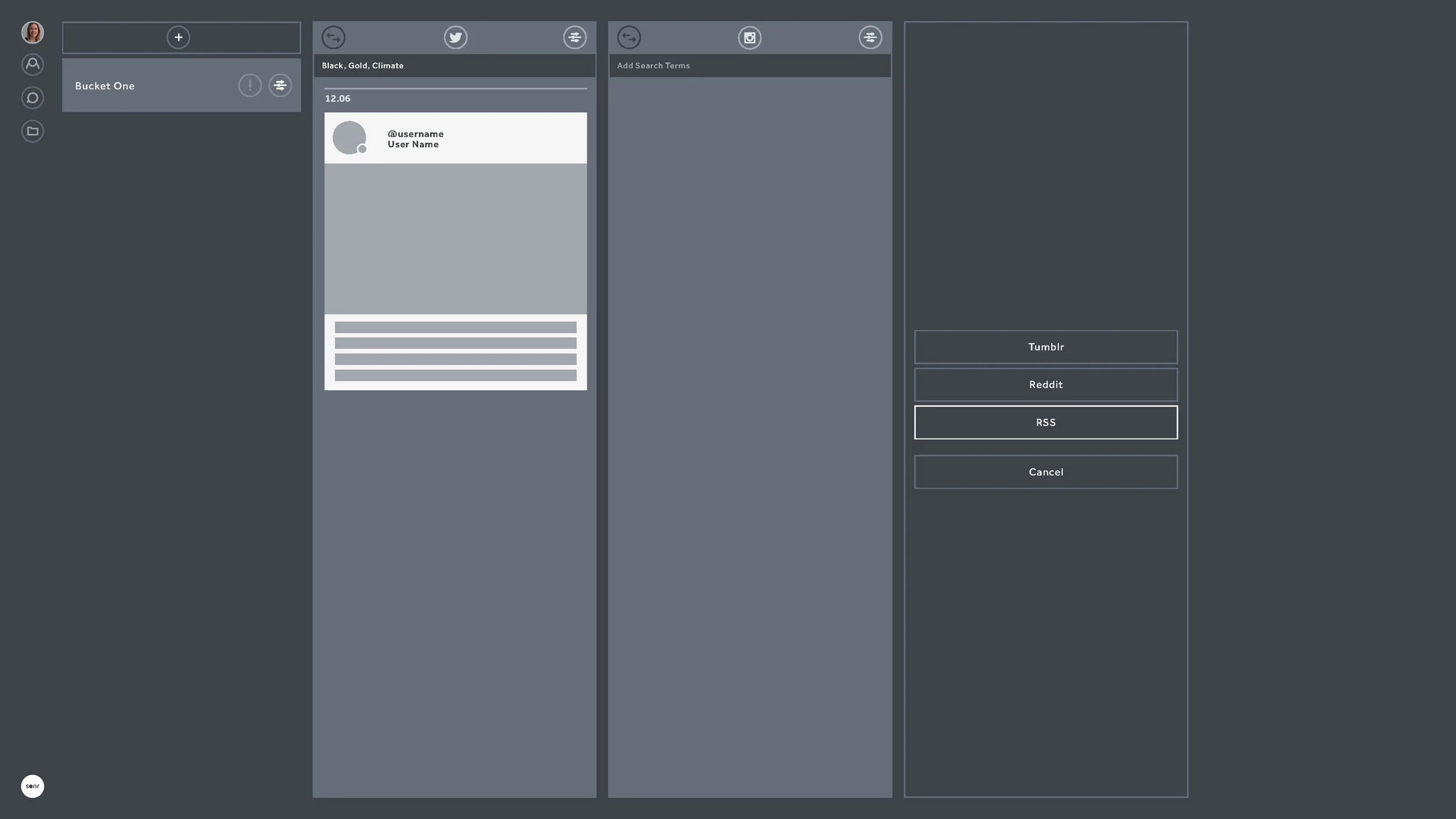


Onboarding became a big focus at this stage. We'd done enough user testing and design reduction to know the sticking points of the product. We were focused on simple, clear and progressive steps to getting the user to make their first actions within seconds of sign-in.


Focusing on making the APIs individual not only meant we didn't have to worry too much about outages, but it also meant we could develop API specific features which could be seen only when that API was being used. This allowed users to search certain networks for people, but for us to allow background actions within certain rate limits. Returning back to the days of us whiteboarding it all in San Francisco - we could allow action and ambient processes. And now the action and ambient processes were decoupled from the various APIs, we could now focus on making them stronger features in their own right.


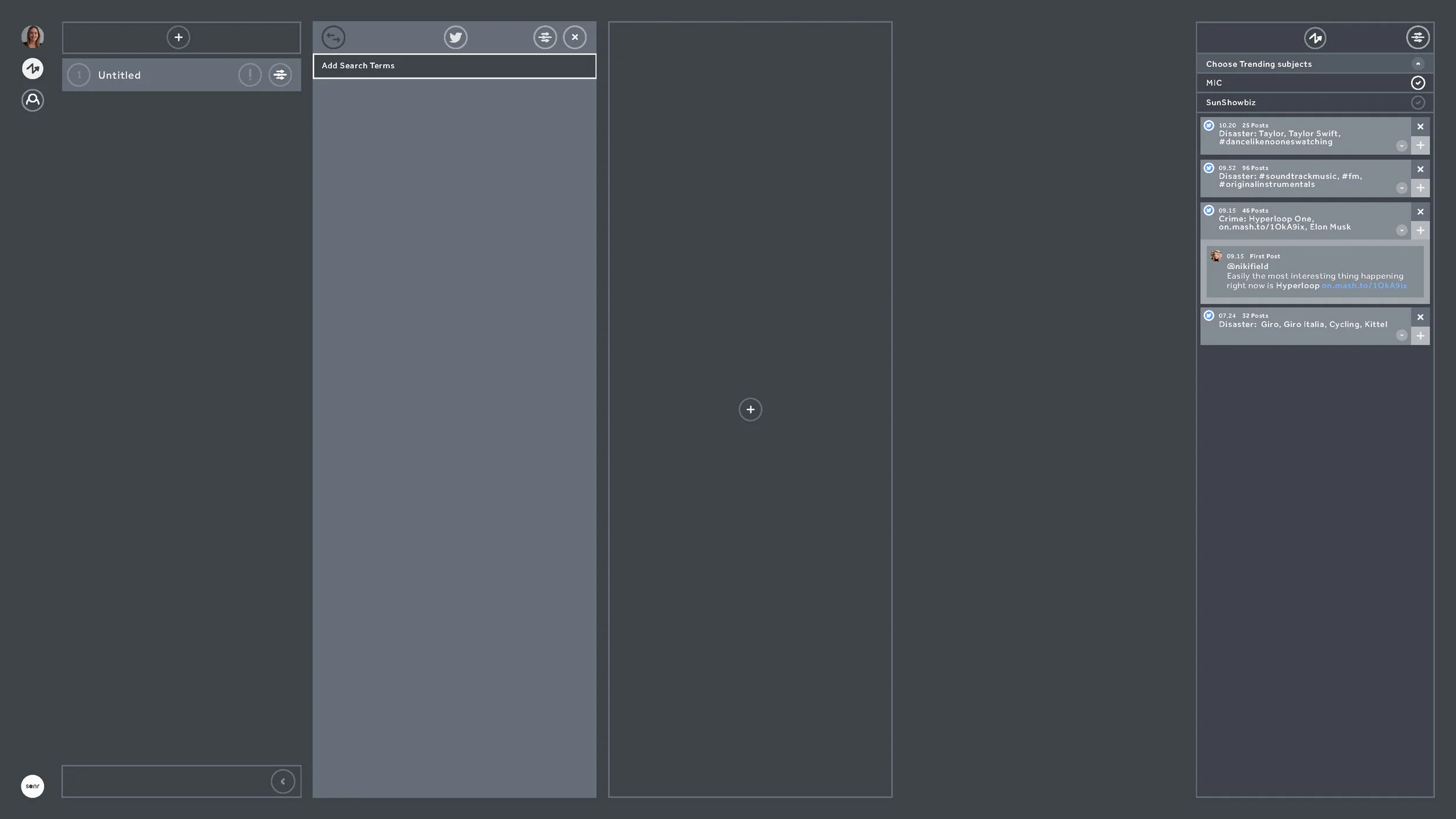

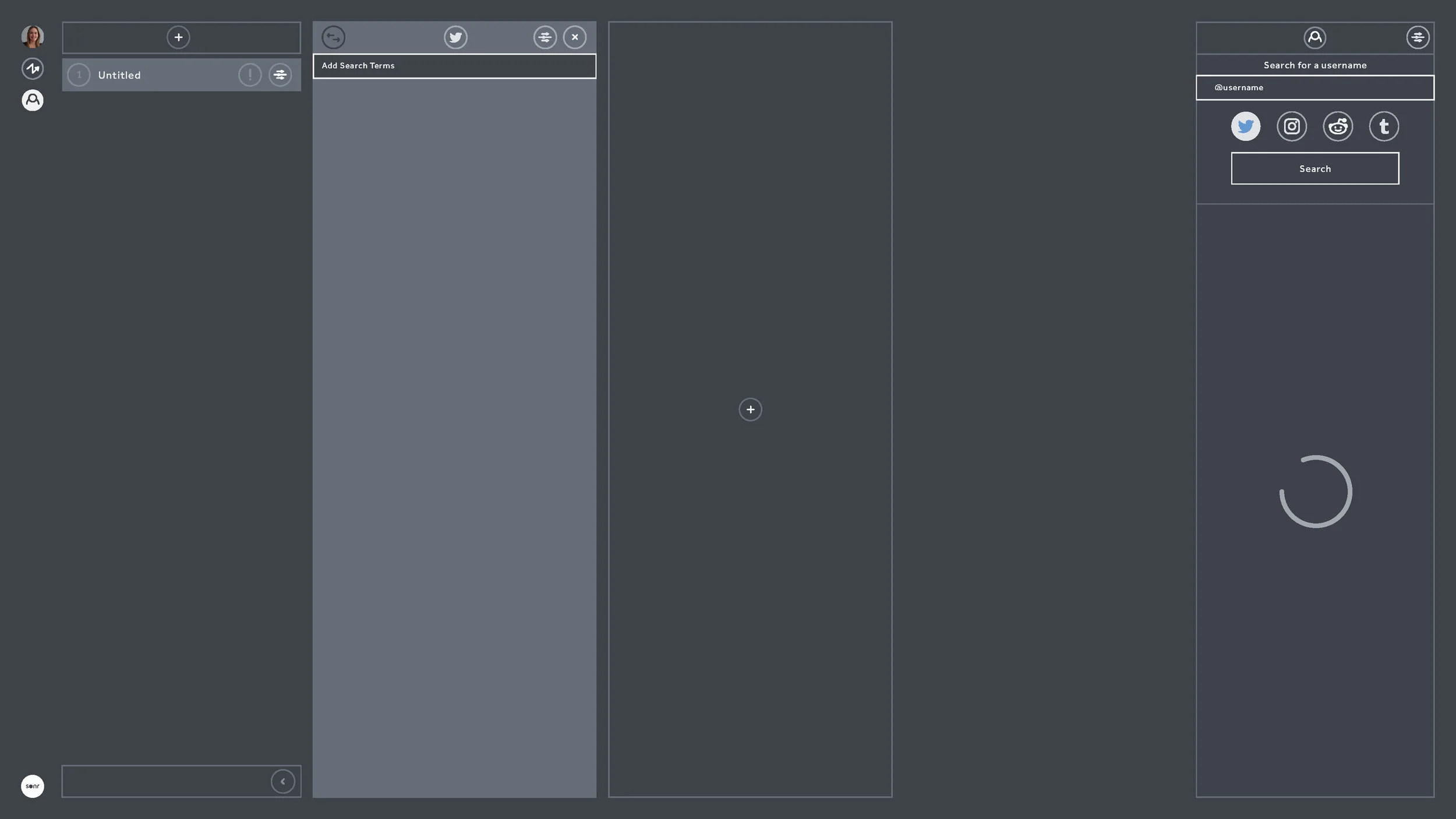


And with that - we shipped to public beta. We began some low level growth marketing around Medium (see here) and after getting some publication acceptance we quite quickly gained a lengthy beta waitlist.