Rob is a product and multidisciplinary design leader with over 20 years experience building things you’ve probably loved.






























Launching a rewards network for people under 30 that raised $60M in one year

As VP Design at Verve, I oversaw a lot of product elements, comms and users. Verve itself as a Saas is a complex beast - it allows you to sell event tickets to your friends to get rewards. This sounds simple enough, but with events spanning from sports to travel to festivals, with ticket integrations like Ticketmaster, See Tickets and more - and multinational e-commerce - US, UK, Germany, Belgium to name just a few, the amount of possible user interactions become huge. A user booking a sports ticket for 3 friends and wanting to choose where they sit is vastly different to someone buying a festival ticket and needing the tools to sell 30 more.
The one consistency across the Verve universe was the concept of rewards. You sell X tickets, you get Y reward - it became core to the user interactions on the site, and we saw it becoming a core driver for both acquisition and retention. Your average Verve user sells a few tickets and will probably earn themselves free access to the event - for these users this is realistically their end goal. Free is a great driver and for many it allowed them access to events they usually couldn’t otherwise afford. What we noticed though was there was a growing super user group who didn’t stop at a free ticket. They wanted more. They leveraged their social networks like an influencer, and had generated an extended reach. We wanted to build a product that could harness this super user behaviour and turn these self-made ‘influencers’ into acquisition channels. We did this through the creation of Pollen.
If Verve was a Series B, 200 headcount, in-rev company, Pollen was a pre-seed startup. We had user data, 100 users and some limited resource to hit MVP.
My role as Design Leadership in Pollen was possible due to the amazing work of Antony Shaw and Peteris Bikis. Hire those guys. They’re very very good.
The Problem
Can we take the power users we have on our existing platform and, through a combination of behavioural nudging, CX support and exclusivity, deliver a rewards network that enables higher sales per user, higher retention, better network driven promotion and cheaper acquisition? To solve this our definition of success would hinge on a few key metrics - on the quantitive side we’d look at GMV, NPS, Campaigns Joined (a user must join an event campaign to sell tickets for it) and Dwell Time (time spent inside or discovering a campaign). Qualitatively we’d look at the feedback we’d get from the CX teams, the semantics of the interactions, and we’d run face to face events to align to our testing - at the events our users were selling for. This last point was key to solving the desire lines in the product, as we saw event attendance as the last part of the user flow.
Pre-MVP
Because Verve is by nature a white label platform - it allows clients to rebrand their Verve site to match their event of campaign - we began initially by using this as the basis for what we were now calling Pollen. This allowed us to first of all test the flows we already had created in Verve, and work out which would be repurposed, but it also allowed us the ability to begin approaching the market with something to show. If Verve is a single sided marketplace through it’s white labeling, then Pollen, with it’s own branding would be a double sided marketplace - we needed users and events to transact at the same time. Without events we couldn’t get users, without users we couldn’t get events.

Reutilising existing flows and product elements was key in initial acquisition
This pre-MVP approach allowed us to begin building acquisition channels and gave us the breathing room we needed to begin brand and product scoping without blocking operations and sales. It also allowed me to quickly create pitch environments for client side partners.
Brand is everything
Building brands for the under-30s market is easier than it’s ever been in terms of broadcasting, but tougher than it’s ever been in terms of communication. Channels like Instagram, Snap, TikTok have given brand and content publishers the ability to reach people visually, way beyond the known limitations of Facebook. Paid acquisition is more impactful, and the organic story features with a focus in video and image get significant reach if done well. In researching these channels heavily with agency The Big Thinks, we defined some key focuses for communication:
Authenticity - Facebook has killed trust, and users are more cynical than ever before. Truth is king, and it has to look genuine - no gimmicks, nothing that can be conceived as BS, transparency is key, be bulletproof, but not to the point of being arrogant.
Don’t look like a pyramid scheme - Seriously, open up your Facebook and find one old school friend not trying to recruit you into a dubious scheme selling protein or moisturiser or something. Users are tired of this ‘friend drag’ and see right through it - in fact this came up again and again in our qualitative research. If it’s too good to be true it usually is, and the people your want to acquire will write you off as a scam. If your friends is offering free tickets on your feed and all you have to do is ‘click here’, people turn off.
Vibrancy - Seems obvious but not to be overlooked. Vibrant content really stands out and can act as a Trojan horse for complex messaging and boring terms and conditions. It’s actually hard to find good, vibrant content - people talk about their content or story being vibrant, but in truth it rarely is. Just because something is colourful doesn’t make it vibrant, and maintaining vibrancy from acquisition to process to retention is unbelievably hard to do.
Elevation - AKA ‘aspiration’ in some circles, but rarely is UX or CX ‘aspirational’, so ‘elevation’ it is. Elevation is usually the missing piece in product and brand flows, and it’s the oil in the engine. You can ‘nudge’ users and force desire lines, but elevation is more effective if it’s baked into the DNA. It’s the ‘too good to be true’ with real Authenticity and ‘not looking like a pyramid scheme’. It’s also incredibly difficult to define and needs to be user led.
I’m not immune to the brand think cynicism and it’s sometimes hard to type brand think into product design without feeling a little like you’re talking fluff to logic, but time after time I’ve seen products fail over and over again due to a lack of foresight and ‘feels’ when it comes to user acquisition. Acquisition is a lifeblood, yet it’s often talked about in terms of part of a paid strategy and usually nothing more. If you want to encapsulate a true sense of usability and elevation in a product, you have to have some mind in brand and marketing. This blending of the marketing and product, the ‘cross-pollination’ if you will that I was able to place into the teams at Pollen, in retrospect, was key to its organic success. Why? Pollen never lied, and its marketing and voice never wrote a cheque it’s product, CX and real-world presence couldn’t cash.
If Marketing and Product converge (which they should) on one action it should be ‘managing expectations’. Marketing should not be acquisition at all costs, nor should Product be ‘execute flows on the acquired user, everything else can be dealt with by CX’. One of the biggest issues I think we solved at Pollen was applied constraints. While it’s easy to promise the earth and tell the stories you want to seal the deal, it creates a falsehood where the brand overtakes the product and disappointment or suspicion gets seeded in the community. If there’s one thing to be learnt from Fyre Festival, it’s probably that.
The outcome of this Branding period was Product was educated enough to consult on imagery and copy for campaign, organic and paid. In fact post-MVP at Pollen saw Product Design working directly on Marketing campaigns alongside Marketing Designers with equal positioning.
MVP - There’s an app for that
You don’t need an app for that usually. In fact an app usually slows things down when trying to find the thing you need to build. In the case of Pollen however we wanted to build an app because our data told us to build one. In Verve world, where the web is accessible to everyone, an app isn’t a priority (it’s something that’s always in early stage development at Verve, but never ships). Pollen needed an exclusivity angle and using React Native allowed us to make an exclusive container for Pollen while keeping web on target. There are pros and cons to React Native, I’ve read them all. Pollen was the perfect React Native candidate.

Pollen MVP powered by React Native
If Verve was single campaign driven (one user, one festival), then Pollen was Multi-Campaign driven. This created a lot of complexity in both our user testing, but also in our personas and known quantitive data. Verve had been built and tested on a single campaign approach, focused flows, simple checkout - in fact simplicity was the 100% focus with Verve.
Pollen was very different. It was a discovery product first, with user choice and communication coming at the top of the funnel, leading to multiple checkout flows, options and end goals. If a Verve user had one definition of success to manage (sell X tickets, get Y reward), then there were potentially unlimited defined successes in Pollen, with different actions delivering different rewards at scale.
To navigate this we couldn’t equate X=Y anymore. We had to develop a different system for rewards based on a framework that could adapt to different values and different frequencies. If selling 5 tickets in one campaign as a Verve user equates to 1 free ticket as a reward, what is the reward if a Pollen user sells 1 ticket in 5 different campaigns? Do they get a free ticket? And if so, for which campaign? What if the campaigns are priced differently? Does a $400 holiday score more highly than a $10 gig ticket?
We began to build a rewards system that assigned point values to sales, weighted towards cost of sale. A user sells a holiday - 10pts, a user sells a gig ticket - 2 points. This made logical sense. Something costing more is harder to sell, therefore would get more rewards. We created Blue, Gold and Black statuses, each requiring a certain point value to access. Each ‘tier’ entitled the user to a range of rewards they could claim relating to their interests. The limitations of this system however began to show itself immediately in testing with users.
Reward behaviours
In testing rewards behaviours we began to realise that a weighted point based system wasn’t elevating our users. There were a few reasons for that. The logic of more cost equating to more reward makes sense (AMEX has built an empire from this dynamic) but for Pollen users the dynamic was too capitalistic. What we were doing was equating an experience someone was having with the cost of its purchase, which is to say that something that costs more MEANS more in our ecosystem. That just wasn’t the case. Our users saw straight through it - they saw money meaning access and immediately we began to loose authenticity. Money meaning access is something we’d originally sought to avoid with our users - those under 30 for the most part don’t see their personal wealth as an elevating element. We saw claims of unfairness, of ‘so if I’m rich I get more stuff’, of ‘this isn’t for me, because I can’t afford a holiday’. The reward behaviours we began to see positively emerge were non-hierarchical - every sale gives you a something towards a reward. And it was this non-hierarchical reward structure that unlocked the retention model we were looking for.
What we discovered was that ‘fandom’ played a large part in retention. In the world of ‘fandom’ someone who sells 5 tickets weekly to a club night has more worth than someone who purchases one large ticket item. In turn that ‘fan’ has more leverage with their network through constant broadcasting, making them effectively a micro-influencer within their domain.
‘Fairness’ in this world then becomes less about spend and more about usage. It’s less AMEX and more Foursquare. Removing money as a contributing factor began to make the reward dynamic more trustworthy, and more accessible. It removed the unnatural calculation of cash vs points.
We switched the tier access in Pollen to ‘amount of sales’ rather than ‘sales amount’ for MVP and it immediately opened up the concept of value to the users. Value that wasn’t monetary. Value that was calculated by the user, not Pollen itself.
Aiding Discovery
The quickest way to gain a user and retain them in Pollen was to give them the opportunity to discover new and exciting things, but more importantly let them find things they were looking for. With a marketplace built for scale, there’s only so many items you can place in a carousel before the intent to search is lost. We began with a powerful search tool front and centre in the UI, with predicative search display and the added options to request a search item if none was found - this allowed us to poll our users in real time.

The smart search feature in Pollen
For many products (such as Citymapper) search is bread and butter. It’s the 99% use case. In Verve world, search was non-existent, so integrating search into the product was a big deal. In fact it was such a big deal that multiple revisions of the discovery product were trialed before we tackled search being given such prominence in the UI. Search really began to take centre stage (and become more smart) when we finalised the first quarter of MVP trials in London. Pollen was expanding quickly and was showing astonishing GMV values, and the pressure was on to begin rolling Pollen into the US as soon as possible.

Adding location switches into Pollen
Much like Citymapper, we added a city switcher into the product which put more and more pressure on search, along with hyper-localised discovery. The back end required work - more tagging, more controls and the partner requirements equally grew as we added new locations. We also began reworking our initial MVP style guides to incorporate geographies. The UK is largely a single territory clubbing / festival market, with hyper-local users attending hyper-local events, save for annual festival pilgrimages. Stylistically and semantically its London - sorry to say that, but its one city that aligns the country in ‘how things look and feel’. The US is vastly different. We found our users travelling from NYC to attend a Diplo event. People from LA travelling Okerchobee, people from the east coast making the a pilgrimage to Coachella. Would someone in London use the city picker? Probably not. Would someone in NYC? Most definitely.
The more time we spent with our users on the ground in the US the more we realised that culturally the geographies were very different. Can we display an event in London the same as in LA or NYC? This opened up design framework discovery and a focus on an ever simplifying style guide.
Management
One consistency across all the locations we added was the core functionality of sales management. With users selling tickets and experiences across multiple events, locations and dates, to multiple friend groups, through WhatsApp, SMS and email - we needed a robust sales flow that would be easy to use and not require large amounts of CX spend.

Sales management in Pollen
Integrated into that sales management was SMS flows, allowing a user to send their friends checkout links and tickets, along with ‘sales links’ giving the user the tools to pitch their friends events they wanted to sell from within the app interface. These integrations were significant complexity - event discovery through to event selection through to adding friends, pitching and checkout - and getting them operational across multiple ticket providers in multiple currencies in different geographies was an impressive feat to achieve for MVP, but it was so core to the product experience that they couldn’t just be a redirect to mobile web. React let us build cross platform delivering consistency in our flows and user data.
What now?
Pollen continues to grow. In fact what was an MVP in one territory now controls the majority of collegiate travel in the US and Canada and continues to dominate in Europe. That growth was so strong that Pollen - in the space of two years - replaced Verve as both the core product and the core brand - and now leads strategy. Verve is no more - Pollen took over, and seems to be continuing to ‘pollenate’ within the experience and events market year on year.

Pollen continues to dominate
Update
In October 2019, Verve raised $60M in Series C financing with Kindred and others on the strength of the Pollen marketplace - and in turn rebranded Verve to Pollen. Pollen now leads the influencer sales market in both EMEA and the US, and through M&A owns the lion share of student travel in the US.

Citymapper Smartbus - the world’s first 5000lb 50mph beta release

I’ve written and talked quite a bit about Citymapper’s Smartbus project and my role in it - including all the ‘official’ writing I did about it on the company Medium blog and in the press. But I wanted to give an overview of the project / product in one space because it’s such a vast project / product - and one I keep forgetting the sheer complexity of. So while this serves as a nice portfolio piece, sure, it’s also a static reminder for me about what I did for the entirety of 2017 and why I should be constantly in awe at what we achieved - especially over the first 4 months.
Before Smartbus was SimCity
SimCity started life as a MapBox map with some simple data overlays. The idea was born of a hack in the FE team to figure out how to overlay some of our live app and open source data and make sense of it. We wanted to investigate transit products, but we didn’t even know if there was even an opportunity - mass transit dynamics are complex, subsidised and buried in policy. This means that even calculating a basic business model is complex as everything is in constant flux and renegotiation.

SimCity with Journey Duration data overlaid
We started building a basic web app that would allow us to overlay user centric data onto maps. If the business models are complex and subsidised by price, then you can always compete on the singular level playing field - quality of UX. With UX our main play we began to look at population density, A to B desire lines and where the black holes exist in a cities infrastructure - black holes though politics, restrictions, funding or lack of density. Mass transit is for the masses - this means its focused on scale and broad strokes. A smaller operation could exploit those gaps, compliment the existing network and still remain competitive.

SimCity with Journey Duration data cross-referenced with live transit links
We ended up after about 4 weeks with a product that did some pretty cool things in multiple city environments (not just London as shown here). Using various live data overlays and historical archives, you could choose a time, day and place, draw a transit route you liked the look of - and the product would auto route your selection via GPS, chose the best stops and stations for peak traffic at the time and date provided, and show you your competitors.

SimCity in action - a hyper powerful Saas that allowed route planning combined with live transit and app data
You could plot a route, save a route and analyse it using algorithmic processing of millions of known and projected data points based on known human movement. From this we were able to calculate projected passenger numbers - by stop or station.

SimCity’s brains - predicted route analysis could be then be calculated in minutes via algorithmic processing
Combining live and archived traffic data we could then predict the P&L - along with labour and machinery costs - of running any transit route it the city. From this we could rank routes by user need or profit potential, make quick changes and tweaks, and use the analysis tooling and infographics to understand the stop-by-stop dynamics in terms of passenger potential vs cost. A shorter route is cheaper to run in fuel and depreciates assets less - it also costs less in labour and has a higher frequency (which passengers love) - but it limits its profit potential and reach, while also reducing the chance of that route joining two areas of a city that actually need to be connected.

The SimCity ranking system
We build many data analysis tools and infographic overlays to our data. But this was an internal tooling system, not a commercial Saas - and as such it was allowed to be quick, clunky and navigated by feel. This was very much a service design led project with some limited usability considerations.


We had now analysed thousands of routes, and worked out where to throw our chips. We had a route. We just now needed to work out how to build a bus.
Project Grasshopper begins
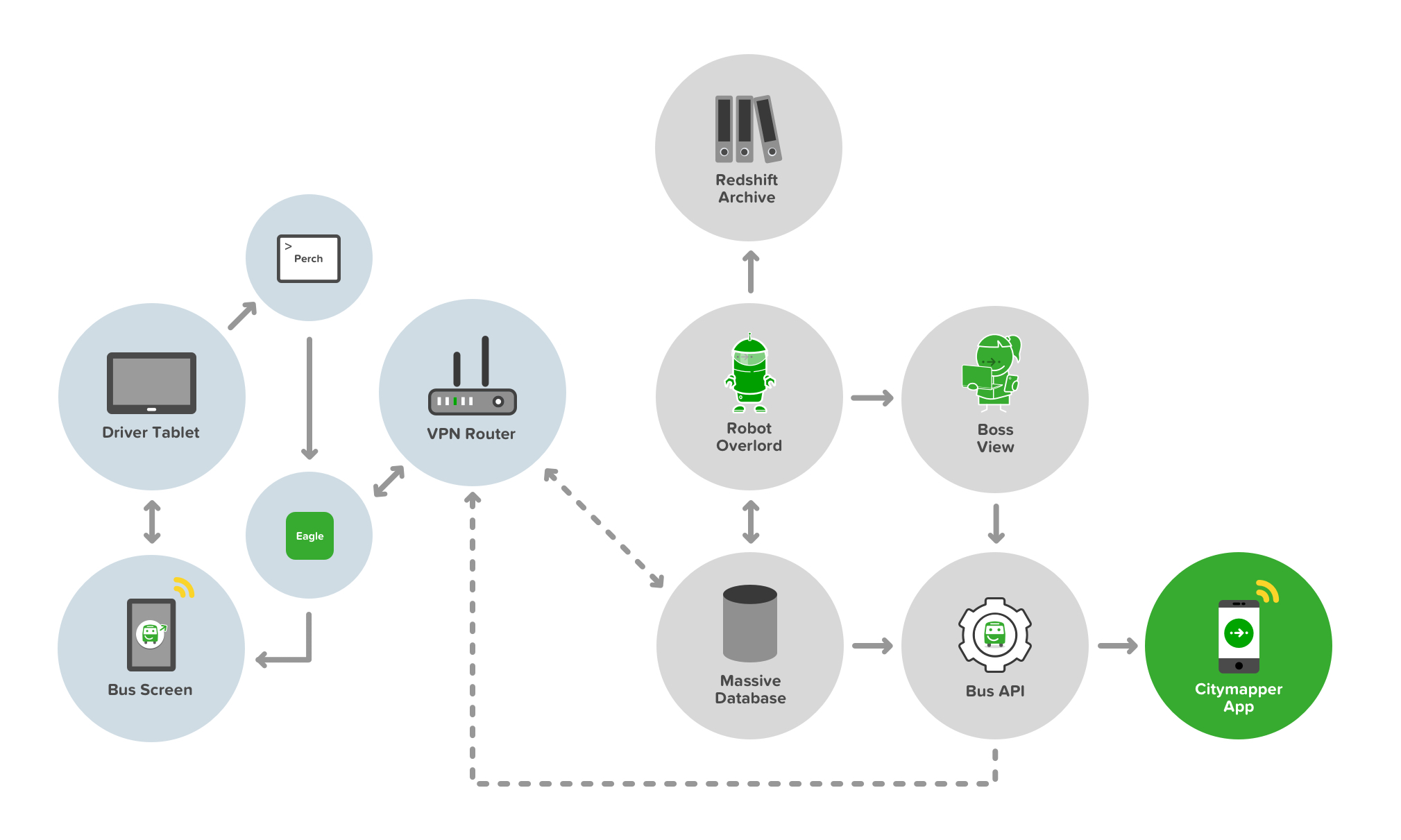
The full development stack of Smartbus from API to App to Bus to User
Building a Bus API isn’t easy. Neither is placing a server on a bus to facilitate that API. Buses are not really cutting edge tech - they’re cumbersome, heavy duty and - well - not a Tesla. We also wanted to deliver a Smart element to the buses. Sure, the bus was running on a Smart route thanks to SimCity, but we wanted to make the bus smart too. There are two key Smart innovations in this stack. Well, three - thought the third really sowed it’s colours later in the game.
The first is the concept of ‘Bus as a Platform’. The bus provides data of it’s whereabouts and behaviours, traffic and timings, passenger numbers and payments - in real time - to both the controller (i.e us) and to - and this is key - other buses. Smartbuses on a route are like an integrated mesh network - aware of each others status and proximity and able to self-predict their ETAs and passenger demand. This means they can talk to each other - and tell other buses to slow down or speed up depending on the current demand.
The second concept is the bus talks to the user. It shows transparent ETAs, location, other connecting nearby services, other Smartbuses, and even when to get off the bus (more on this later). The bus also talks to the driver. It shows the ETAs of other buses, how long to wait at stops, and it delivers simple information and two way communication to the driver about shift changes and start times.
The third concept is the bus talks to the Citymapper App, and therefore the user via their mobile screen and audible / haptic notifications. But it also responds to user inputs on their device too. It’s a personalised feedback loop, and one that benefits all the other buses in the mesh and therefore all other users of the network.

The first ever Smartbus rolling off the production line and straight into WIRED magazine
Other than the cutting edge tech, the bus needed an exterior and in interior refit. 3 buses in total and a lot of vinyl and signage. Most people know how to use a bus. It’s a lizard brain dynamic. But paint it green, change the payment terminal, add some screens…and it breaks something. The silhouette is changed. The UX shifts, the trust dissipates and new storytelling is required. Not everyone uses tech products, and mass transit caters for everyone - not just transit app nerds. The questions that were naive edge cases in development are no longer edge cases but massive critical issues. Should I get on this bus? Is it safe? Where is it going? Is this replacing my usual bus? How much does it cost? Will it tell me when to get off? How can I pay? Can I bring my dog on?


The integrated Smartbus screens providing live location and ETA data via live Bus APIs and app data
The driver UX is also critical in terms of usability and trust. Can they operate this bus safely? Is the screen a distraction? How do they reboot a Smartbus? How do they answer passenger questions? What does their uniform look like? How do they deal with platform bugs? What happens if the payment system fails? How do they communicate a problem? How do they change shift? Where do they pee?

Smartbus driver control systems delivered via Android tablet

The Smartbus driver control system user view
The bus controller ‘Boss View’ UX isn’t critical, but at scale it’s hugely important. Where are my buses? Are all my drivers on the road working? How can I contact my drivers? Are my buses bunching up? How bad is the traffic? Should I reroute a bus to avoid traffic queues? Who needs to go on a break? Has a driver exceeded their legal driving time? Is this route profitable today? How much am I burning in costs?

The Smartbus Boss View, allowing network controllers visibility over their headways
All of these questions are moot unless someone actually gets on a Smartbus of course. No passengers, no action. This meant using the bus to tell the story externally to potential passengers, making it look accessible, but also making it look trustworthy.

Smartbus rolls out through Southwark, London
Hark, Bigger buses!
Smaller buses are agile, but they also hold less people. Less people means lower demand routes, and lower profits. We spun up a fleet of six large buses with the goal of making the Smartbus scale.

A bigger Smartbus used to test a bigger revenue model

Smartbus interiors on a 5x scale
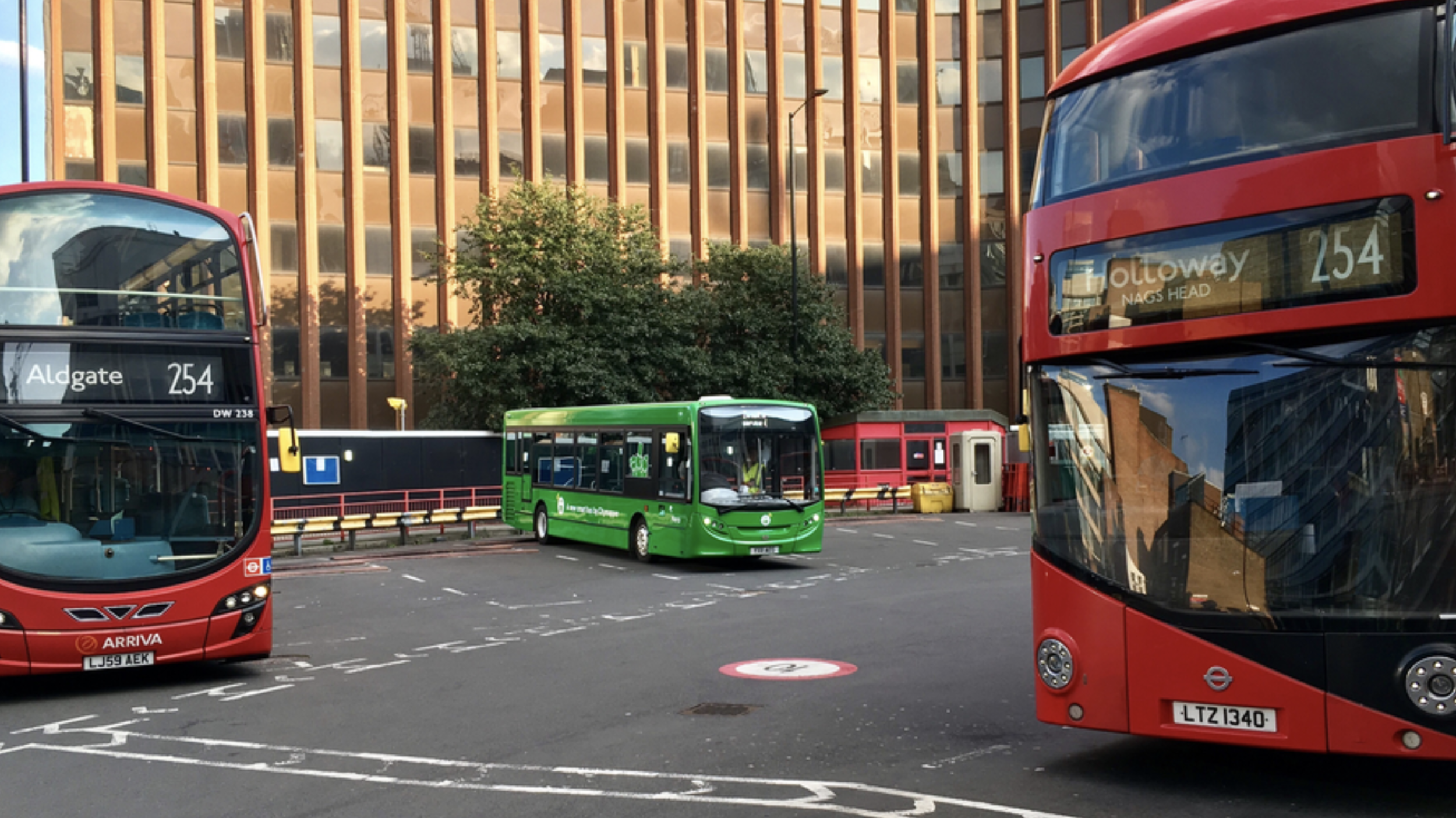
Smartbus rolls out on it’s new routes in East London
Higher frequency routes and more passengers means communications and payment UX becomes a critical part of the user onboarding flow. If the bus stops to onboard 10 passengers, to maintain the frequency of the service, the payment transaction process and boarding needs to be completed as quickly as possible. If it takes 10 seconds per passenger, each asking questions about how to pay and what to pay - that’s 100 seconds per bus stop, which totally derails the other buses frequency and schedules. It also annoys passengers being onboarded - and also annoys existing passengers with places to be.

Payment UX is crucial in transit, along with payment wayfinding

Transit payment communications and touch points are critical in passenger flow dynamics
Much like the smaller bus we needed the UX and storytelling to extend to the exterior of the bus - making it look accessible, but also making it look trustworthy.

External communications to aid with navigation, trust and passenger payment dynamics and flows
The bigger format of the larger bus allowed us to use large 40” OLED screens to expedite that communication and storytelling. However the time a user has to see these screens is limited - at the bus stop as they board, as it travels by at 50MPH, or if it’s stuck in traffic from the sidewalk.


We chose four in-flux screen states that allowed for a consistent narrative - location, payment, user benefits and at-a-glance plain language destination. The left side of the screen remained static, containing the crucial information relating to cost, route and route number.

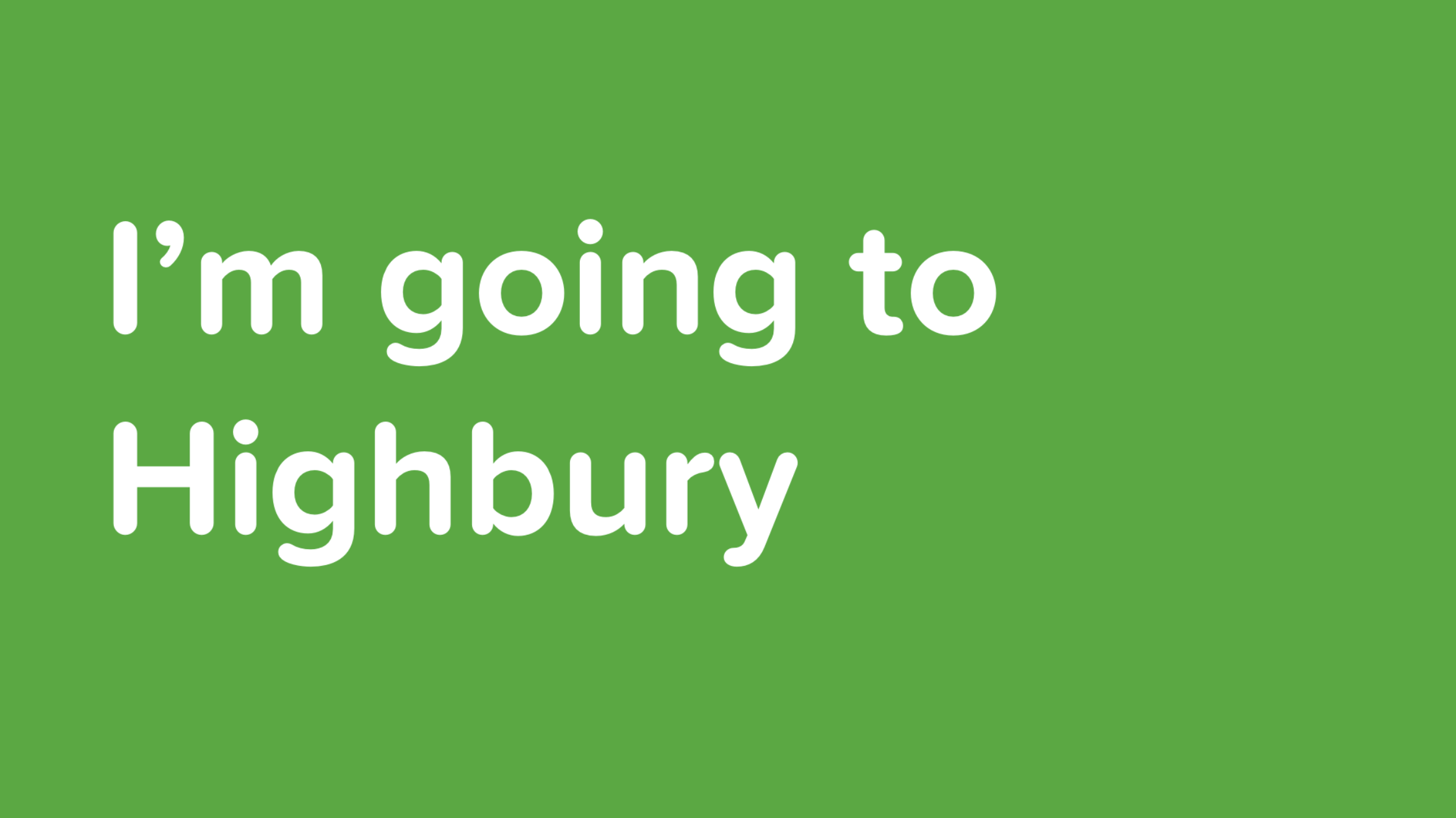
Our internal UX also got an upgrade. We were able to improve on our Bus to User feedback loops and allow users to interact with the bus platform. With Busmoji we were able to give users a personalised experience - using the Citymapper App, the user chooses their route as they would normally. On boarding the Smartbus, the app signs them a Busmoji. When it’s their stop, the bus reminds them by showing their emoji on the bus screens. Great for drunk passengers - even better if you’re not sure of when to get off or have forgotten the name of your stop.


There’s so much more to talk about with Smartbus and it’s UX, but context is really key. Context of politics, context of legal limitations, context of public services. Here’s some other articles I’ve contributed to or written relating to the Smartbus universe:

Designing a product to shake up the world of Digital Asset Management

The Problem
DAMs (Digital Asset Management systems) are pretty established these days. Once your company gets over 100 in headcount, the need to control you assets between yourself internally and with partners externally starts to become a strong need. Even more so if you’re a remote or distributed company.
There are some clear problems with DAMs though. They’re usually large and cumbersome. They have features you don’t really need. Their pricing is opaque. They’re sold as enterprise and at huge cost. They’re bespoke yet weirdly inflexible. They don’t really iterate like a Saas, nor are they as accessible or as easy to use as a Saas.

Enter Workshake. Workshake is a Saas approach to DAM technology with a focus on user experience rather than technical need. If a DAM is usually a badly skinned database built by backend engineers, Workshake is a careful crafted and intuitive product based around what people need.
The Market
DAM is a market that is growing quickly. As cloud storage solutions become lower cost and higher value per GB, there has been a significant growth the the cloud services market which is scaling to support it.


There’s also another reason for that. As companies increase their global distribution and remote enable workforce, the need to provide colloid solutions and cloud access to employees increases exponentially.

The Solution
Workshake allows businesses to consolidate all their Cloud storage solutions into one space, and use powerful search tools and meta data passporting to be able to quickly find, share and categorise their assets. Their assets exist within a solid AES 256 encrypted environment which only they can access - and control access to - through user IDs.
On synchronisation with Workshake, assets from wherever they may come from are analysed and applied meta data through a lightweight Wolfram engine that looks for format, file structure, image type, colour, existing meta, location and GPS tags, making or versioning formats and basic semantics.

The Product
Workshake operates like an inbox for your assets. Add assets or asset sources, view, browse and search existing cloud services and simply share with integrated platforms or the product’s secure external portal.

Use Case One
Here a distributed team want to share - in this case - a World file amongst themselves. Workshake allows for groups to be created quickly and simply, and for files to be made private, team enabled or all-team enabled though basic, easy to use statuses.

Use Case Two
Here a team want to share a file externally with a client or partner and wish to do so through a secure and trustworthy portal.

Use Case Three
Here an agency has uploaded some imagery - both photo-based and graphic. Workshake uses Wolfram Engine to analyse the basic properties of the asset to automatically assign editable meta data to the asset to aid in its retrieval. The user can also add additional meta data, or edit and correct existing meta data. In the case of the image, this analysis includes location tagging, colour extraction, and some basic image recognition to aid in it’s retrieval - is there a tree, it there sky, are there people, is it a portrait. In the case of the graphic, this analysis includes typographic suggestion, file size, letter recognition, colour extraction and file type. The reason this is applied is to expedite retrieval. Often we don’t remember what an image is called or where it is located, only that, “It was a picture in a park I took last year of some flowers”. Workshake allows you to search using these parameters.

Use Case Four
Here a user has created a document in Workshake to share with their team. As the user types, Workshake analyses the semantics and the imagery being uploaded and applied automatic, editable meta data to aid with its retrieval. The user can also add additional meta data, or edit and correct existing meta data.


Meetings mean time, time means money; so I build a product that times meetings

The best products are built from identifying real problems. In a previous role (no names mentioned) I ran a product line and associated team doing pretty deep and complex work, however it often felt we were executing that deep and complex work despite the negative cultural elements that surrounded us. There were pressurised long hours, expected attendance, clock watching, micro-aggressions and micro-management. So far so uncultured start-up I guess. I won’t delve into that culture too heavily here - except to say that it’s the opposite of what a good work culture should be, I’m thankfully out of it, and I’ll never return to it regardless of the equity thrown my direction.
That aside, the one element of this company culture I truly detested was unplanned, unstructured and un-time-boxed meetings. I’m not (at least I don’t think) arrogant enough to describe my ‘time as money’, but I do consider myself experienced enough to consider flagrant and mandated bad use of my time disrespectful. And I’m not talking about the kind of meeting which is ‘hey, could we all meet and have a chat about some ideas I’ve had’, which, you know, often are unstructured and wavering meetings, sometimes seemingly with no end - but sometimes there is a need for those meetings which become a rolling critique or discussion, specifically if the focus is there in the room and there’s a clear need and everyone is engaged.
The fact that my team invented a side-app to cope and expose the futility - and cost - of the meetings we encountered, should probably be proof that they weren’t those meetings. No, these were undirected ‘hey come into this room now’ meetings which often roped in 10 to 20 participants and could run from 2 to 4 hours on a bad day. If you were super lucky you could claim ‘something urgent came up’ and find your way out of them - but that was rare.
And so a product was born. Born from the question, “Hey there were so many of us stuck in that meeting and it was totally pointless - I wonder how much that just cost?”. A very valid question, specifically if you’re in the process of burning venture cash in search of a market fit, and time is described as ‘runway’.
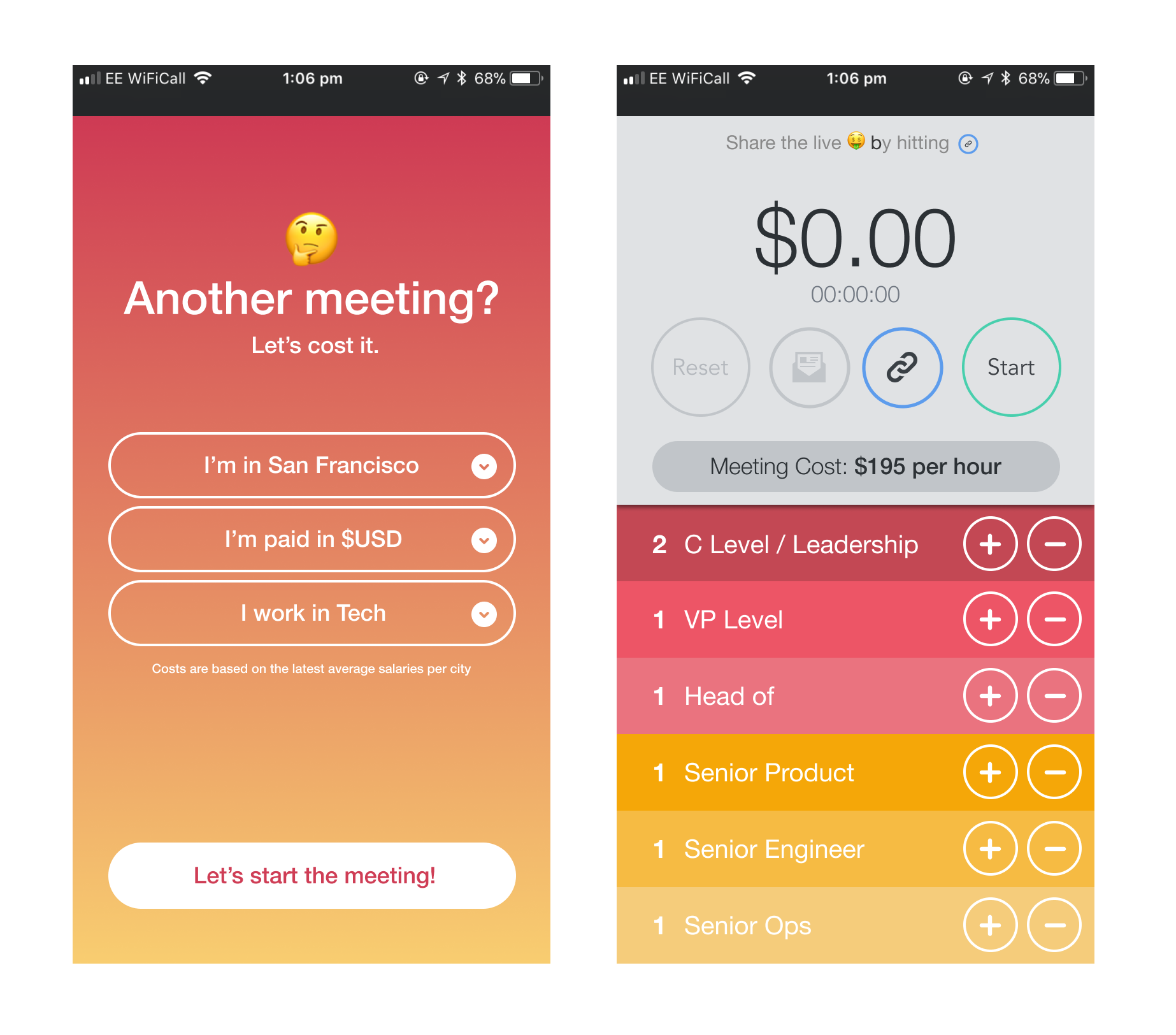
Designing this product was pretty quick and scrappy. React Native, some quick sketches, a few conversations, empower the front end designers and embrace the feature adds that magically appear. Let’s not call this a portfolio piece, but let’s call it a useful and fun product. It’s a product that everyone who sees it says ‘Man I wish I’d had that on my phone in this meeting I had the other day’.
It’s simple. So simple that you show it to someone and they immediately go ‘OH!’ and grab it from you. It’s probably the only product I’ll ever make that will be so simple and have such an immediate reaction.
Simplicity aside, there’s some cool features in the product though. The great thing about these mini-features as they came from - clearly - a passive aggressive moment, probably in a two hour meeting.
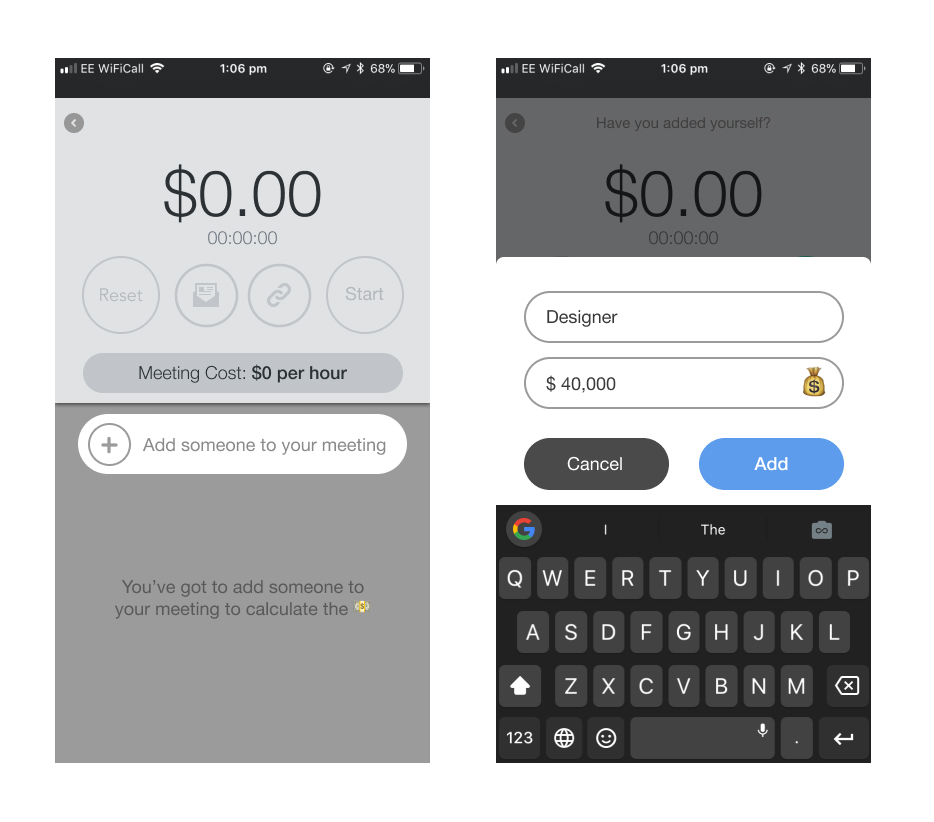
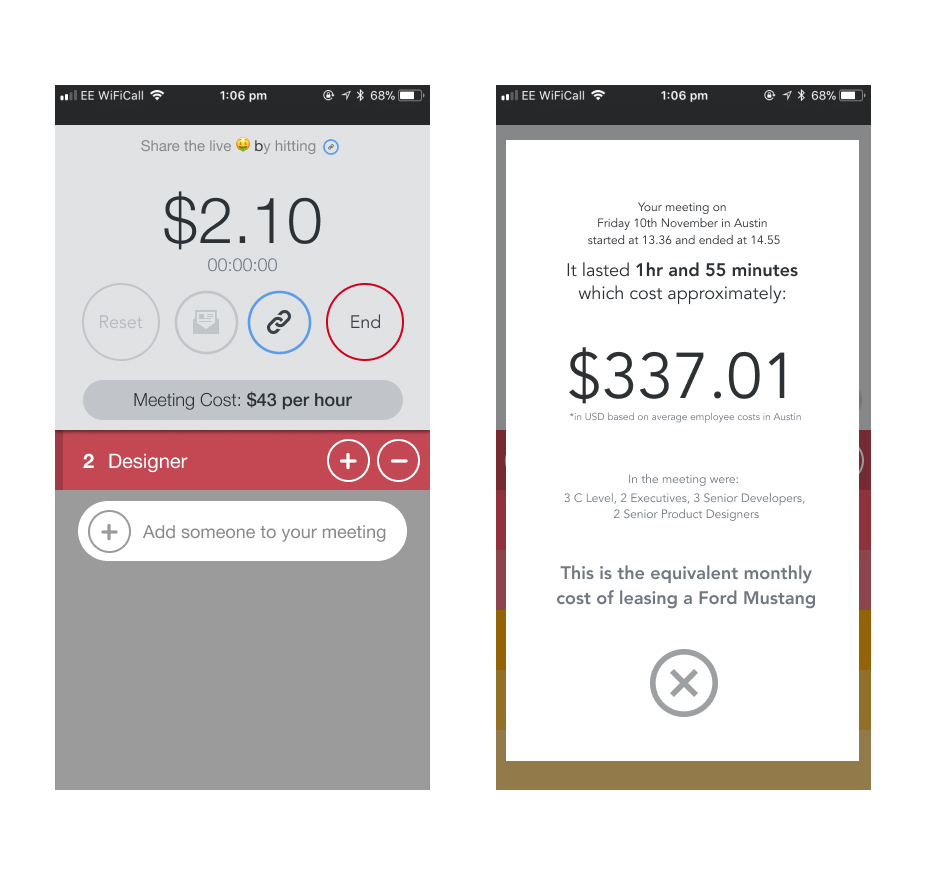
Yes, you can share the scary multiplying cash value by hitting the link icon - send it to whoever, however to show the futility of your meeting existence. Yes, you get a report on the total bill due from your wasted group session, but with the added value of being told that the meeting cost the same price as a thing you’d maybe like.
In seriousness though, the app does provide shocking value in the moment. Using it in anger to disrupt pointless meetings, and claiming that time back to yourself is a glorious outcome. Using money as a metric also seems to be a metric everyone can understand.
Now all I need to do is work out how to get it to track my personal social media ‘burn’.

Launching smarter buses as a service with Citymapper

Since October of last year I've been at Citymapper, and I've been building a bus. Well - more accurately, I've been leading product design on a Smartbus. In that time we've built and shipped 2 productised Saas platforms, a full hardware stack, an Android framework and an App. We've also stripped down a fleet of buses and rebuilt the tech from the ground up and productised it all. We've even wrapped the interior and exterior, rebuilt the seats, and deployed a super-cute bus icon on everything.
I'll go into more detail about the whole product stack soon enough when I catch a breath, but for now here's some better writers than me talking about the launch:
There's also more product elements at Citymapper.com/smartbus for anyone who is interested and we're also experimenting with crowd sourced bus routes with a crazy beta drawing product here.
If you're a holistic product type who sweats the details, then I've got you covered - check out the blogs coming from the product team on Medium and some 'finely crafted' copywriting here that involved more than a few late nights. That's right - product is a full stack requirement.

How we built and exited a big data Saas using global remote teams

Sure it's a cheesy metaphor - but it is the actual sunset on my last work day in San Francisco
Leaving a product - especially one you've built from whiteboard to public release is a hard thing to do (and especially one where your desk has the above view). But that's what I'm doing, and as I leave Sonr - as goes the cliche - I've had the chance to reflect on what we've done, what we've shipped and the processes we've developed. This isn't a post about personal failure and / or learnings - I'll be delving into that in a medium post at some point soon (lucky you) - nor is it a commentary on startups or being part of a founding team. It's more an overview of product creation - specifically from my point of view as a Creative Director / builder / shipper / strategist of product (i.e someone with a strong preference relating to pens). Anyway, here's a quick fly-by-night overview of my past two years in Sonr-land.

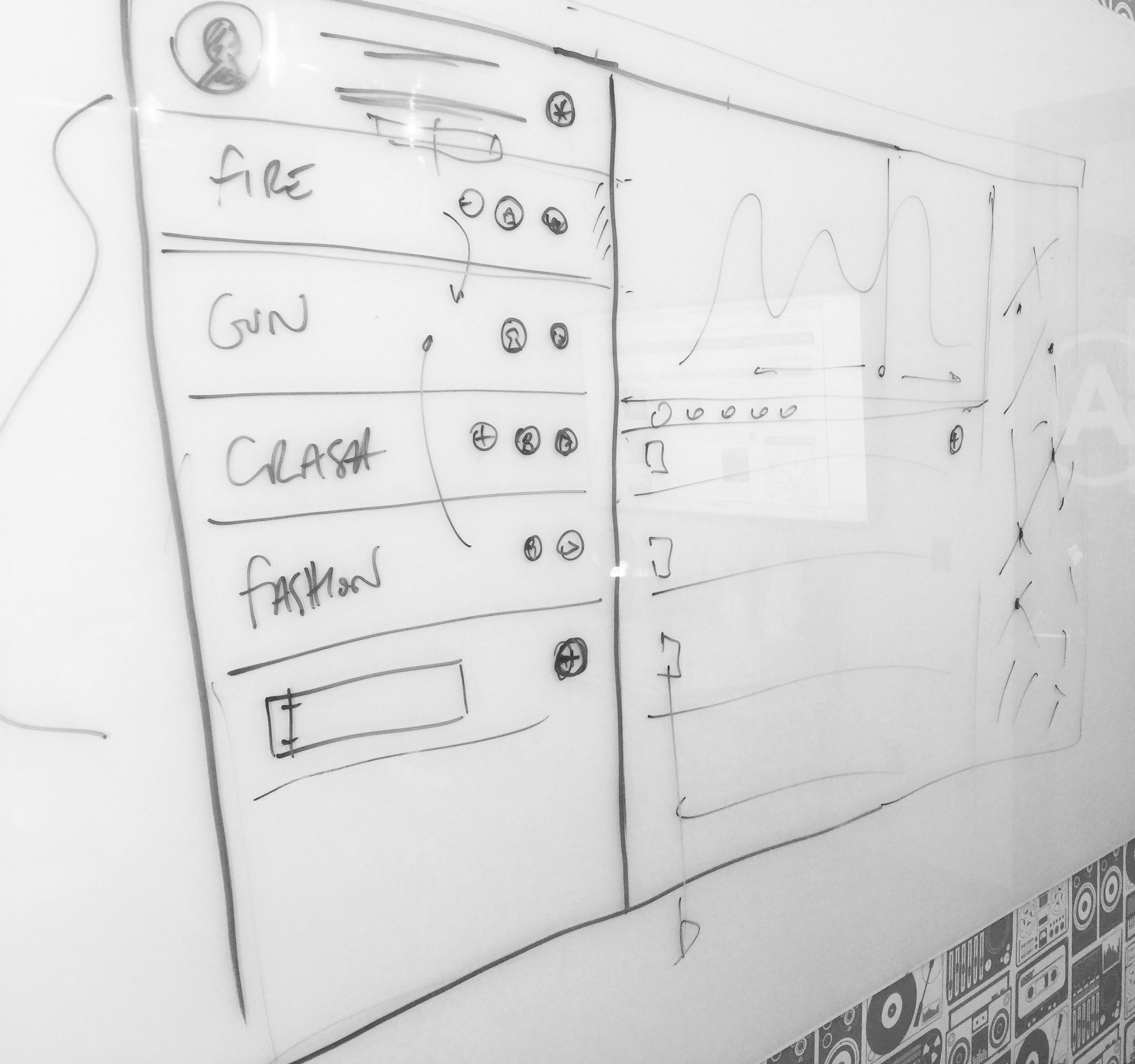
Breaking ground on the product in Potrero Hill with the founding team - the first sketches
We started the product design in San Francisco in 2014 after the initial pre-seed round had closed. We had a whiteboard, a development team and had time-boxed a few days. I'd had a few weeks before my arrival to get some homework done - I'd performed some business canvas workshops, we'd done our requirements gathering from the business and from our potential customer base, we sorted cards, and we'd created our first round of user personas (knowing that we'd end up trashing them within the month). What we came up with in that first office in Potrero Hill was a very basic product specification that focused on business and user verticals - in fact much of the technology at that stage was a relative unknown (such were the joys of social APIs in 2014) but the focus was very much on building a proof of concept. We did this by utilising existing frameworks - specifically Bootstrap - to build the basic front end and get the ball rolling. Using existing frameworks is a great way of bypassing needless development - we were using the framework to test UX hypothesis, but also to give the backend something to output to. That first iteration, those first pre-MVP versions - we excepted their inevitable generic bland ugliness because we knew we'd be throwing them away sometime soon anyway. Using a simple framework can give you an advanced front end in minimal time with minimal spend compared to bespoke front end noodling. It allowed us to take the whiteboard process above to the UI below in weeks rather than months, while giving us the opportunity to quickly iterate front end elements around without slowing down backend development schedules.

The initial Bootstrap mockup which raised Seed
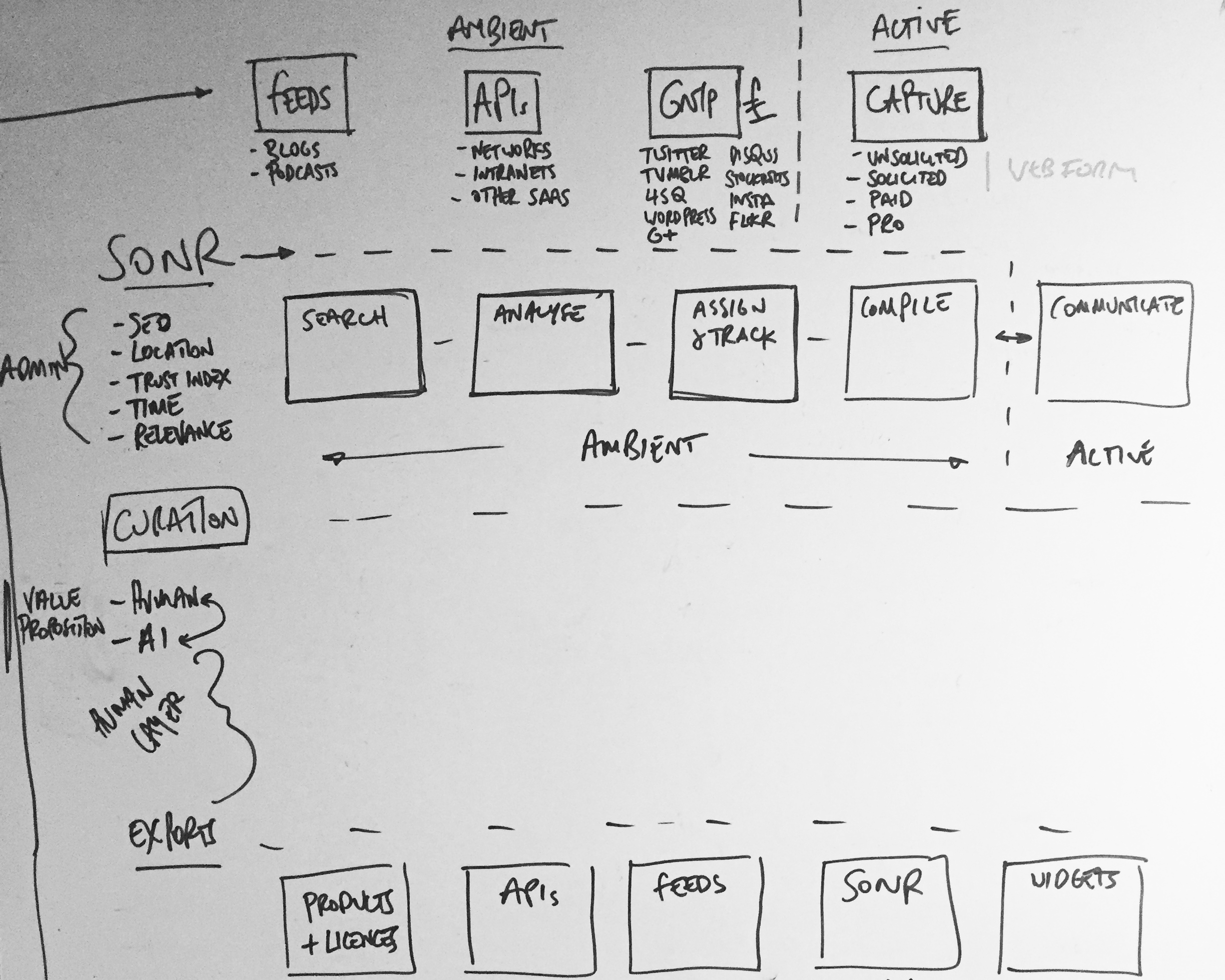
Active and Ambient states mapped out
From here we moved as fast as we could to prove hypothesis - I placed these early versions in front of as many possible end users as possible. This was quick and dirty guerrilla-style user testing, the type straight out of the IDEO playbook. We changed some things off the back of that. We - of course - also trashed our user personas and wrote new ones, and began to really figure out the structure of the data behind what we were now building. We deep-dived into API documentation, we attended conferences (see below) and spoke with possible partners, we scouted competitors, we tried to work out better user flows, oh, and we had to raise some significant money (which we did). I created user flows, overlaid with data architecture to try to break down and visualise the actions of the user and the impact on the product. This broke down the product into 'user intentions' (which were effectively collections of related user flows) and 'product reactions' (which were how the product would react to a 'user intention'). This gave us a high level overview of user and product intended behaviour, with both influencing each other. A user could be administrating, searching, curating or exporting - meanwhile the product could be active or ambient at any given time.

Visting Twitter Flock 2015 NYC

Visting SXSW 2015 Austin TX
Iterating to v2 with our awesome new product team in Midtown, NYC
Around this time we'd begun to crystallise a product team in New York who were beginning to build out processes, set up Jira workflows and form QA schedules. We began to form more stringent user testing systems, and began to do one-on-one Google Hangout interviews. The distributed nature of these teams, between New York, London and San Francisco at this point began to place strain on product development, and marshalling it became a full time balancing act of clear documentation, scheduled Hangouts and constant Slack use. With this in mind we spent time in New York training the team there to become product design focused, allowing them more time autonomously working with the west coast team on product features. We also began to iterate the designs to fully incorporate our user feedback from testing. With new front end developers being hired we were now able to break away from our Bootstrap framework, and move to something more advanced and scaleable in ReactJS. Initially we kept the Bootstrap aesthetic (there was no rush for design beyond UX elements at this phase of the build) - icons, drop-downs, transitions - they were all defaults and generics. We were ignoring the details until we solved the bigger UX picture.


Distributed teams are *really* hard work and can 'jetlag' a product
There were also organisational problems to solve - distribution meant we had the problems that all distributed teams have - things fall through the gaps, and communication is hard. Being on hangouts across multiple timezones led to long days for those on GMT and deep investigations into the best conference calling and video calling tech (bottom line: there are no 'amazing' conference call headphones - but it's all about the microphone. We ended up with Sennheiser PC36's for group chat and the Jabra SPEAK 510 for portable conference calling - and always using Google Hangouts. Slack may change this space, but for now Google is the best).
I began work on two things at this point - mobile (which was based in London) and documentation upgrades for those on the west coast. Documentation is often seen as a failure to pair-code, but while pair-coding is indeed best practise, it becomes near impossible with a 6-8 hour time difference. Here is the 'Manual' that was produced (below). The 'Manual' is written with a group definition (say 'Search' ) which is defined by the user Action, Behaviour and the related user stories that created the Action and Behaviour to be defined. Within each group there a section of each element that combines to group, each element having precise schematics defining it's default state, basic behaviour and basic action. This level of precise documentation prevents any grey areas forming, but also focuses the UX and product into defining every inch of the product and it's intended action - and making sure that this action is being supported by at least one user story (here's an excerpt from the 100 pages it eventually ran to).


With mobile being in London, the need for such precise documentation wasn't so great. We could pair-code and whiteboard solutions. We still needed to define the actions though, and we used Flinto for the bulk of our prototyping. These prototypes were then user tested by the product team and with our user groups for feedback. The feedback was then incorporated into the wireframes (see below).


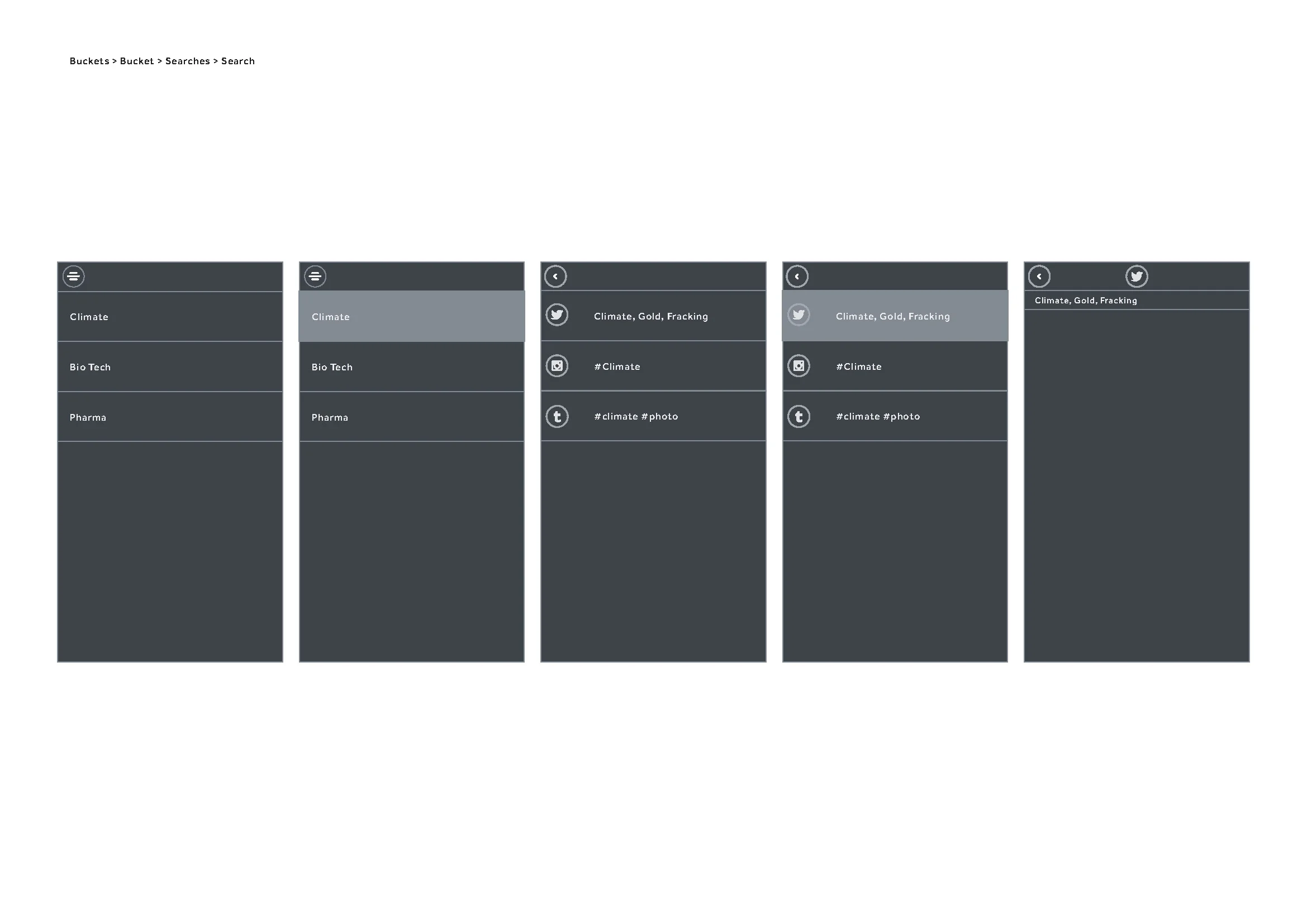

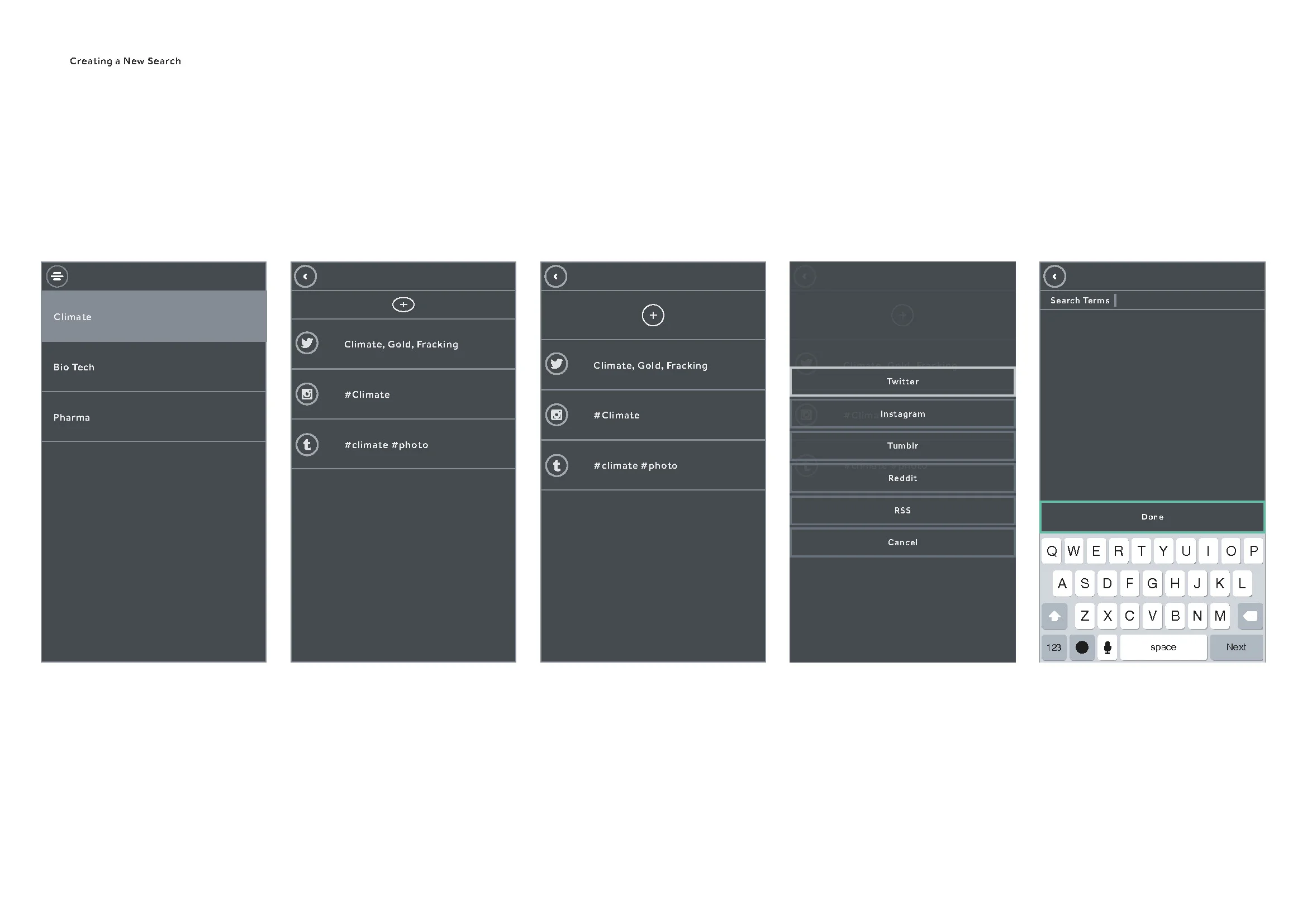
At this time we were getting significant feedback on the web side of the product, mainly about it's complexity. Now was the time to begin stripping away elements and beginning a process of reduction. Feature creep is inevitable, especially with diverse user testing groups, stakeholders and partnerships. The technology had also changed - our stack was nearing full development, but the partner APIs we accessed were developing at their own pace and changing. We also had ReactJS to consider as a framework - React works better in certain load scenarios than in others, and we were noticing lag in the front end performance. We began to simplify the design, but as we had defined and tested user stories we could focus more on the technological execution and making things more reliable, faster and economical.


Partner APIs are tricky beasts and by now, with large changes across most of the major social networks underway, some of our features - specifically the ones that attempted to unify some of the social network content - were becoming swiftly outdated (or worse - redundant). We were facing capping, call limits, sandboxing - the APIs were fluid and at the whim of their development teams. We soon realised we needed to simplify further. Like - waaaay further - and get to the core of the user stories that mattered and reduce the strain on the APIs. Some of the features were cool - some were 'wow' - but with the APIs in drift they would more often than not throw up an error or a time out. Effectively the experience we'd built was great when it worked, but was so prone to third party error we'd inadvertently built a frustrating experience that seemed buggy, but was in fact just feeding errors from APIs that we had no control over. This was a serious UX issue that needed resolving. We went back to the core ideas of the product and the subsequent research we'd done - along with all we knew about the APIs we'd been using. We chose to treat the APIs as individual elements which allowed for outages that wouldn't affect the UX as a whole. This also allowed us to prioritise individual network onboarding, sign-in, OAuth and sign-out.

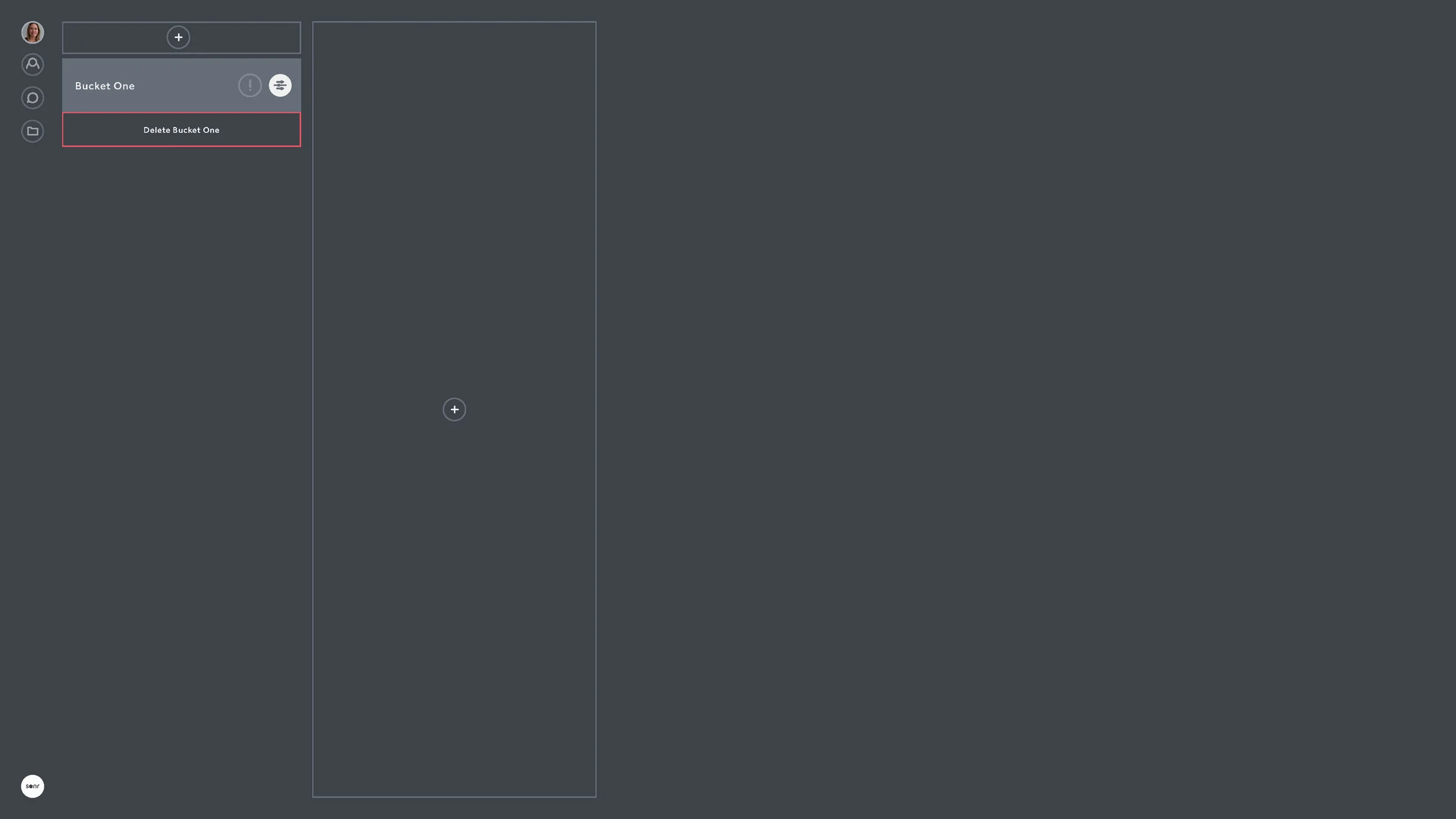


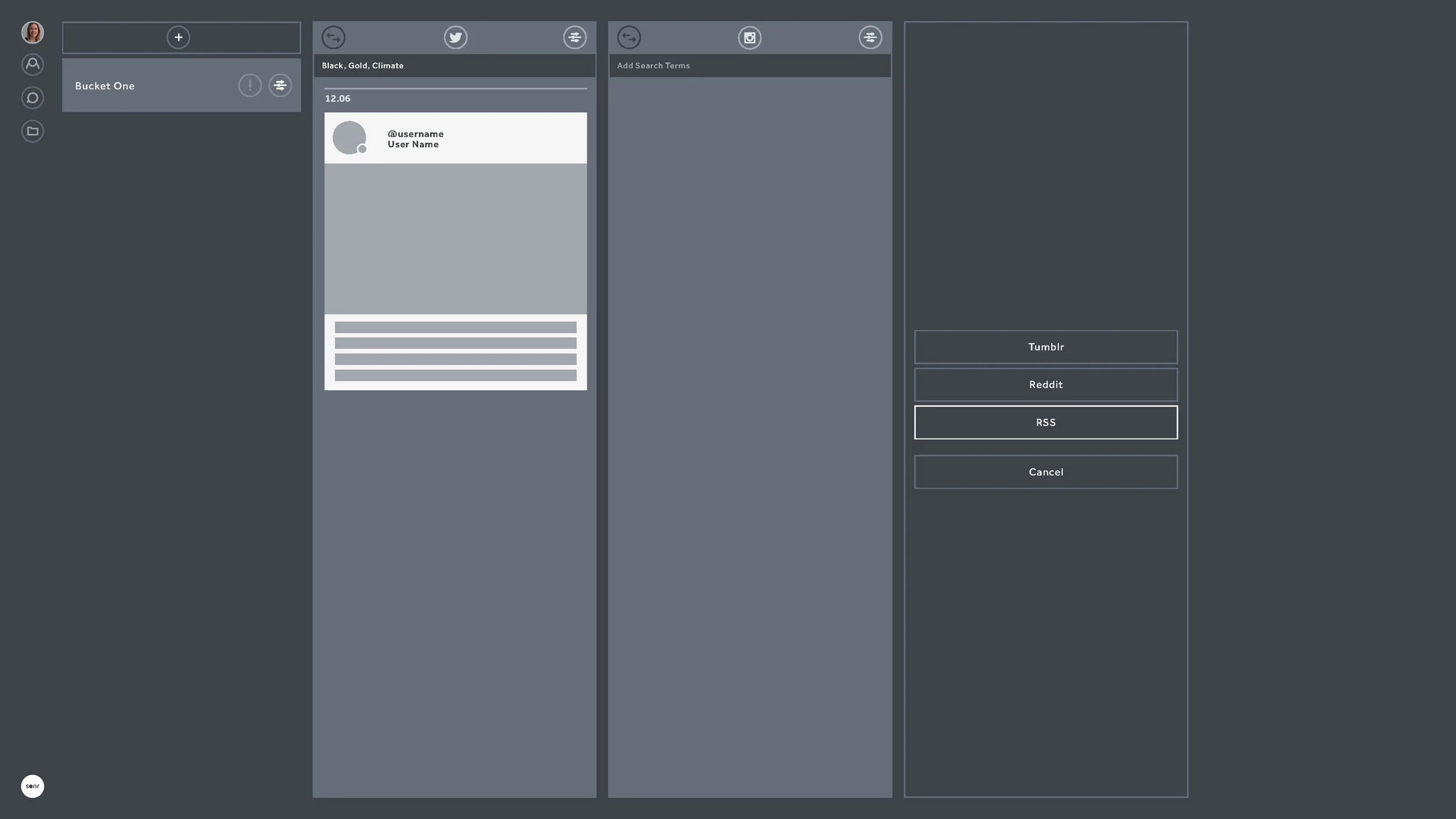


Onboarding became a big focus at this stage. We'd done enough user testing and design reduction to know the sticking points of the product. We were focused on simple, clear and progressive steps to getting the user to make their first actions within seconds of sign-in.


Focusing on making the APIs individual not only meant we didn't have to worry too much about outages, but it also meant we could develop API specific features which could be seen only when that API was being used. This allowed users to search certain networks for people, but for us to allow background actions within certain rate limits. Returning back to the days of us whiteboarding it all in San Francisco - we could allow action and ambient processes. And now the action and ambient processes were decoupled from the various APIs, we could now focus on making them stronger features in their own right.


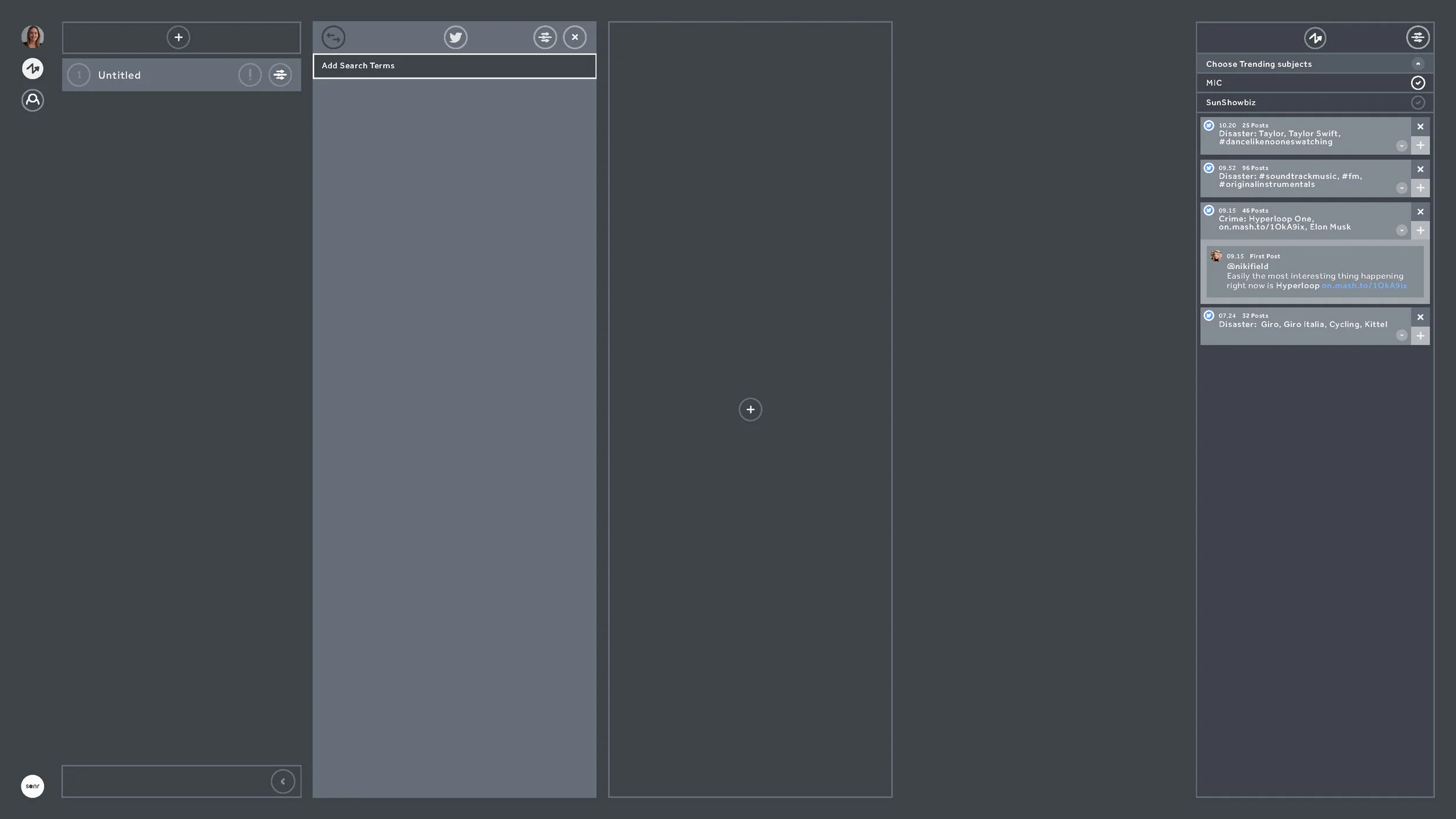

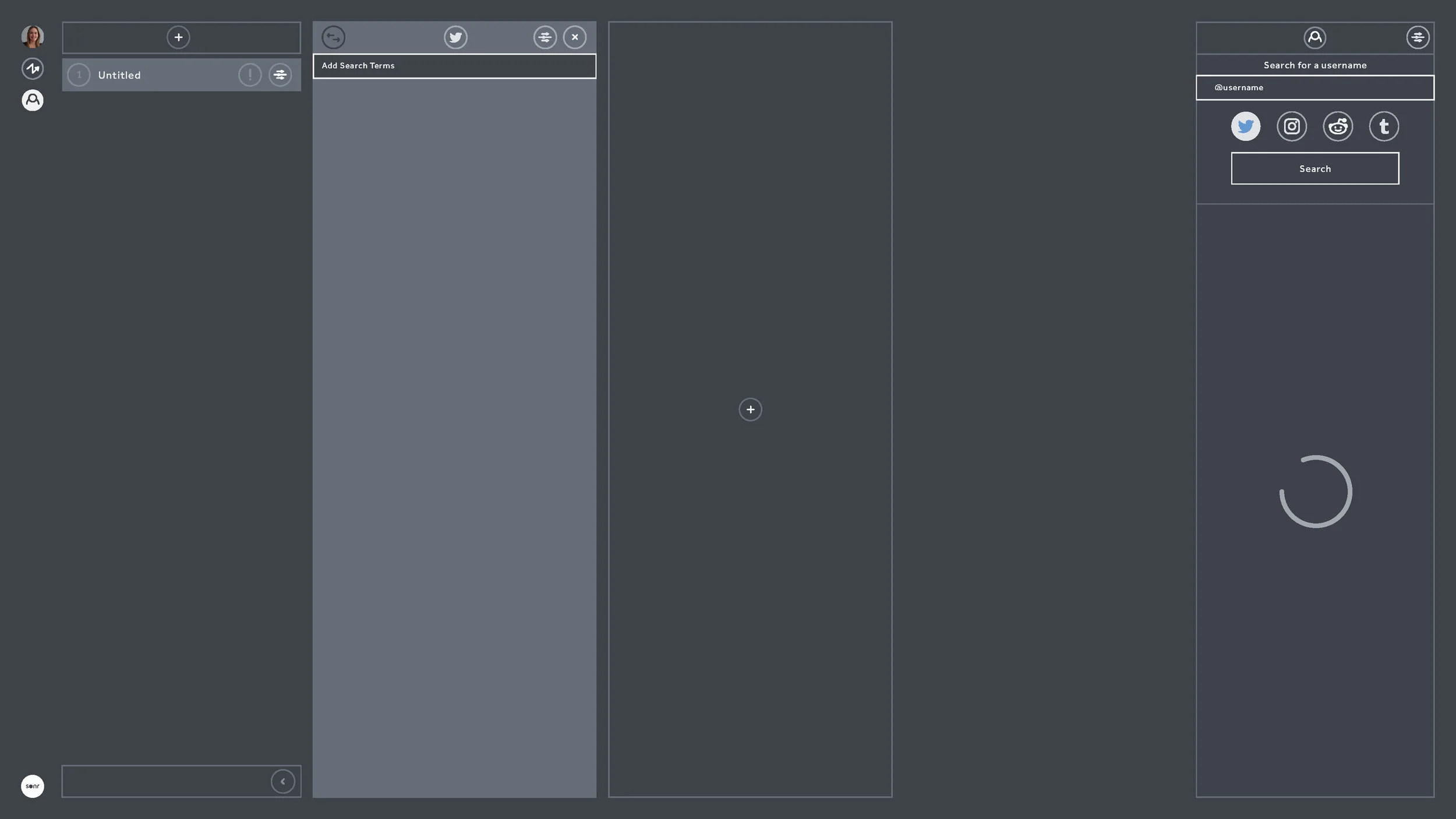


And with that - we shipped to public beta. We began some low level growth marketing around Medium (see here) and after getting some publication acceptance we quite quickly gained a lengthy beta waitlist.

When to Design - and when to *design*

I've been designing Sonr for about 16 months in total. We've built prototypes, raised capital, tested, prototyped, tested - and then began to build out the core product - which is now in private beta. In all this time I never actually designed any icons. I used UI Kit for iOS. I used a variety of resources like Noun Project and Iconmonster. I originally used whatever came with Bootstrap. It's not because these design elements aren't important - they are. But they are not important until the workflow, framework and UX is designed and tested. When we initially moved past whiteboards and paper at the beginning of the Sonr project and we need to build a solid prototype, I sat in a room in Potrero Hill 8 weeks before the first investment round presentation and delivered a paper prototype with boxes and attributed actions. I didn't care so much what it looked like, but I did care about what it did. We chose a low latency framework - Bootstrap - and using it's modules and components which looked like ***generic website template no.4*** began to flesh out the boxes and actions. This was a time to design rather than design.

Bootstrap-alicious
That was enough to do a few things - it allowed us to raise capital, test back-end architectures - and allowed us to realise quite a few things we got wrong with the product. Much is talked about technical debt - but design debt is also a silent killer in new products. Building a fully fledged front end too early inevitably means having to squeeze in features and newly validated workflows into an increasingly creaking - and expensive - architecture. Bootstrap got us around that. Much as it hurts to admit as a designer - no one cares about your icon set. Or your colour selection. Or your font. None of that is even noticeable if your product is weak or badly considered.

Colours finally making it into react.js
Spin forward 16 months and 50k airmiles later - and I've designed a v1.0 icon set (see above).
I have a hard coded set of colours. I have a GUI font in testing. Bootstrap has been replaced with a more scaleable and enterprise framework in react.js.
The icon set is a little complex as we run it as a font, allowing multi-state rollover / fill options to reside with the development team. This was a conscious decision as it prevents design slowing down product design and development. Design can be easily changed on the fly and through pair coding - not constant revisits to Sketch or Photoshop. Breakpoints can now influence icon behaviour. The downside is that we can't make cool interactive SVGs and GIF icons - but for a product in beta...it's just too much design for what users need right now. I mean I'd love to make 'em, but I know deep down it would be a waste of time.
In truth, the design in the product has moved on with the implementation of react.js - we now have flexible components, but these components have been simply assigned colour HEX and behaviours - they haven't been designed. This is sometimes a tough thing to communicate to stakeholders. Yes it looks sexy, but it's effectively still a lightweight wireframe - a really really nice one obviously - but it's still the product at its most basic. The design priority right now is load times, rendering issues, improving UX and architecture, testing, bug tracking, iterating quickly...not adding more design layers and slowing things down on the development side of things.

Now in react - with plenty of design, but not much design
When we set out on the road of designing a complex SaaS product, we wanted the design to scale with the engineering. I didn't necessarily want to design a flat UI. I didn't adopt an existing design framework. We just ended up here through research, iteration and product / engineering requirements. It will of course be designed one day in the near future, once the beta stage is cleared and the feedback compiled. The design layer is of course required. But when that will happen I'm not so sure - it's probably going to be up to the user.

Building a product for Creatives who don't really know what they want
In most of the interviews I've had for roles (and interviewing people for UX focused roles is tough, I sympathise), there are always two questions - or variants of two questions - that consistently crop up: 'Which product do you wish you'd designed?' and 'Which has been the best product you've worked on?'.
The answer to the first, if you must know, is Slack. Why? Because it solves a very complicated problem, and it does it in the difficult B2B space. It's elegant. It feels good. Yes - that's right - it has feels. Which is gold dust. It's a remarkable mix of bread and butter UX and magic. And the magic stuff - which is sometimes really simple interactions, manipulations or renders (like the way it parses HEX codes into the IM thread with colour swatches) is jealousy making. I love that product. It completely knows what it is. I'm jealous of a product that is so...product aware.
Ok, so Slack is awesome. But the answer to the second question changed for me about two years ago when I got to work on a wonderful - if intimidating - project, which I still think brought out some of the best critical thinking I've ever done. Not because the final 'product' was amazing and shiny. We didn't make Slack - we had 3 months - but we made a process which was validated, tested and used to impressive results. But answering that second question is hard in an interview, because we didn't produce a 'product'. It could easily be a product, but we didn't make it into one. Which means that if you ask me that question and want a response I'm probably going to need half an hour and a whiteboard - and maybe some playing cards. Because the best product I've designed was meant to be a 'product' - we actually did set out to make one - but we ended up designing a card game instead. And it was awesome. Like, Slack awesome.
Through random circumstance and Twitter I was introduced to Matt Locke. Matt is an interesting character, and it's evident the moment you meet him. Total energy, focus and hyper intelligent. Matt was Senior in BBC R&D before leaving to head up Channel 4's digital OnDemand offerings. Now he runs an agency called Storythings (among other things like The Story conference). And the team he had amassed was rather intimidating. Project Producer was Kim Plowright - an Emmy award-winning talent from the BBC and Dan Catt - original lead front-end technologist from Flickr. Unlimited Theatre - one of the first theatre companies to combine technology with experiential theatre - were there to lead user research. There was a lot of work completed on this project, and I'd hate to speak for anyone else about their processes, so with that in mind I'm going to talk through my perception of the project, and not really go into what others were working on in tandem. It's not really fair to do that.
Investigating the product
The product we were investigating building was based around the concept of aiding writers with writers block - or more broadly - aiding writers to develop concepts and narrative arcs quicker, easier and through collaboration. This is - as you may be able to guess - a pretty complex problem. It involves ego, creative fragility, personality, voice, networks and...so much more. A day into whiteboarding and card sorting and we were somewhat closer to identifying a focus and a hypothesis. The hypothesis itself here was important as we had a client - namely a BAFTA award winning client in the form of writer Graham Linehan and his production company Delightful.
Client focused product is different to internal stakeholder product in many ways - the client is paying and there is usually a time box as time is money. Clients usually have a varied interpretation of the 'definition of done' and the 'definition of success' that needs to be navigated. This isn't a bad thing at all - in fact it's one of the reasons agencies can produce such incredible work - but it's a different approach to an internal stakeholder scenario where these definitions are core to the company ethos - or at least they are in product focused companies.
Delightful is easily one of the most interesting clients I've ever worked with. Graham himself is incredibly clued up on product development. Oblique Strategies? Done it. IDEO Cards? Yep. Agile? Tried it. Kanban? Sure. *Name book about creativity, UX, design or creative management*? Read it. He owns a copy of Gamestorming. All of this was something of a first for me. We researched his tools, interviewed him about his work processes and had hours of notes and audio files. Then we prepared a workshop.
Workshopping the product
I've prepared and managed many workshops, but in this instance we were going to collaborate with an experiential theatre company. This was also a first for me. We had a theatre space, and we used all of it. Every wall, table and box was eventually covered in cards, notes and whiteboard sheets.

The experience was very interesting. Having a theatre company craft an experience around the workshop added a very unusual - even uncomfortable - sense of personal distance that is very difficult to explain, but seemed to really focus the process. It's something I'd certainly like to try again on other projects and products. It allowed the participants to fully investigate the user journeys they were trying to explain or imagine - the process of theatre seemed to provide an empathic element I've never experienced in a product workshop. The idea of applying a narrative (even music) to the investigation of a proposed narrative sounds overly-complex and bizarre - but it isn't - and it works. It forces the workshop group to forgo their rational defaults and the professional roles and look deeper into why things are important in a possible product rather than what is important in a possible product.
The research we gained was invaluable, and in particular for me the narrative tools that can be used in crafting stories - specifically the processes of Kafka and Neil Gaiman, plot processes and character arcs, mcguffins, and hide/reveal - all added to my toolset . I've used these since in other projects, but it was a rare chance to learn these things directly first hand from people who have mastered their craft.
From the research we began the sort process - breaking down the ideas into stories we could build, and from there we built out the tasks within the stories. The workflow was also starting to form from these processes. We'd identified the user flow but not the technology stack, however we knew that the product felt 'bot' like, so we created a temporary element in the workflow to mimic the stack - and we called it DelightfulBot. We also began some external user research, asking writers from a variety of backgrounds and disciplines how they write and how they collaborate.
Research

Copyright - Storythings 2015
It's worth pointing out now that I'm not going to delve into the stack. I'm only going to talk about the UX and design elements in the build - mainly as the stack is not of my making, is under IP and...I'd do a bad job of explaining it.
Identifying the need for a bot meant working out the interaction design around it. Specifically the bots tone and reach. We focused research on the the emotive interactions the bot would be required to interact with, along with the level of interaction it would be required to maintain. Around the time we were building this, there was little research being performed into AI and generic bot interactions - what would be annoying, what would build trust and what would form a preferable bot personality.
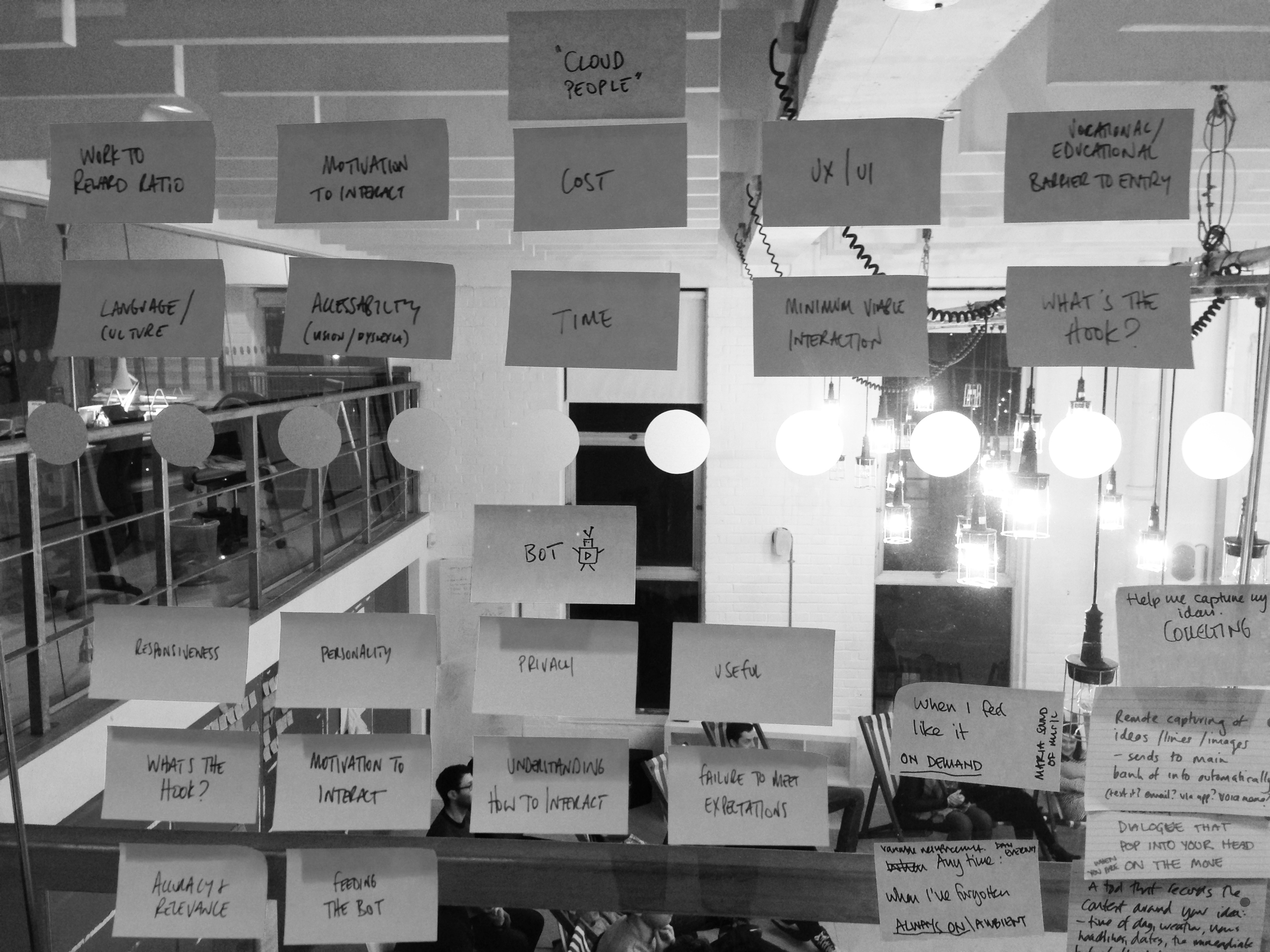
The result of this research was to create a set of principles for the bot, and to do this using the same structure we would use for a user story. So instead of "The user is..." we worked with the structure of "The bot is...". This allowed us to match up user stories with bot stories and allow a cross-pollination of interactions. So with this in mind, "The bot is..."
'Polite and clear. Not too cutesy. Says please and thank you. Is just intermediary - it goes and asks other people. It doesn't do things magically or automate creative processes.'
It has the following attributes:
Approachable
Helpful
Likeable
Responsive
Alert
With the following tone of voice:
Excited
Loveable
Friendly
Honest
The bot also needed to have a definition of reach. How intrusive would it be? What environments would it find itself in? From this we could begin to create a playbook for how the bot would begin to react in certain environments and situations (and designed a small bot mascot to begin humanising the playbook with users).

Copyright - Storythings 2015
With this we'd created a framework for both the bot and the user, and from here we could begin sketching product solutions to both factors. We also began to look at adding game elements into the product to increase user interaction with the product, and focused initially on habit forming processes which required the user to add 5 writing ideas per day (which was based on feedback we'd received around procrastination in some users). This would address the issue of re-engaging users in the bot network, and also hopefully aid writers in their ideation processes. The bot at this stage became a true go-between in the forming product. A user would add ideas, and the bot would deliver them more based on the ideas they generated - but the bot wouldn't be an NLP powered AI, rather an anonymous mechanical turk - as more ideas were added, so the bot distributed more ideas the human layer, and by proxy the human trust in the product would remain intact.
Realising the frameworks
From this I began to build wireframes to flesh out the user frameworks. I based my default interaction style on Twitter Bootstrap to aid modular building and known icon sets - this had the benefit of not slowing down product development prior to MVP with design related bottlenecks, which are so often icon or CSS related and have little impact in user testing. These were wires to flesh out the user interactions and workflows - nothing more. We also started to look at easier ways of ingesting the users ideas into the product, and began to sketch and test early prototypes of a capture app allowing words, images, audio, video and geo elements to be uploaded and categorised.

Copyright - Storythings 2015

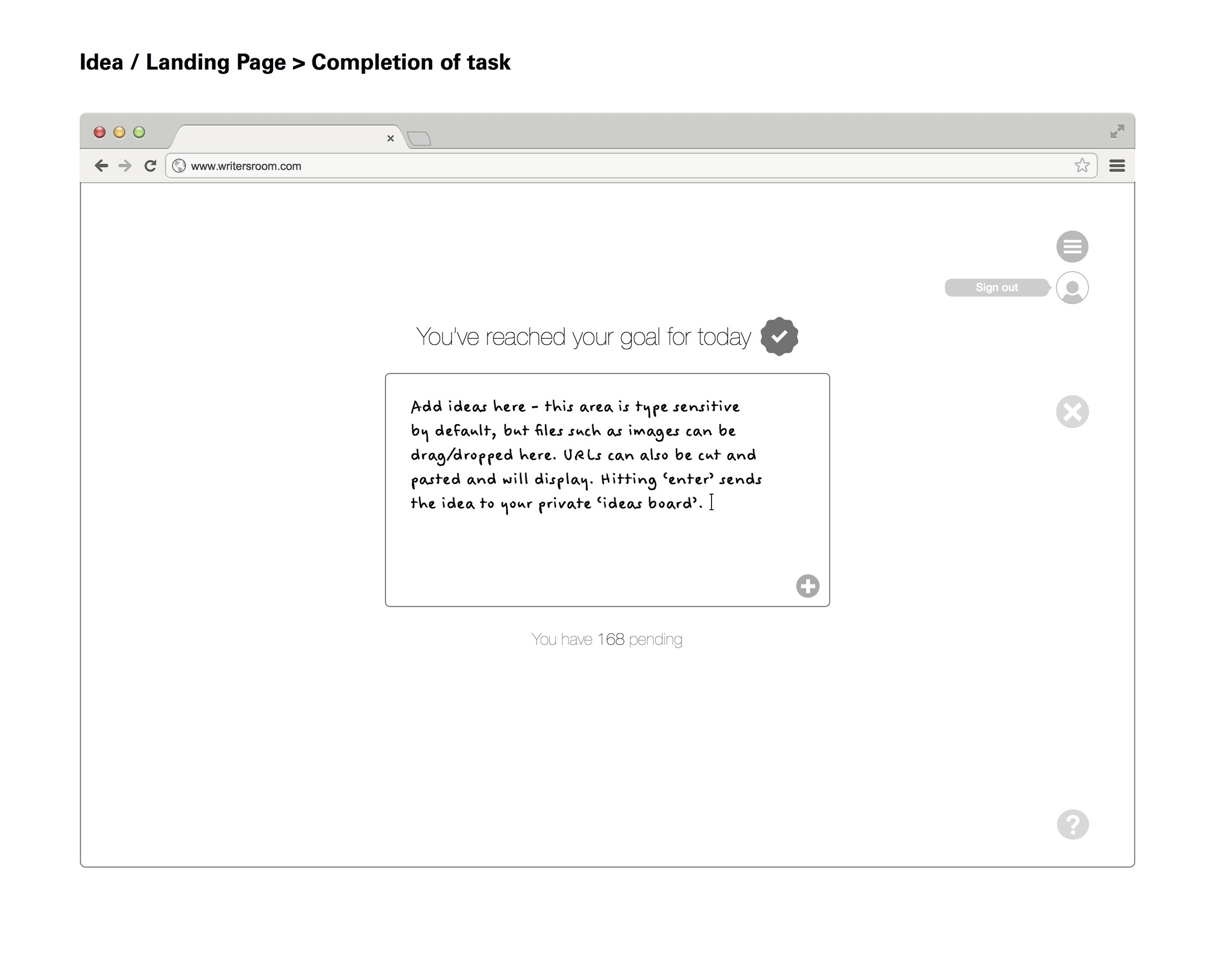
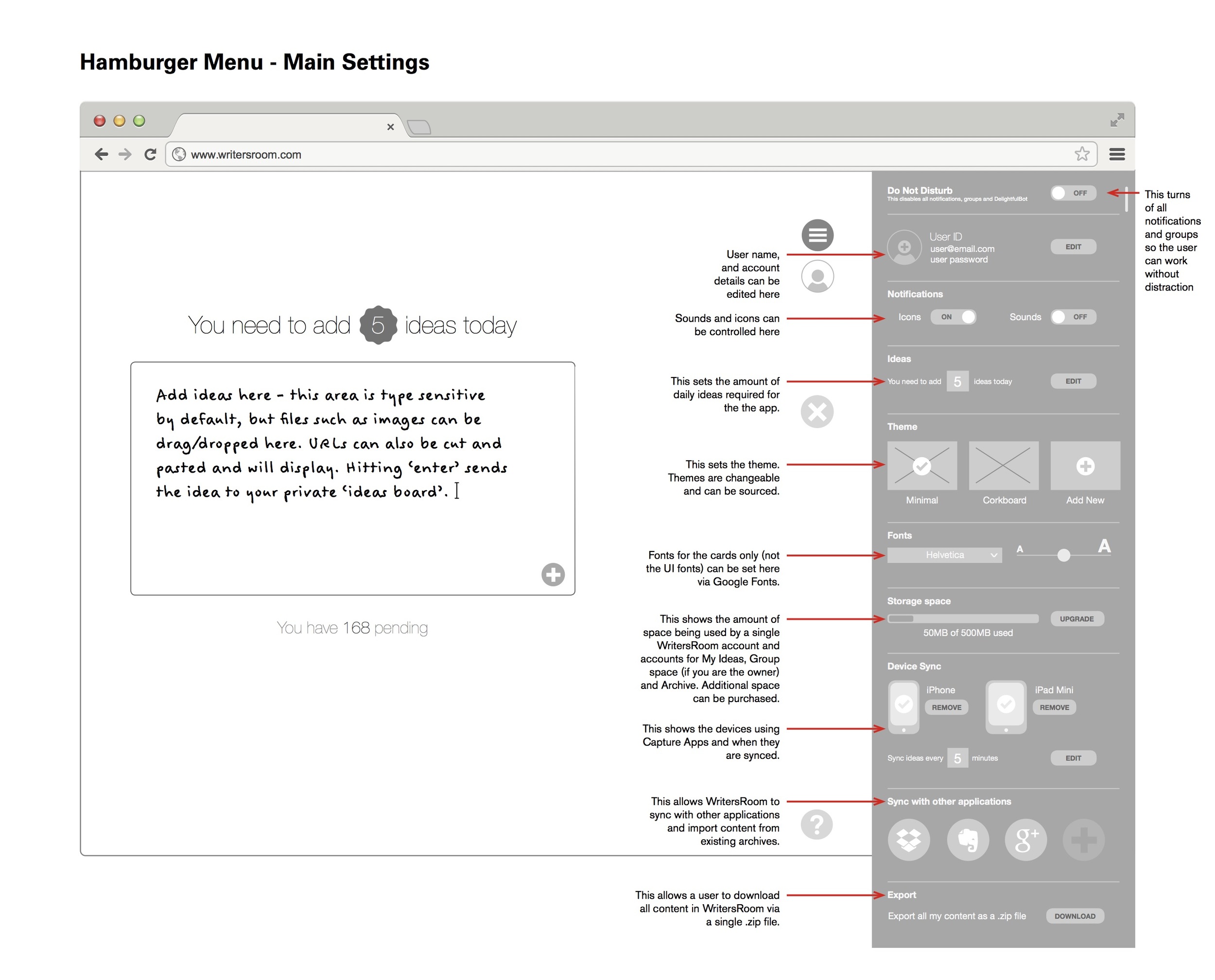


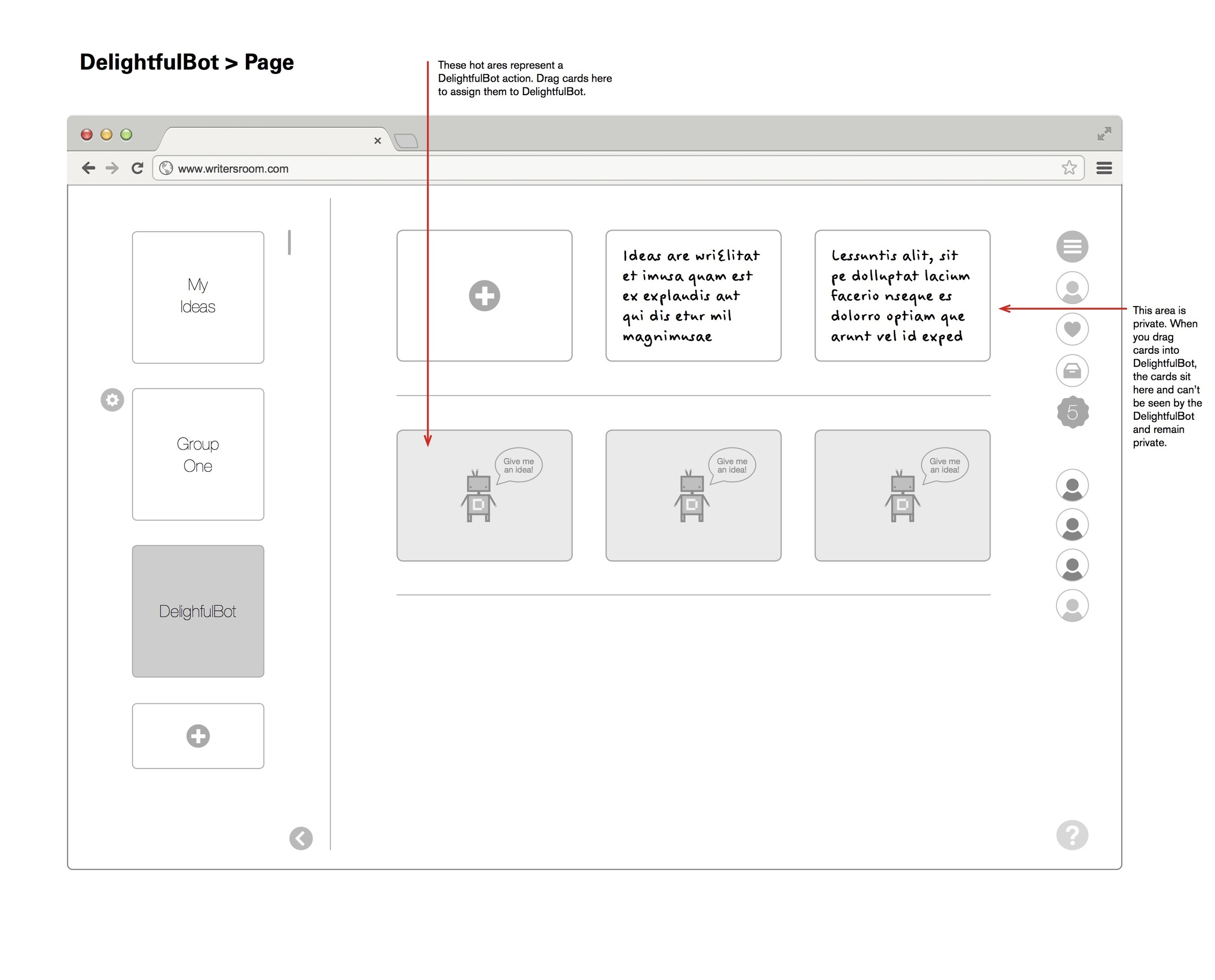
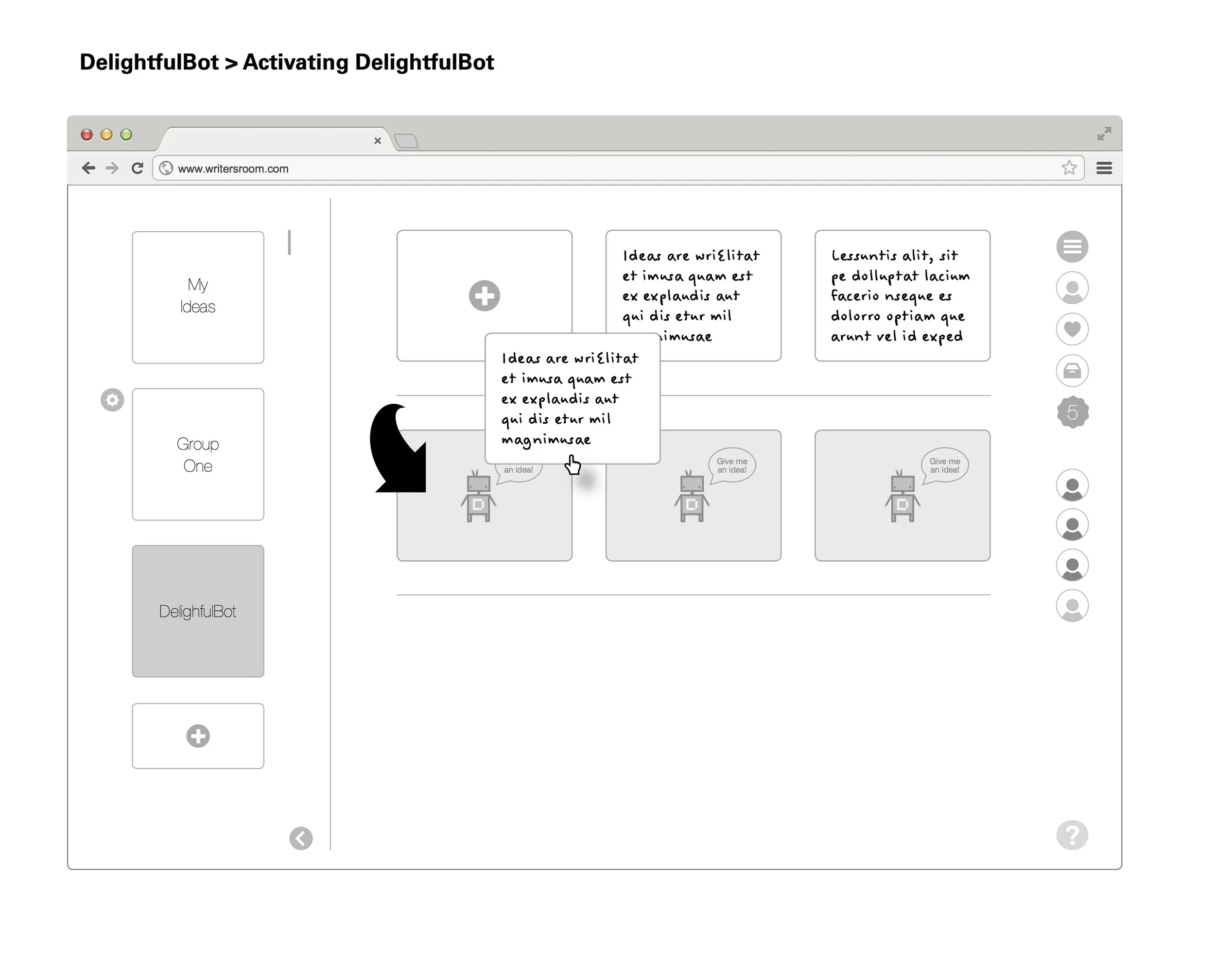


With the user framework realised, I now began to look again at the bot framework. The more we looked at the bot, the more we began to think that it could form the core element of a bigger game dynamic. The wireframes are just that - framing of interactions - but the bot could move more freely in this product. Yes it was a tool to allow anonymous sharing of ideas - and in effect it was a CDN in it's own right - but it was at the core of what the product was. We were looking at ways of testing the bot framework, and validating the wireframes prior to further development - we were also looking to expand the game element of the bot. With all this in mind, and user testing deadlines approaching it seemed a good time to remove the wireframes from the testing schedule and go back to focusing on the user workflow framework and the bot framework, and to increase the testing parameters, apply a game framework to it which would compliment the workflow.
So we made a card game. Here is the original game framework we developed. It's overly complex, but at the time we were effectively testing three games in one session.
The game
Game Setup:
Coloured cards - one colour for each player. (Or white cards with coloured stickers).
Cards have double sided writing ability.
A selection of cards with Stars on them to indicate a reward.
One archive box with a slit cut into it.
One external person is the Bot.
Writers sit on chairs facing away from each other. Each has some wall space to stick up ideas. Players do not talk to each other. There should be some indication that players are in a game environment of silence so they can exit it to talk. I’m suggesting a bell or similar - maybe a line drawn on the floor. Players must feel they transition from individuals to the workshop group at certain points - we will required them to imagine themselves writing alone. But then transition to talking in a group about the process of the game. It could be two area with different lighting or two rooms.
Game Dynamic:
The basic DelightfulBot concept is described. Introduction to the game environment and the rules required.
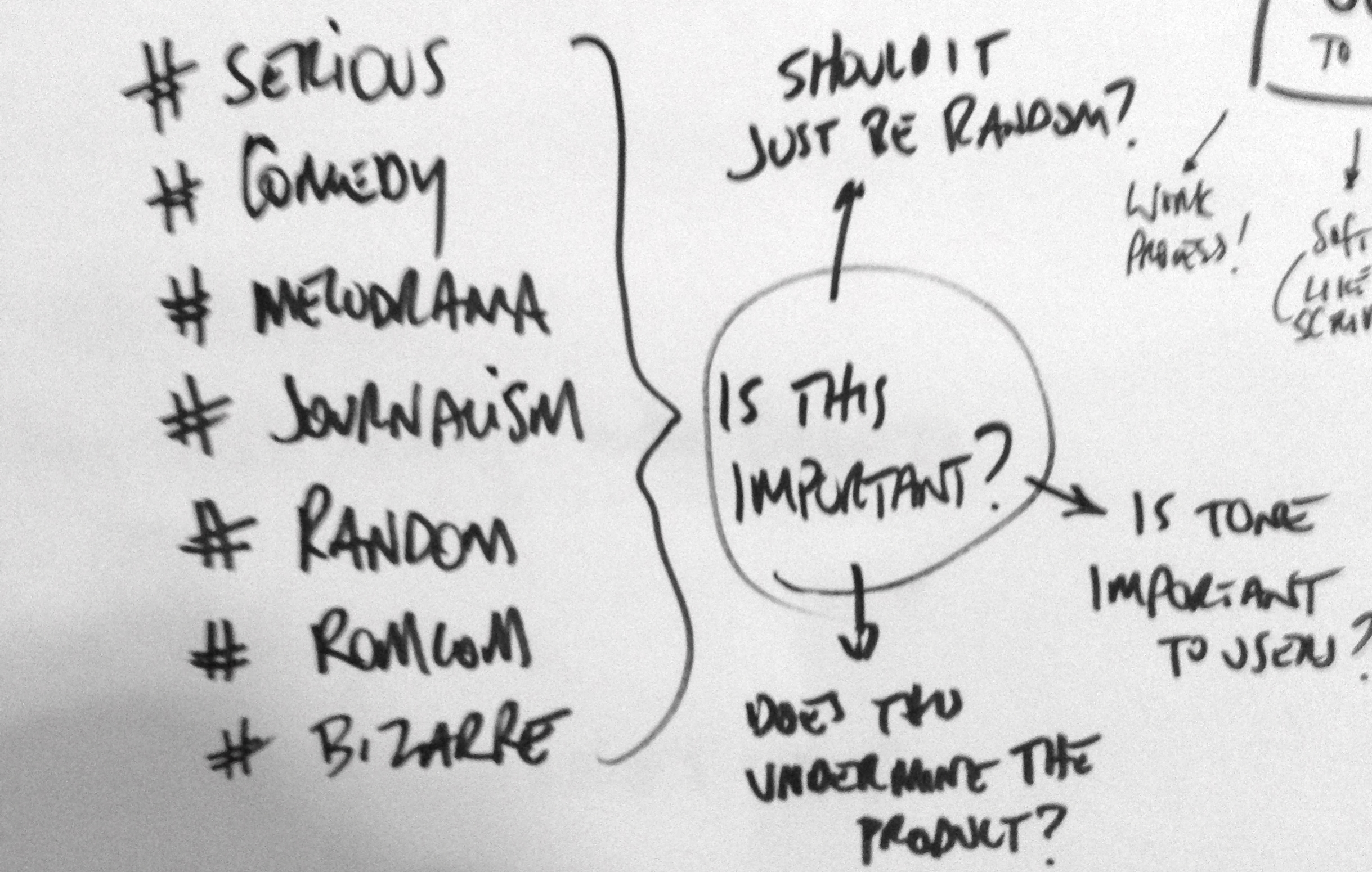
The players decide through group discussion on hashtag descriptors for the tonality of their writing. This is a group process. These hashtags are pinned up so they can be chosen and discussed. They maybe:
#serious
#family
#adultcomedy
#teencomedy
#melodrama
#romcom
#documentary
Ideally these would be debated from a larger list then broken down to 5-8 descriptors. Once these are agreed the players can be briefed on game dynamics. Players can use the hashtags.
Game 1: Individual Writer
Players are grouped into 3/4. Each group has a Bot who is a facilitator. One player is randomly designated as the Player by Bot. The others are designated as the Writers. The writers must not talk to each other or acknowledge the Player.
The Player is kept separate. The player produces 3 ideas or problems on cards. These ideas are numbered then pinned up by the Bot for the Writers to see. Each Writer must create an idea or solve a problem for each of the cards pinned up by Bot - and do so on a card numbered after the problem. The Bot then takes these back to the writer. The writer chooses the ideas they like and favourites them by starring the card. The other ideas are archived. A writer whose idea has been favourited receives a ‘starred card’ in return by Bot.
This process is repeated 2 more times. The Bot then takes the cards that are favourited and pins them up. The group then come together and discuss the process and the results. Focus on if the process of idea generation was fun, how people felt about writing ideas for others. Also to discuss the ‘hook’ or game dynamic - do they want to play it? Did they need to feel their ideas were well received?
Game 2: Write the Story (closed group dynamics)
Each player is to write a short 50 word story from scratch. They will use the group to do this. The story structure will be:
Beginning > Middle > End
Each transition between these structural elements will be group sourced for narrative ideas.
A player can- at anytime - ask Bot a question on a card. Bot will respond with a stock set of answers derived at random but this is very much like the Brian Eno card process - Bot will ask questions mainly such as “Where is this character going?” or “Where would the character go if they became lost?” etc. Bot to write these on the fly. They are handed back to the player in question.
Beginning (single player creates their own initial set up)
The player then hands this to the group by placing it in the box provided.
(The Bot then duplicates this idea 3 times. The three ideas are then randomly circulated to there players who write their development or idea on the back of the card). The players then deposit these cards back into the Bot Box and they are redistributed back to the original players. (NO PLAYER MUST RECEIVE THEIR OWN)
Middle (the single player takes their 3 group sourced ideas, chooses one and develops their story further until they need to develop an end to the story).
The player then hands this to the group by placing it in the box provided.
(The ‘Bot’ then duplicates this idea 3 times. The three ideas are then randomly circulated to their players who write their development or idea on the back of the card). The players then deposit these cards back into the Bot Box and they are redistributed back to the original players.
End (the player then concludes the story)
Each story is then presented by the player telling the story and pinning up the group sourced idea as they used it. They also pin up any Bot answers they requested.
Each player then explains the process of them writing the story and how they felt the idea helped them or hindered them.
The conclusion
The game was successful in testing all the hypothesis we had related to the user workflow, bot frameworks. The game dynamics needed simplifying certainly, but it was very successful. At this point however there is a need to 'define' success in this type of user testing - and the first stage definition of success we chose was 'does it help the writer solve a problem'. And it did. I can't tell you what that success looked like for various reasons, but I can tell you I watched a writer solve a problem in real time, trust the Bot, revel in the game dynamic, and receive a visible spark of inspiration - one that made their final draft some months later.
The question now is - is this the product? Is the user and bot framework wrapped in a game framework - now the conclusion? Does it need a technical solution? We'd certainly concluded the project as a whole - we had tested and validated frameworks and a solid game dynamic with the research to back it all up. Did we now need to build something more? Was what we had an MVP?
I think so.

How to make video user experience not suck

I've spend much of my career making products that publish content or try to solve problems relating to publishing content. I was preparing a new talk for a UX Conference, and as is normal for me this involved standing, staring into mid-distance, wondering what I was going to talk about. I wanted to identify a problem and discuss a solution. Three or four drafts in - and a week later - I had a talk completed. As it turned out, I really wanted to discuss one issue that I felt had never been properly solved - editorialising video and by association consuming editorial video. As part of the talk, I'd mocked up a really basic slide to explain the problem and what a solution might be. The problem it turned out was pretty simple: videos are too long and have no context - if you want to show me a clip of a single joke in a comedy show, you'll probably link to the entire comedy show via YouTube (unless someone has edited it for you) and tell me to 'check out the funny bit at 2.33'. So to boil that down to a user story: 'The user should be able to see a section of a video in an embed, understand it's context, and before watching it, decide if they want to actually watch it.' Here's that (really basic) slide:
That really basic slide
So for some context here; what I've mocked up is (from the top down) a HTML video component, underneath that - instead of a scrub bar - I've placed a SoundCloud music player with user comments, then below that - GIF modules from Buzzfeed which play scenes of the video, which in turn underneath them have editorial space, comments and share options in the style of Facebook. So the demo ran a bit like this - watch a GIF of a scene from the video which has some copy around it telling you what the context is, then if you tap it that scene of the video loads in the main HTML video module. It's a quick and dirty solution to a problem, but it was designed to show how problems can be solved with existing ideas and technology - that taking an element which SoundCloud uses for content navigation, out of context and repurposed - can be used differently while still keeping the elements core UX or USP intact. The feedback I got was surprising (considering how basic the slide was) - people loved this idea and many had opinions on how it could be implemented and other user problems it could solve. A successful talk.
The thing is - this idea didn't go away after the talk. I became slightly obsessed by it. The idea was kind-of solving the problem, but wasn't solving it in an elegant way, and this was itching something in me. It was too clunky. To busy. It was, in too many ways, pulling focus away from the content I was originally trying to uncover - so while it solved some problems, it actually generated more problems. I ended up working on it for a month around other work. I'd walk away and then come back to it. I'd apply knowledge I'd picked up on other products I'd worked on to it. I'd refactor the whole thing only to start again. I used Design Sprints to try and break out alternatives. I Gamestormed it from concept to business to find other perspectives. I made people who didn't care about my random obsession give feedback (and I bought a lot of people drinks until they did care). I was using guerrilla UX tactics to prototype and iterate - asking people their thoughts and almost pitching them it as if they were going to invest.
At the end of the month I felt I had something. Well - I'd found a solution anyway. Maybe not a final draft. Maybe not an MVP. But a solution. It desperately needed engineering minds to collaborate on it to move it forward, but with that cost insurmountable at the time, work pilling up on my desk and the itch scratched...it stalled. It became clear this was a product with more complexity that the engineers I knew could budget for. As an element of closure, I called it RPPLE - named after the process of 'ripple editing' I used to use when I edited video and After Effects promos. Also it felt nice to have an old Final Cut Pro reference in there somewhere. It was branded and sadly abandoned. But the learning, research and discipline I got from the whole process - I still use that constantly. Anyway, here is that solution.
The RPPLE concept
To solve the user story 'The user should be able to see a section of a video in an embed, understand it's context, and before watching it, decide if they want to actually watch it.' I had to look at the point of embed first. This player would need to be part of a distributed media strategy, so it would need to work within a Tumblr post and the Tumblr video embed, but also link back to a main core player experience. In the same way, that main player would have to export elements of itself into embeds with a distributed media strategy, and at the same time allow for revenue generation through standard metric driven advertising formats such as pre-roll and post-roll. The embed is a single scene that has been shared, except rather than it be a full video without context (or a full video with a defined start point in the timecode) it would be context driven: a headline and sell summarising why the video scene should be viewed, with a looped GIF of the scene being played - much like a GIPHY preview. This would then be used to draw the user into experiencing the main player and full video. The key to the embed however was not to generate a defined 'media card' style initially (which would involve a lot of support) but rather it would 'cuckoo' itself - adopting the style of whatever network default it found itself in. The next stage with embeds would be to define a more refined card style once user testing across multiple networks had been completed and evaluated.
The RPPLE player
The 1280 x 720 breakpoint for the main RPPLE embed player
So this is the basic solution at a 1280px breakpoint. The player is completely responsive, but I'm talking about breakpoints for ease of presentation (I find wireframing initial RWD solutions easier to plan and communicate using 4-5 breakpoints) . The RPPLE player is made up of some consistent elements, regardless of it's position or size. In hierarchical order these are:
A user avatar and <h1> global title
The main HTML5 media player component
A scene based navigation, displaying edits and basic heat mapping
An editorial 'carousel' that editorialises the scene selected with <h2> and <p> tags
A share button that exports the scene as a GIF for distributed media embedding
The user avatar displays the user who generated the video (more on that in a moment), and the title and media player component are self explanatory. There are two elements here however which require some clarification.

The scene selector - a new way to navigate video
The 'scrub bar' has been replaced with a selection of scenes shown in a ripple effect. Each scene shows it's length in time relevant to it's width in size. The wider the scene, the longer it is. These scenes are made of metric subdivisions of the total length of the video: 30 seconds, 20 seconds, 10 seconds, 5 seconds and 3 seconds. These metric subdivisions are there for a reason - 30 seconds is the maximum length of an Instagram video. 5 seconds under the length of a Vine (6 seconds) but with space for an end frame (if required for advertisers). 3 seconds is the minimum for Instagram. Additional to the width there is colour. The colours range from green to yellow to orange to red with green being the scene with the lowest metric of engagement and red the scene with the highest. This performs a few actions - the user can immediately see in a video which element of it everyone is talking about and sharing - it becomes a heat map of engagement. The producer of the video can see a breakdown of their edit and which part of the narrative gained the most engagement (almost as a direct feedback tool) to aid them in making better edits in the future. It also however shows the narrative of the video in a bare, visible metric. If this was a video of the new Star Wars trailer, the red section is going to be the really cool bit - the bit everyone is watching - but the orange bit beyond it is also gaining traction. This means that the user is more likely to browse through the video rather than just watch the 'bit everyone is talking about'. So it aids discovery through colour, it aids discovery as the video is broken down into scenes which are easily digestible. But it also aids navigation - scrub bars are notoriously fiddly on mobile, and these 'scenes' allow the user to simply tap on them to view them, knowing approximately what the engagement is on the scene - but also it's approximate length. It's hiding nothing from the user - it's transparent. Well - transparent except for context.

The carousel - adding context to the scene selector
The carousel provides this context. As the user plays the video through, or jumps to a specific scene, so to does the carousel below it. The carousel contains an <h2> headline and a
<p> body copy option which are completed by the video editor. The <h2> and <p> have - as shown here - character maximums. These are to allow the scene descriptions to accompany the video scene onto any social network regardless of minimums. 200 characters? This is a good amount to boil down what the scene is. 70 characters? The perfect length to form the basis of a tweet or Reddit post - and still give the user room to add some emojis. The carousel is also a navigation however - a user can scroll through the carousel looking for content in the same way they can use the scene selector, and they both move in sync through a simple flowing animation process. Hitting share in the carousel opens up modal dialogues for a variety of video enabled network APIs, and the resulting export is a GIF of the scene with the appropriate context copy depending on the character limits enforced by the API.
Editing a RPPLE
So they're easy to navigate and to share...but obviously they have to be created in the first place. For the end user, the experience is great - 30, 10 seconds chunks of content, easy to view and share. But what about the user trying to create these 30, 10 second chunks of content? And what if they have a two minute video? How do they consistently edit and cut varied chunks of content into a rippled edit? It's a tough ask. So I had to build an editor.
The trouble with online editors are they're a bit 'meh'. They give you too many or not enough options. And they're really expensive to run too - hosting video, streaming it to an editing portal and rendering the result. So what if you can do the upload somewhere else? What if you have video elsewhere already being hosted?
The RPPLE uploader
The uploader allows you to upload video - of course - but also pull it from somewhere else. Youtube, Vimeo - even Dropbox. All you need is a URL (and the copyright to do so of course). This allows a user to remix existing videos and distribute them in a different way. Once uploaded or linked, the user can then edit them.
The RPPLE editor
The editor is pretty slick. At the top you add your title and set your video to public or private - and we assign you a URL. Assigning the URL at this point is useful - it shows the video is uploaded (not in some partial storage or cache) and allows you to return to this page if you need to (say your browser crashed). The URL follows the video through the edit process through to completion.
The user can edit the video by clicking on the scene selector, which is all green and single width. By clicking they immediately create an edit with the option to choose the duration. A duration is chosen (in this instance it looks like 30 seconds is the right one) and the user fills in the header <h2> and body <p> copy. Then, going down the hierarchy the user can add comments, voting elements and metrics. Then they can choose an optional end board - for non-looped video this will be the bit that is freeze-framed at the end of the clip. For looped video this will be the pause before it restarts. This would allow you to add a note, small advert, or credit to the video.
The user can go back and change edits by clicking on the scene and changing the length, editorial copy, settings or end board, with the carousel below the scene selector scrolling to interact with the user interaction above. It replicates the process of watching the video - the two processes are purposefully similar. Editing the video should be as easy as watching the video which should be as easy as sharing the video.
In Summary
The player has many variants - voting modules, nested comment styles, proposed media cards, audio options...but these are all subject to any user testing. There are mobile wireframes. Flinto prototypes. But these are all 'nice to have' additions to this core player - in that the core player solves a problem. Hopefully one day I'll be able to return to it and make it better, refactor it again - and maybe finally release a working version of it.

Yes, hi-def prototyping is still important

I spent some time this year looking at framer.js and working out how it would fit into my workflows. Sadly it doesn't. Well, not currently. It doesn't currently because I'm quicker with other tools, and I'm a big believer in speed of execution - whatever it takes to 'show the thing' for initial feedback is the right tool to use. I use a lot of paper prototypes, but my normal workflow is:
Paper sketch > Paper prototype > InDesign wireframes (basic) > Feedback > InDesign wireframes (mid-def) > Engineered prototype (pair coded) > User testing
However, I've also started to add some tools to my toolkit for certain scenarios (usually visually lead stakeholders, AdTech people and content publishers). I'm a fan of Flinto for mobile mockups to demo transitions for example. I've used InVision before to mock up basic interactions for pitches and quick user testing (see here). For specific interactions I've even used After Effects - mainly because I'm pretty proficient in it after my time in broadcast design, but also as it sometimes has the nuances of actual interactions. By that I mean Z space, speed and time. The danger of After Effects prototyping is obvious - it takes ages to build and render and it's not 'hands on'. But sometimes it's a great tool to show the scope of interactions and it can be a great tool to bring designs to engineering when pair programming isn't an option (for example in multiple timezones). It's also a good way of breaking down animations and interactions into frame-by-frame elements. To give you an example, below are two videos. One is a high definition finished product I was working on at Dennis Publishing, which has been screen recorded with actual user interactions. Below it is an After Effects render of a mid-def wireframe to show proposed user interactions, prior to it hitting engineering. Sometimes interactions can make flat prototypes - well - make more sense.
Whatever it takes to 'show the thing'.

Hacking Google Venture sprints to expedite design discovery

Before the book was a thing, I did some workshops with Google Ventures - specifically Jake Knapp and Daniel Burka - about their new in-house process Jake had developed at Google called 'Design Sprints'. It was an interesting process being involved in GV Design Sprints, and it made me consider a range of challenges I hadn't really solved in my own workflows - how to involve stakeholders more adeptly, how to encourage teams of designers to move out of safe defaults, how to enable more junior designers to 'own' their concepts and pitch them into groups with conviction - and how to encourage 'mistakes' in the design process. Mistakes are important as they clear the way for stronger ideas, can inspire great ideas, and sometimes can just be great ideas incorrectly defined. Mistakes are the reason I don't use Moleskin notebooks anymore for my note taking; Moleskins make me nervous to sketch in - they force me to sketch in 'high definition'. Effectively they make me afraid of making mistakes, so now I use layout paper and sketch mistakes as part of my process. My desk is awash in pads of layout paper.
Anyway, Sprints are about sketching. And making mistakes. Which is great.
The full GV Design Sprint process boils down an entire product cycle from discovery to concept and test in 5 days. It's simple and effective. It engages stakeholders and the whole business from day one, removes barriers to communication (by getting everyone to draw their ideas and contribute) and forces a fifth day mandate to launch something. I'm not going to go any further into it than that - I'm sure Jake would want you to buy his book instead - rather what I'm going to do is focus on how Sprints can be done (or elements of them) to improve existing design team practises.
One of my favourite processes in Sprints is the use of Crazy 8s - a focus on drawing 8 iterations of something in 8 minutes. Crazy 8s is the 3rd process in the sketching part of the GV Design Sprint, relying on the previous process of generating notes on ideas, then doodling rough solutions. In the existing design structure I had, we already had notes and ideas. The notes were sometimes briefing docs, the doodles often whiteboard ideation sessions. But Crazy 8s was something new. It bridged the gap between the bigger picture looseness of the whiteboard and the more focused higher definition sketches. The problem we also had though was we'd discuss briefing documents in one meeting then maybe whiteboard it a day later. Crazy 8s felt too intense a process to just introduce it at random. It needed to exist within a framework of some kind. This led us to create micro-Sprints.
micro-Sprints
micro-Sprints are just that - smaller and more agile than Sprints. Much like Kanban, micro-Sprints can be called at any time by anyone to solve a problem. We found them useful for designing a new feature or module in an existing product. The team involved in a micro-Sprint should be as diverse as possible - ideally it should involve stakeholders from engineering, design, product and business. Oh, and ideally it should be in a single room with a visible timer. You should time-box the hell outta this.
A typical micro-Sprint involves:
A tl;dr briefing session - this is where the person identifying the problem explains the problem to the group that has assembled. It should be short and to the point. The team should then ask any questions they may have. Imagine it more as a kind of agile standup. (20 mins)
An ideation session - the team then uses a whiteboard to identify the problem and architect some immediate solutions. (20 mins)
Crazy 8s - the team then all take a sheet of large paper, fold it to produce 8 squares, and then iterate their solution 8 times from the previous ideation session. We used Sharpies to draw with - mainly because it helps people who can't draw communicate easily without trying to be neat, and also because you're drawing to communicate, not to win an art prize. (8 mins)
Solution Sketch - the team each take their solutions from the Crazy8s and focus them down to a single large sheet of paper. We used sticky notes to show the refined sketches and the paper to annotate around the sticky notes. (20 mins)
Show & Tell - the team then each individually present their idea, pinning it to the wall or whiteboard, explaining it and - most importantly - fielding questions and comments and then answering them. We found that the questions and comments worked best when they were critical as well as informative. At the end of the presentations we'd use small, brightly coloured circular stickers to vote on the ideas we liked. Each team member gets 10 stickers, and they can vote as many times as they like for whatever idea they like. (20 mins)
At the end of this process you should have a wall of solutions along with a clear heat map of team-led choices as to which is the best solution. And all of this is achieved in under an hour and a half. From here the team can either prototype the solution, or begin higher-def wireframing - depending on the scenario, and the complexity of the solution.
Problem solved.

Creating a simple framework for product design

'You're creating a framework for Product Design? What would that look like? Why would you do that?'
All valid questions. I did make a framework for *basic* product design (lowercase P, lowercase D), and I'll tell you why: product design is usually too complex. Now, before anyone shouts 'but product design IS complex!' - I know how complex it is. But imagine being in a workshop with 10 stakeholders, all with different understandings of what 'product' and 'design' is (as well as numerous variants on what 'stakeholder' means too) and having to stand there as the Creative Lead and explain the complexity of product design and why it's important. Now imagine you're not working at Facebook where everyone is mostly on the same page with the mission ahead, but you're in a room with divergent stakeholders - some of whom may never have met the other stakeholders - may not even understand what that stakeholders department might be or what it does. I've been there and it's sometimes great, and sometimes awful.
Workshops are a great way of quickly identifying the problem either at hand (which the proposed product will solve) or within the team (which is more complex to solve), and over time I've amassed a tool kit to aid communication. IDEO cards are great for discussing different ways of understanding problems, for example. Gamestorming is a great manual to have on hand to facilitate group discussion and break down departmental language barriers. A Business Model Canvas is a great way of seeing the impact of product decisions, and can allow a creative team to see beyond the wireframe or aesthetic into 'how we get paid' territory. I've even built discussions around Oblique Strategies (don't try this mid-workshop in a panic). They're all tools for aiding discussion, and they're all good at aiding discussion. They work. That's why they're popular.
The problem I've found with using these kind of frameworks in Workshops or in teams I've managed is exactly what makes them so strong. They inspire discussion, but they usually deliver less actionable results. The outcome of the discussion can be many ideas, but sometimes the important questions haven't been addressed - like 'what problems does it solve?' or 'can we actually deliver it?'. I love that Gamestorming can deliver moonshots, but when your team are whiteboarding a new product vertical to replace an existing one - the need sometimes for shrewd questioning becomes more important that big sky thoughts.
This framework is broken down into five core elements - five colour coded elements which are pretty straightforward for any existing product team:
Brand
User Experience
Concept
Commercial
Quality Assurance
Each of the core elements is designed to ask a series of 10 awkward questions that you'd expect a really exacting/mean VC to ask in a funding meeting. Yet the framework is asking the questions - not a physical person, so it's harder to get annoyed with the person asking the question and then get resentful or defensive. It's Cards Against Humanity for Product Designers, but YOU personally answer the awkward blanks.
The framework can be used at any time in the product roadmap. The earlier it is used in the product cycle, the answers to the questions generally are less passionate and more vague, yet a designer may become more aware of the commercial strategy. A PM may become more aware of testing complications. The later the framework is used in the product cycle the more hard the questions are to answer in honesty. They're tough. I'll give you an example.

"How will the product be iterated?" is a simple enough question. Yet it's always been one of the more divisive questions in workshops I've been in. Depending on at what stage of product cycle the question is asked in, it can mean any of the following, or cause any of the following to be asked:
"How are we going to support this thing once it launches?"
"Do we have a team big enough to keep this updated on an ongoing basis?"
"Who is going to be in charge of it after the launch?"
"Do we have to hire more people?"
"How are we going to handle legacy tech or product debt?"
"Does the development team feel they know the full requirements of supporting this code base?"
"How do we fit this product into an ongoing test schedule?"
"What is this products expected lifespan?"
Answering those questions in a group can cause conflicting answers, and sometimes can draw out seething issues, (to paraphrase a stressed and tearful PM I saw answering this question with their team) "I know it's going to be up to me to support this thing like it always is. I'm sick of products getting dumped on to my schedules after launch". In this case the team were shocked and tried to work out how their products were relying on one person so much - and the answer was technical debt. The PM in question was the only one in a new evolving team that understood the legacy CDN infrastructure.
I've used these cards by single suite to target specific issues, but I've also placed all 50 face down on a conference table and encouraged everyone in the group to pick a card at random and answer it to the best of their ability before asking the group to contribute their answers. Often we'll write the answers on a whiteboard too if there is confusion or conflict. Or sometimes we use them to draft a mission statement at the beginning of the product, using it like a backbone during production - allowing for quick and easy product goal retrospectives and requirement tracking.
So as I was saying earlier, product design is too complex. It's too complex as too often we don't ask the questions we need answers to make product design simple. This is a framework to help you ask the questions that you were too afraid / busy to ask.
And of course, once you have the answers to those questions, you can get on with the complex job of product design.
If you would like a copy of the framework documentation please contact me here.

Creating frameworks for gamifying experience design
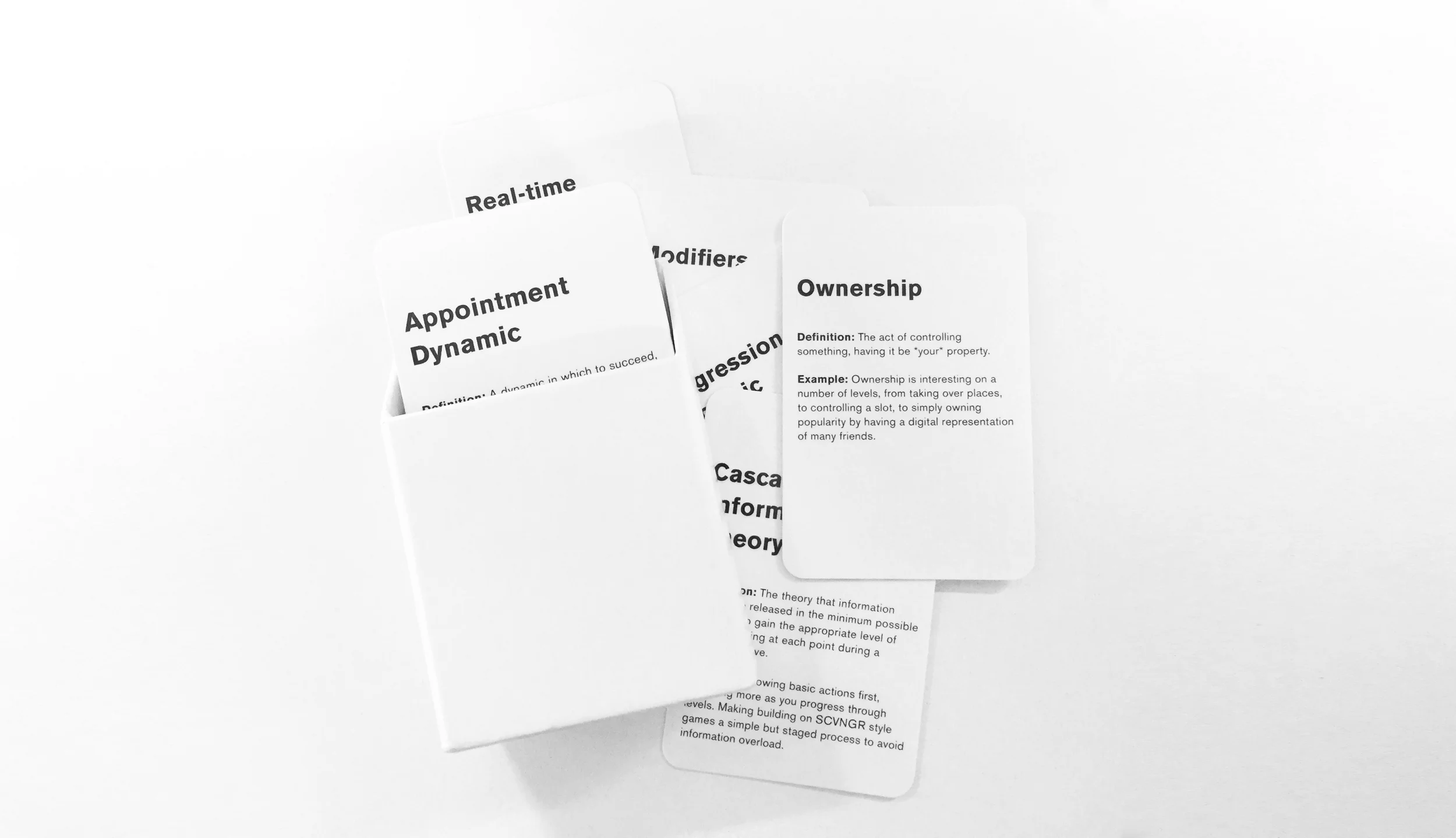
Much like a JS developer might use React, Ember or Angular to build quick prototypes and scale them, I've been creating a range of frameworks for my own use in relation to product design, execution, iteration and known UX behaviours. And just like the majority of developers I've worked with dream in full stack and their own applied language, so do I...but with, you know, design stuff. This framework is less authored and more curated than others I've created, but it came from a genuine concern I had about my own knowledge (or lack thereof) of game design. My knowledge was too patchy. I attended a talk by Nir Eyal and realised I was getting confused with my own applied knowledge and experiences - I was too concerned with getting users to return to the product, and not necessarily as concerned about keeping them engaged with the product. Keeping users engaged is hard as the tools at your disposal to manage engagement are often vague outside of 'real game design'. If you're developing a SaaS platform do you encourage your user to 'level up'? If you're building a B2B focused workflow do you offer jewels to the users who complete set tasks? (tl;dr answer: no you don't). To be clear - I'm not in any way a 'game designer' - but the process of game design itself, the behaviorism behind it's known tropes, the knowing about human reactions to game play - or even just the concept of 'play' itself - is fascinating. In fact I'd go as far as saying after the research I did into it that understanding the concept of 'play' is essential in any product concept or build process.
This framework takes the form of cards, with 46 in total. Why cards? Cards are cheap to make in small runs and easy to scale up. Cards can be pinned anywhere, moved around tables, handed to people, amended. Cards can be, well, played with. This is a non-digital framework that when used doesn't feel like scanning a PDF for research answers - it feels like you're in the process of already building something. Something like UX Lego (note to self: create UX Lego). What's on the cards is also proactive - each card has an actual game dynamic with a definition and a real-world example (as such this framework seems to have a lot to thank WOW and CandyCrush for). Each game dynamic on each card comes from an existing in-use game deck or published research of game dynamics from Zynga, Rovio, Disney, EA, a variety of TED Talks (such as Jane Mc Gonicgal) and a range of books (such as Nir Eyal's 'Hooked: How to Build Habit Forming Products'). 46 game dynamics in total - and I'm convinced I've missed or accidentally excluded some 20-odd more. But 46 seems a nice amount to work with in a group setting, workshop or on an applied project. It certainly covers the bulk of the dynamics that can be used or easily discussed (or at least are recognisable to the majority of people).
I've used this framework now in several products, including the latest product I'm working on, which is an enterprise social media SaaS. I've even used it in a product I designed for the Institute of Physics 'to show the history of modern physics in relation to string theory' (tough brief). It's a supplementary framework in that it doesn't determine the product, but rather informs the actions and interactions within it. It makes you and your team realise that every product is a playable experience at it's core. Every product is competing with the attentions of users. In workshops it makes everyone empathise with user boredom and UX ROI (return on investment). In applied situations it makes you realise the answer to the question 'why would a user want to return to and use this product daily' is a hard question that cannot be answered with a typical ego-fuelled response of 'but the product is awesome!'.
Sometimes your product has to do more than issue a numerical notification in a red dot (Pavlovian Response), verify a user (Pride Action) within a highly animated menu system (Achievement), or rely on the time the user is stuck using your products processes to achieve anything being the thing encouraging them to keep using it (Behavioural Momentum).

Balancing advertising and content in an age of fake news with The Week

A while ago I was invited to produce some designs and concepts for The Week - specifically their new online presence. I'd done work on their tablet and mobile app concepts - I'd even worked on some of their print based special projects - but this one was harder. Redefine new AD environments. Put imagery first. But hardest of all was trying to define The Week online. Here is a print title that defines itself by it's weekly retrospective on the previous weeks news. It's old news effectively, made new through considered and often complex hindsight. So how do you interpret that to an environment where the new, the immediate and the simple is encouraged? Grids, timelines and new AD formats? And before you ask - yes it was responsive. In fact the mobile views even had a daily podcast download ability that could be geo-fenced.


Building flexible online experiences for Somethin' Else

Back in 2014 (?) before I pivoted my agency, I was approached to produce a treatment for the broadcast agency Somethin' Else by the producer Kim Plowright. Somethin' Else are an agency that look after broadcast talent - and even broadcast production and programming for the BBC among others. It was specifically a web brief, but distributed media being what it is, a CMS driven flexbox site - while looking nice - probably wouldn't scale and adapt to a media landscape increasingly dominated by distribution networks, embeds and timelines. Well - it had to go beyond 'cards' anyway.